
What is the best photography website builder for showcasing a portfolio, proofing clients, and selling prints in 2026?
Quick answer: Squarespace is the best overall photography website builder in 2026 thanks to its visually refined templates, unlimited storage on paid plans, and solid built-in ecommerce. Wix is the strongest alternative if you want maximum drag-and-drop control and a large template library, while Format is the top choice for photographers who need integrated client proofing and workflow management without bolting on a third-party tool.
Researching the best photography website builder? We compared 7 platforms on galleries, client proofing, print sales, and pricing so you can find the right fit in 2026.
Key Takeaways
- Squarespace is the best all-around pick for portfolio design, storage, and clean ecommerce.
- Wix offers the most template variety and design flexibility for photographers who want full control.
- Format and Pixieset are purpose-built for client proofing and gallery delivery workflows.
- SmugMug provides the most comprehensive print-fulfillment integration for photographers selling prints.
- Total cost includes the builder plan, any proofing add-on, and print lab fees — compare all three layers.
- Squarespace, Wix, and Hostinger all include image SEO tools; local photographers should enable geo metadata.
- Match your platform to your photography niche: wedding photographers have different needs than fine-art or real-estate photographers.
What Is the Best Photography Website Builder in 2026?
Here's the reality: the "best" photography website builder depends entirely on how you plan to make money with it. A wedding photographer delivering 40 client galleries a year needs different tools than a landscape photographer selling fine-art prints, and both need something different from a hobbyist building a first portfolio.
That said, if you want a single, confident recommendation for most working photographers in 2026, it's Squarespace. Clean templates, unlimited storage on paid plans, and ecommerce you don't need a plugin to run. If you want more layout freedom, go with Wix. If you need built-in client proofing without paying for a second platform, pick Format.
Tip — How we evaluated these platforms > We compared the seven builders on gallery flexibility, client proofing capability, print and ecommerce tools, template quality, pricing transparency, and mobile-friendliness. All prices quoted are standard plan rates verified at publication. Promotional and introductory pricing changes constantly, so we link to each builder's official pricing page — click through and verify current rates before you subscribe.
What makes a website builder "photography-specific"?
Not every website builder is designed around image-heavy portfolios. The difference comes down to whether the platform treats your photos as the main product or as decoration.
- Generic builders like Wix and Squarespace have strong photography features, but they're built for every business type — restaurants, consultants, retailers, photographers.
- Specialist platforms like Format, Pixieset, and SmugMug are built exclusively for photographers, with native client proofing, watermarking, and print-lab integrations.
- Key differentiators include full-bleed gallery layouts, high-quality image delivery, client-proofing workflows, and print-fulfillment partnerships.
- Choose based on your primary use case: public portfolio, client delivery, print sales, or booking.
A photography-specific platform saves you from stitching together three subscriptions. A generic builder gives you broader design freedom and a stronger SEO toolkit. That trade-off runs through every comparison below.
How We Evaluated Photography Website Builders
Photography Launchpad doesn't physically test every platform in a studio. We research — closely — using official vendor documentation, published independent reviews from sources like DPReview and PetaPixel, and the consensus feedback photographers share in working communities. That's how we keep this guide honest: real features, real pricing, no inflated hands-on claims.
Here's the framework we applied to every builder in this comparison:
- ✅ Gallery flexibility: layout options, full-bleed support, slideshow and grid views
- ✅ Image handling: compression quality, color profile support (sRGB), storage limits
- ✅ Client proofing: native proofing tools, password-protected galleries, download permissions
- ✅ Print and ecommerce: print lab integrations, digital download sales, payment processors
- ✅ Template quality: photography-specific designs, mobile responsiveness, customization depth
- ✅ SEO tools: alt text fields, image sitemaps, local SEO features
- ✅ Pricing transparency: standard plan costs (not promotional rates), value at each tier
- ✅ Ease of use: onboarding, drag-and-drop editing, learning curve for non-developers
Page speed matters too, because image-heavy sites can struggle with Google's Largest Contentful Paint metric. We note where builders give you control over compression, lazy loading, and image sizing — all levers that affect your Core Web Vitals and, by extension, your search rankings.
Top 7 Photography Website Builders at a Glance
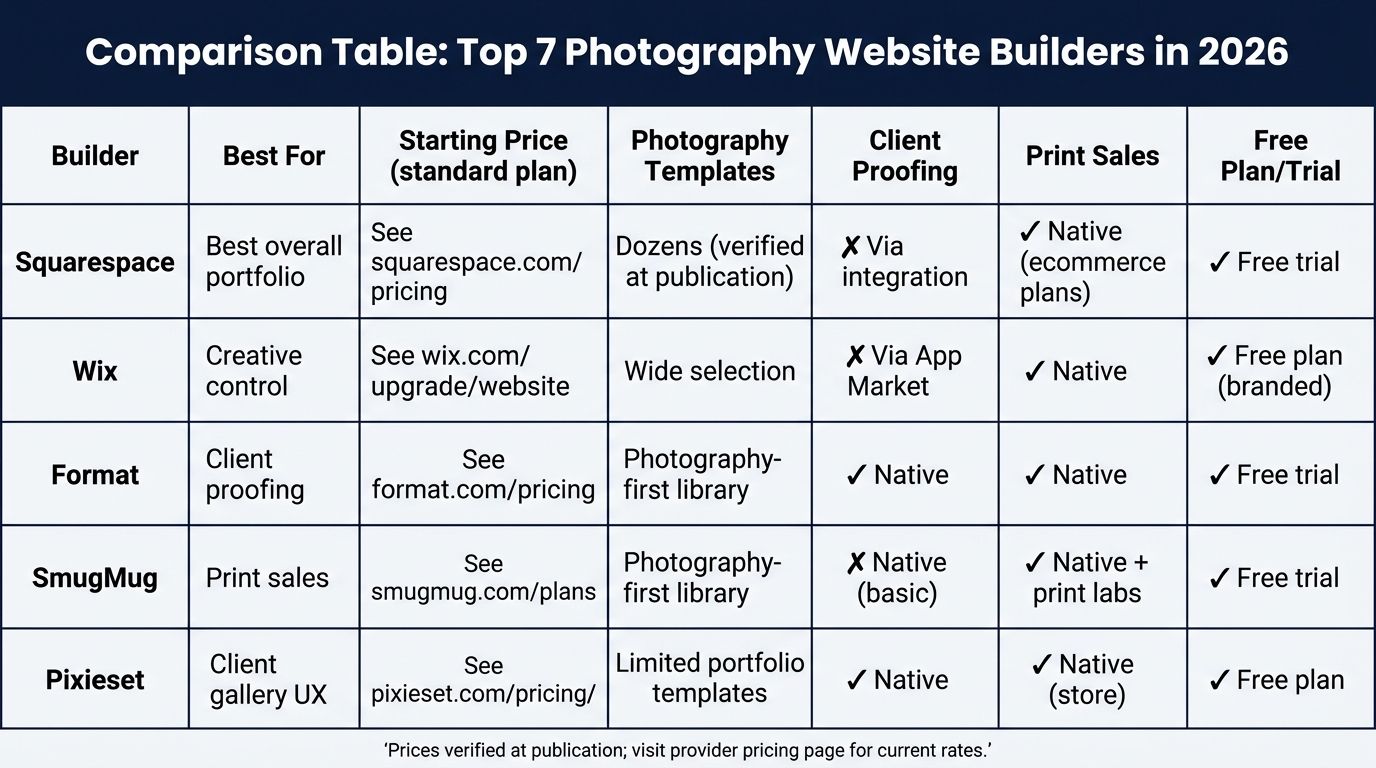
If you want to skip the detailed reviews and jump to the shortlist, here it is. Each builder earned its spot by excelling in at least one area a working photographer cares about.
| Builder | Best For | Starting Price (standard plan) | Photography Templates | Client Proofing | Print Sales | Free Plan/Trial |
|---|---|---|---|---|---|---|
| Squarespace | Best overall portfolio | See squarespace.com/pricing | Dozens (verified at publication) | Via integration | Native (ecommerce plans) | Free trial |
| Wix | Creative control | See wix.com/upgrade/website | Wide selection | Via App Market | Native | Free plan (branded) |
| Format | Client proofing | See format.com/pricing | Photography-first library | Native | Native | Free trial |
| SmugMug | Print sales | See smugmug.com/plans | Photography-first library | Native (basic) | Native + print labs | Free trial |
| Pixieset | Client gallery UX | See pixieset.com/pricing | Limited portfolio templates | Native | Native (store) | Free plan |
| Hostinger | Budget option | See hostinger.com/pricing | Limited portfolio options | No | Basic ecommerce | Free trial |
| IONOS | Local studios | See ionos.com | Business-focused | No | Native | Free trial |
Pricing and features verified at time of publication. Visit each provider's official pricing page for current rates.
⚠️ Pricing note > Promotional and introductory pricing changes frequently and varies by region. All prices in this article reflect standard plan rates as of publication. Click through to each builder's official pricing page before subscribing to confirm you're seeing the current rate for your country.
The headline: Squarespace wins for most working photographers because it's the only platform in this list that combines refined templates, unlimited storage on paid plans, and native ecommerce without demanding you master a design tool first.
Squarespace: Best Overall for Photography Portfolios
Squarespace is widely regarded as the top all-around photography website builder for its refined templates, unlimited storage on paid plans, and clean built-in ecommerce — with no need for third-party plugins. For most portrait, wedding, and fine-art photographers, it's the fastest path from empty canvas to a professional-looking site you'd actually hand out at a networking event.
The templates do a lot of the heavy lifting. They're built around image-first layouts — full-bleed hero sections, generous grid spacing, and type that steps aside so photos lead. You don't need design chops to end up with something that looks considered.
| Plan | Monthly Price (billed annually) | Key Photography Features |
|---|---|---|
| Personal | See squarespace.com/pricing | Portfolio pages, basic SEO, custom domain |
| Business | See squarespace.com/pricing | CSS/JavaScript customization, promotional pop-ups, ecommerce with transaction fees |
| Basic Commerce | See squarespace.com/pricing | No transaction fees, print and digital sales |
| Advanced Commerce | See squarespace.com/pricing | Subscriptions, abandoned cart recovery, advanced shipping |
Verify current pricing and fee structure on the official pricing page — Squarespace has updated plan names and feature allocations several times over the past few years.
What we liked about Squarespace for photographers
- Refined, gallery-first templates designed for image-heavy portfolios across wedding, portrait, and fine-art genres.
- Unlimited storage on all paid plans (verify on official pricing page) supports large high-resolution image libraries without worrying about hitting a cap mid-season.
- Built-in ecommerce for selling prints and digital downloads without requiring a third-party plugin or additional subscription.
- Strong mobile responsiveness across all templates with minimal manual adjustment required.
- Built-in SEO tools including alt text fields, clean URL structure, and automatic sitemap generation.
Where Squarespace falls short
- No native client proofing or workflow management. You'll need to integrate a third-party tool like Pixieset or Pic-Time if you deliver client galleries.
- Less drag-and-drop freedom than Wix. Layout customization follows a structured grid system — great for consistency, frustrating if you want pixel-level control.
- Template switching after launch requires manually re-applying your content, so choose carefully upfront.
- Transaction fees apply on lower-tier plans unless you upgrade to a commerce plan. Verify the current fee structure on the official pricing page.
Example — Who Squarespace is best for > Portrait, wedding, and fine-art photographers who prioritize aesthetic template quality and want an all-in-one solution with built-in ecommerce, without needing a separate proofing platform.
Wix: Best for Creative Control and Custom Design
Wix is the right call when you want to design every pixel yourself. Where Squarespace nudges you toward a clean grid, Wix hands you an open canvas and gets out of the way. For photographers who already think visually and want their site to look like no one else's, that freedom is the whole appeal.
The Wix Pro Gallery widget is the standout photography tool here. It handles grid, slideshow, collage, and masonry layouts, with controls for image padding, hover effects, and loading behavior that go deeper than most competitors offer.
What we liked about Wix for photographers
- Extensive library of photography-focused templates across weddings, portraits, commercial, and fine art (verify current count on wix.com).
- Wix Pro Gallery supports grid, slideshow, collage, and masonry layouts with customizable image padding and hover effects.
- Full drag-and-drop editor allows pixel-level placement of any element on any page — rare among mainstream builders.
- Wix ADI can generate a starter photography site from a short questionnaire, cutting your initial setup time to under an hour.
- App Market includes booking tools, proofing integrations like Shootproof, and marketing apps that extend the platform.
Where Wix falls short
- Storage varies significantly by plan tier. Photographers with large libraries should verify storage limits on wix.com/upgrade/website before committing to a plan.
- Template cannot be switched after publishing without rebuilding the site from scratch. Lock in your design direction before you launch.
- Complete design freedom can backfire if you don't have design experience — some Wix sites end up looking cluttered because everything is customizable.
- No native client proofing. You'll need a third-party app integration, which adds to your monthly cost.
Example — Who Wix is best for > Photographers who want granular control over layout and design — including those with graphic design experience — and who don't require native client proofing.
Format: Best Built-In Client Proofing
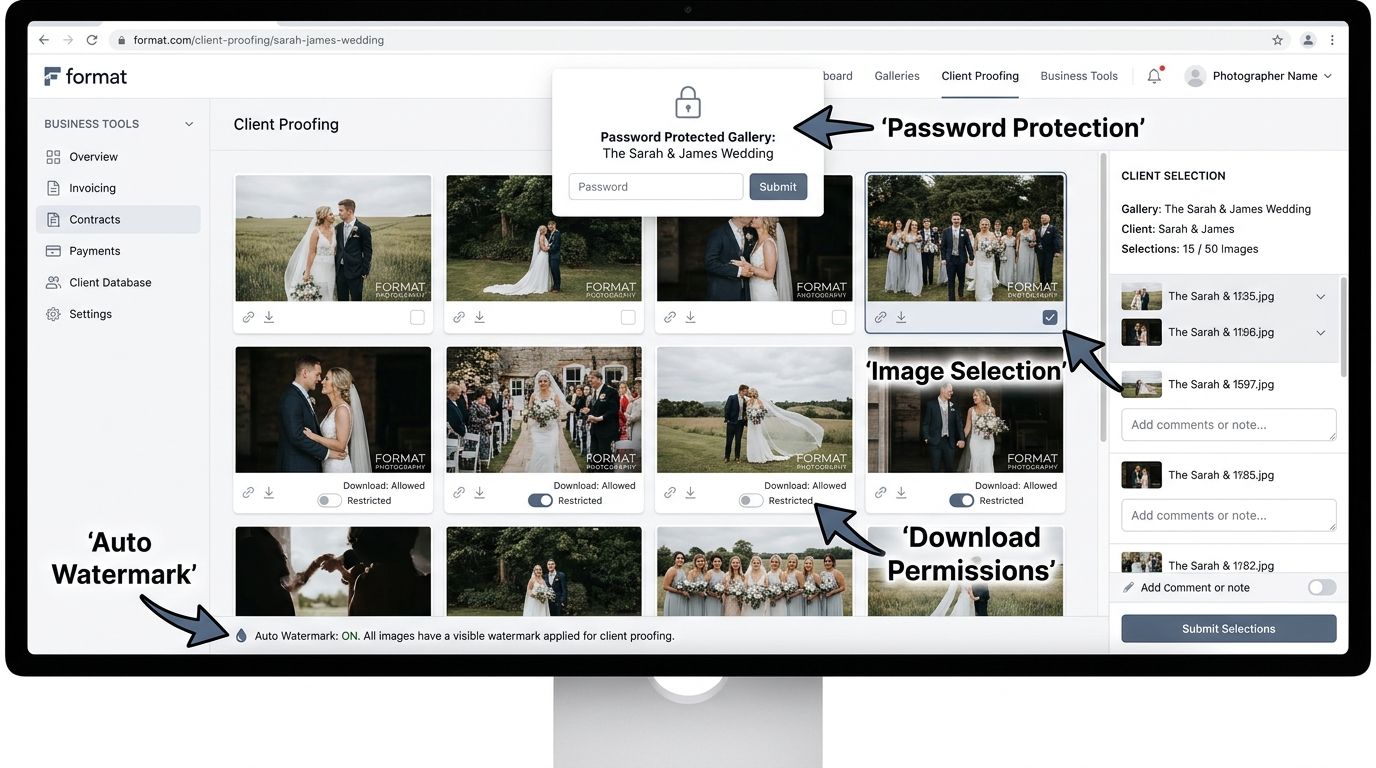
Format offers the most complete native client-proofing workflow of any photography website builder, including password-protected galleries, automatic watermarking, download permissions, and client selection tools — all without a third-party add-on. For wedding and portrait photographers who deliver galleries week after week, that integration alone can justify the higher subscription cost.
Format is purpose-built for photographers, and it shows in small places other builders overlook: contracts, invoicing, and a lightweight CRM sit inside the same dashboard as your portfolio.
What we liked about Format
- Native client proofing with password-protected galleries, image selection tools, and granular download permission controls.
- Automatic watermarking applied to client galleries protects images before you've been paid for final delivery.
- Built-in business tools including invoicing, contracts, and client management in one dashboard — a real workflow saver.
- Photography-first template library designed around portfolio presentation across weddings, portraits, commercial, and editorial work.
- Integrated print sales and digital downloads without needing a separate ecommerce platform.
Where Format falls short
- Design flexibility is narrower than Wix or Squarespace. Templates are less customizable if you have specific branding requirements.
- Pricing sits higher than general-purpose builders. Check format.com/pricing for current plan tiers.
- Less well-known brand means clients unfamiliar with the platform may need a quick orientation on how to navigate galleries.
- Smaller app and integration ecosystem compared to Squarespace or Wix.
Example — Who Format is best for > Wedding, portrait, and commercial photographers who deliver client galleries regularly and want proofing, selection, and download tools built into the same platform as their portfolio — avoiding the extra cost and complexity of a separate proofing service.
SmugMug: Best for Print Sales
If your business plan says "sell prints," SmugMug is the strongest option in this comparison. The print-fulfillment network has been in place for years, the markup controls are flexible, and you get unlimited photo storage on all paid plans — a real advantage when your print catalog needs to live online indefinitely.
The trade-off is the design. SmugMug's templates don't have the editorial polish of Squarespace or Format, so landscape and fine-art photographers often use it as the print-sales backbone while pointing marketing traffic there from a more visually refined portfolio on another platform.
What we liked about SmugMug
- Established print-fulfillment network with partnerships across multiple professional print labs. You set your own markup pricing per product.
- Unlimited photo storage on all paid plans (verify on smugmug.com/plans).
- Built-in rights management and download controls protect images from unauthorized use — important if your prints are your livelihood.
- Client gallery delivery with password protection and customizable sharing settings.
- Customizable pricing tiers let you set different markups per product type, size, and finish.
Where SmugMug falls short
- Template designs feel dated compared to Squarespace or Format for portfolio presentation.
- Limited blogging and content marketing tools compared to general-purpose builders, which hurts if SEO is a growth channel.
- Design customization is less intuitive for photographers with no coding experience.
- No native booking or scheduling tool. You'll need a third-party integration.
Example — Who SmugMug is best for > Landscape, nature, fine-art, and event photographers whose primary monetization channel is selling prints or digital downloads, and who need robust storage for a large image library.
Pixieset: Best Client Gallery Experience
Pixieset is the specialist most photographers reach for when client gallery delivery needs to feel like a premium experience. The galleries themselves are widely recognized for clean design, fast loading on mobile, and an interface that non-technical clients can navigate without instructions.
You get a portfolio builder, client galleries, and a store from a single account — but think of Pixieset as a client-delivery platform first, with a portfolio site as a useful add-on. If your public portfolio is where you expect most of your SEO and marketing to happen, pair Pixieset with a stronger portfolio builder.
What we liked about Pixieset
- Client galleries are widely recognized for their clean, mobile-optimized presentation and intuitive client interface.
- Built-in store for selling digital downloads and print products directly from client galleries — clients see something, they buy it, you get paid.
- Portfolio website, client galleries, and store are managed from a single Pixieset account.
- Free plan available with limited storage, which is unusual in this space (verify storage limits on pixieset.com/pricing).
- Gallery customization options include cover styles, color themes, and brand logo placement so galleries feel on-brand.
Where Pixieset falls short
- Portfolio website builder is less feature-rich than Squarespace or Wix for public-facing marketing pages.
- Storage limits on lower plans can be restrictive for high-volume shooters. Upgrade costs add up fast.
- Less suitable as a primary business website if you need robust blogging, booking, or marketing tools.
- Narrower SEO toolset compared to general-purpose builders.
Example — Who Pixieset is best for > Wedding and portrait photographers who want to deliver a premium, branded client gallery experience as their primary priority, with a secondary portfolio and store.
Hostinger: Best Budget Option for Photographers
Hostinger is the "I need a site up this weekend and I'm on a tight budget" option. The AI-assisted builder gets a presentable portfolio live quickly, and the entry pricing is the lowest of any builder we've compared here. For a first-year hobbyist or someone validating whether paid photography work is viable, that's enough.
You will outgrow it. There's no client proofing, no print-sales integration, and the photography templates are fewer than what Squarespace or Wix offer. But if you need to prove the concept before investing more, Hostinger is a reasonable starting point.
What we liked about Hostinger
- Lowest standard plan pricing among the builders in this comparison (verify current rates on hostinger.com/pricing).
- AI-assisted website builder accelerates initial site creation for photographers without design backgrounds.
- Reasonable portfolio template options for a general-purpose builder at this price tier.
- Free custom domain included with annual plans (verify on the official site — this offer may change).
Where Hostinger falls short
- No native client proofing, print sales, or photographer-specific gallery tools. You'll stitch together separate services if you want them.
- Fewer photography-focused templates compared to Squarespace or Wix.
- Limited scalability for photographers who plan to add booking, proofing, or ecommerce as the business grows.
- Support quality is less specialized than photography-native platforms whose teams understand your workflow.
Example — Who Hostinger is best for > New or hobbyist photographers who need a clean, presentable portfolio on the smallest possible budget and are not yet ready to invest in specialist platforms.
IONOS: Best for Small Photography Studios and Local SEO
IONOS is a less-common choice in photography circles, but for a specific profile — a small studio owner running a local portrait, newborn, or event business — it's genuinely worth considering. The local SEO tooling is stronger than most competitors at this price tier, and the ecommerce features don't require jumping to a top-tier plan.
The templates lean business-first rather than portfolio-first, so IONOS makes more sense when inquiries and bookings matter more to you than an editorial-quality gallery presentation.
What we liked about IONOS
- Built-in local SEO tools, including structured data support and Google My Business integration guidance, useful if you serve a specific geographic market.
- Ecommerce features available without requiring a high-tier plan upgrade compared to some competitors.
- Responsive customer support with phone access, which less tech-savvy studio owners often value.
- Clean, professional templates suited to business-first rather than portfolio-first photography sites.
Where IONOS falls short
- Template designs are less visually impressive for portfolio-first photographers compared to Squarespace or Format.
- No native client proofing or photographer-specific gallery delivery tools.
- Design flexibility is limited compared to Wix's open-canvas editor.
- Brand recognition among photographers is lower than top-tier competitors, so fewer tutorials and community resources exist.
Example — Who IONOS is best for > Photographers running a local studio business — such as portrait or newborn studios — who want a business-ready website with local SEO tools and straightforward ecommerce at a mid-range price.
True Total Cost: Builder + Proofing + Print Fulfillment
Let's break down the actual costs, because the monthly builder fee is only one layer. Photography website costs vary widely by platform and workflow. Standard builder plans range from roughly $3 to $40 per month. Add proofing tools and print lab subscriptions and the total monthly cost can run from under $20 to over $80 depending on your volume and platform choice.
Here's what a realistic cost stack looks like at three different working profiles:
| Workflow Profile | Builder | Est. Builder Cost/mo | Proofing Tool | Est. Proofing Cost/mo | Print Fulfillment | Approx. Total/mo |
|---|---|---|---|---|---|---|
| Budget portfolio only | Hostinger | from ~$3 | None | $0 | None | from ~$3 |
| Wedding photographer (client delivery) | Squarespace | from ~$23 | Pixieset | from ~$10 | None | from ~$33 |
| Fine-art photographer (print sales) | SmugMug | from ~$13 | Included | $0 | Included (via labs) | from ~$13 + print margin |
Figures are illustrative ranges only. Verify current pricing on each provider's official page — Squarespace, Wix, Format, SmugMug, Pixieset, Hostinger, and IONOS all update plans periodically.
Tip — Don't forget domain and email > A custom domain typically costs $10–$20 per year, and professional email (via Google Workspace or similar) adds roughly $6–$18 per user per month. Factor these in when you budget — they're small line items that add up.
When a specialist platform saves money
- Platforms like SmugMug and Pixieset bundle portfolio, proofing, and print sales into a single subscription — often cheaper than assembling three separate tools.
- General-purpose builders like Squarespace or Wix may require paid integrations for proofing (Shootproof, Pixieset, Pic-Time), adding $15–$40/month on top of your builder fee.
- High-volume gallery delivery? Calculate per-gallery delivery cost, not just monthly subscription cost. A $40/month platform that supports 50 galleries a month costs less per delivery than a $15/month plan that caps you at 10.
- Print lab revenue margins can offset platform costs entirely if you're selling prints regularly. Run the math before deciding "cheaper platform wins."
Best Photography Website Builder by Niche
Different photography genres have genuinely different website needs. Here's the quick-reference matrix we'd give a photographer who told us their specialty and nothing else:
| Photography Niche | Top Pick | Runner-Up | Key Reason |
|---|---|---|---|
| Wedding | Format | Pixieset | Native client proofing + business tools in one platform |
| Portrait / Family | Squarespace | Format | Refined templates + ecommerce for session bookings |
| Fine Art / Landscape | SmugMug | Squarespace | Established print-lab network with markup controls |
| Real Estate | Wix | Squarespace | Flexible layouts for property galleries and virtual tours |
| Newborn / Boudoir | Pixieset | Format | Premium gallery delivery UX for sensitive client work |
| Sports / Action | SmugMug | Pixieset | High-volume storage and event gallery sales |
| Commercial / Product | Wix | Squarespace | Custom layouts for case studies and client logos |
| Hobbyist / Part-Time | Hostinger | Pixieset (free) | Lowest entry cost to validate serious intent |
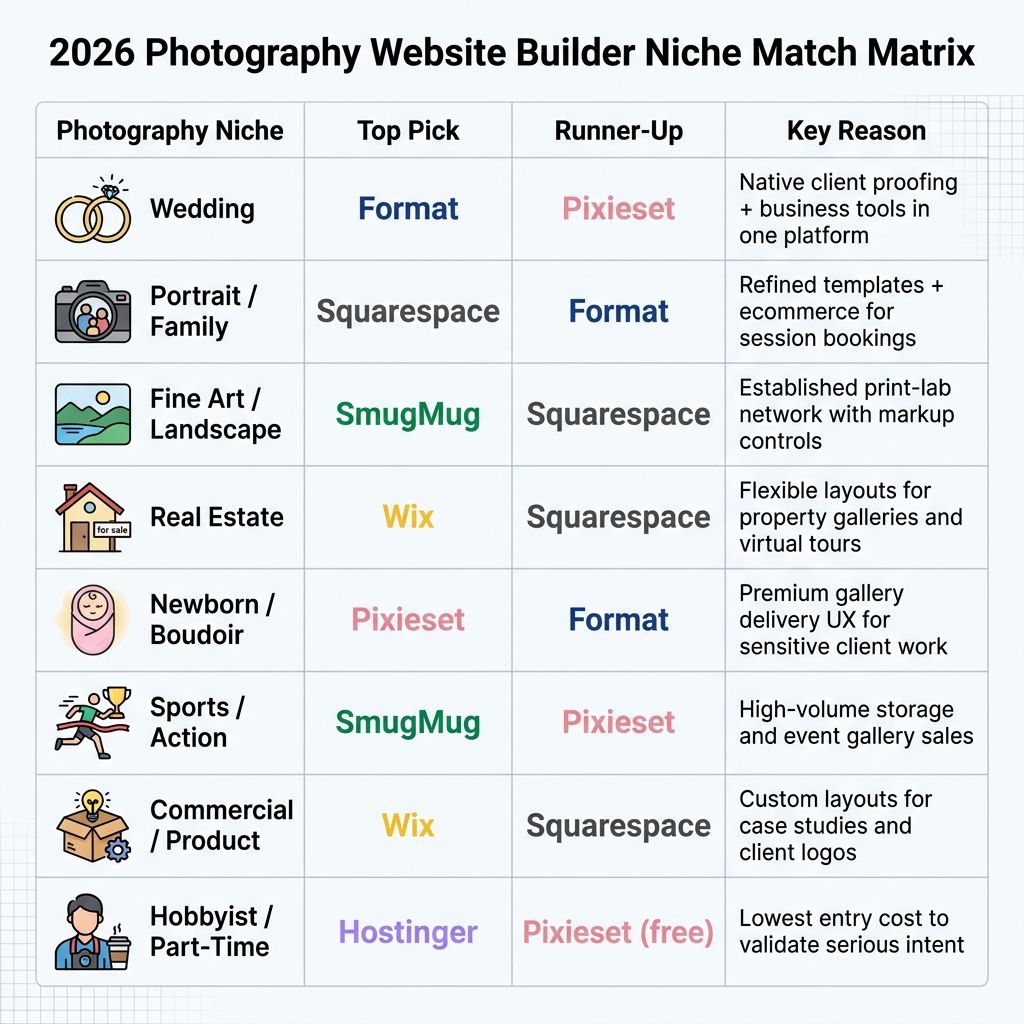
A quick note on hobbyists: if you're not sure you want to go pro yet, don't overpay. Hostinger or Pixieset's free plan gets you online cheaply. You can migrate to Squarespace or Format later when you start charging.
Image SEO and Local SEO for Photographers
Here's the reality most photographers miss: your portfolio won't rank on Google just because the photos are beautiful. Image SEO and local SEO are what turn your site from a digital business card into a booking machine. Google's own image SEO documentation is clear on what matters, and most of it is within your control.
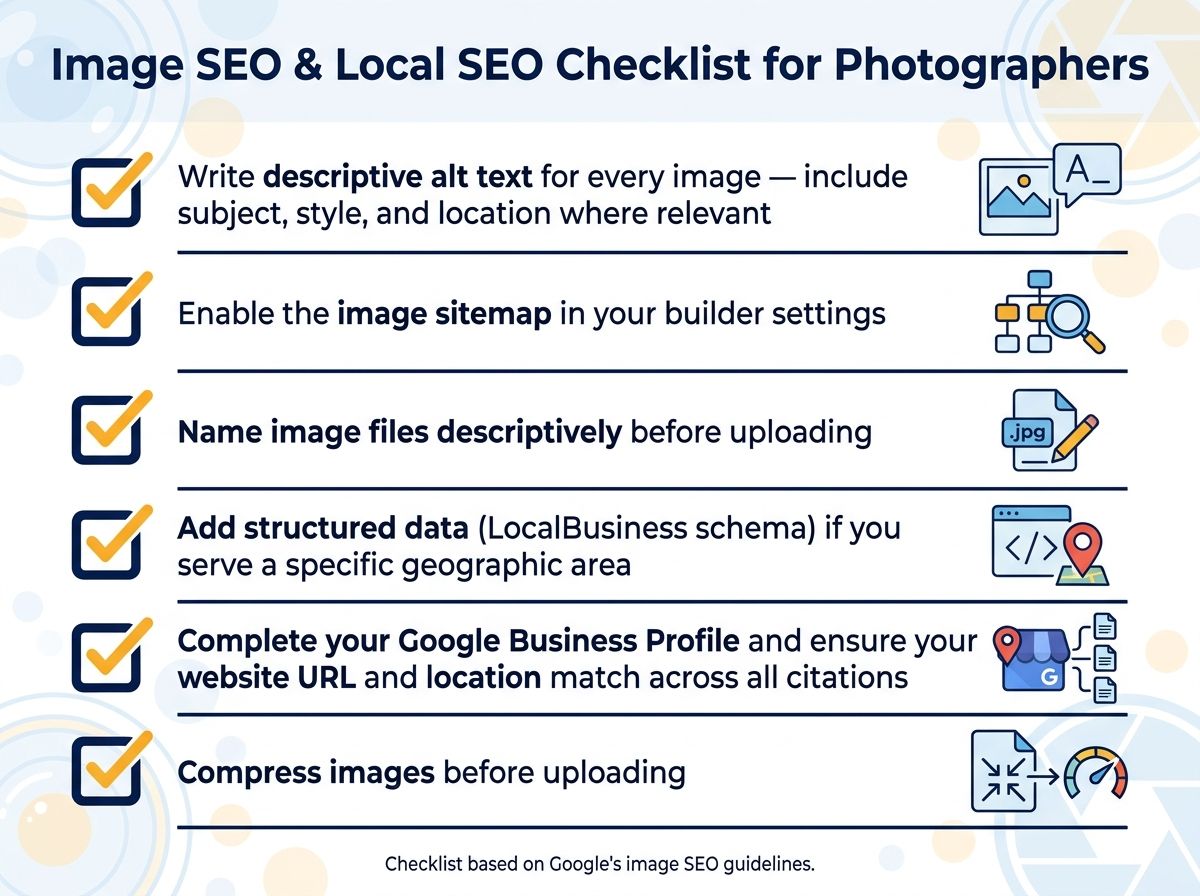
Follow this sequence to get your gallery images indexed and surfaced in search:
- ✅ Write descriptive alt text for every image — include subject, style, and location where relevant (e.g., "outdoor wedding portrait Portland Oregon").
- ✅ Enable the image sitemap in your builder settings so Google can crawl and index your gallery images.
- ✅ Name image files descriptively before uploading (e.g., "portland-wedding-photographer-ceremony.jpg") rather than keeping camera-generated filenames like "IMG_4592.jpg".
- ✅ Add structured data (LocalBusiness schema) if you serve a specific geographic area — check whether your builder supports this natively.
- ✅ Complete your Google Business Profile and ensure your website URL and location match across all citations.
- ✅ Compress images before uploading to balance visual quality with page load speed. Use sRGB color profile for consistent cross-device rendering.
- ✅ Add captions and titles to gallery images where your builder exposes these fields to search engines.
- ✅ Build location-specific portfolio pages (e.g., "Portland Wedding Photographer") if you operate in multiple markets.
Tip — Builder SEO tool comparison > Squarespace, Wix, and IONOS all offer solid built-in SEO tooling including alt text fields, automatic sitemaps, and some structured data support. Specialist platforms like SmugMug and Pixieset have more limited SEO customization — one of the trade-offs of using them as your public-facing site. For deep guidance, refer to Google Search Central's image SEO documentation.
Also pay attention to page speed. Google's Largest Contentful Paint metric is one of the Core Web Vitals that affects your search rankings, and image-heavy sites are the most likely to struggle with it. Use your builder's compression settings aggressively and enable lazy loading if it's available.
How to Launch Your Photography Website: A Quick-Start Checklist
Want a deep dive on this? Here's the 10-step sequence to go from "I need a website" to "it's live and searchable" without stalling out.
- ✅ Step 1: Identify your primary goal — portfolio showcase, client delivery, print sales, or booking.
- ✅ Step 2: Choose the platform that best matches your goal using the comparison table and niche matrix above.
- ✅ Step 3: Register a custom domain name that reflects your name or studio brand.
- ✅ Step 4: Select a photography template suited to your genre and start with the homepage and portfolio gallery.
- ✅ Step 5: Export and upload your best 20–30 portfolio images in sRGB color profile at the platform's recommended resolution.
- ✅ Step 6: Organize images into themed galleries by project, style, or location.
- ✅ Step 7: Set up client proofing (native or via integration) if you deliver client galleries.
- ✅ Step 8: Configure your print store or digital download pricing if selling work.
- ✅ Step 9: Add descriptive alt text to every image and enable your image sitemap.
- ✅ Step 10: Complete your contact page, about page, and social media links, then publish and submit your site to Google Search Console.
One step at a time. If you try to launch everything simultaneously, you'll end up with a half-finished portfolio and no clients. Get the homepage and portfolio live first, add proofing and store functionality in week two, and polish SEO in week three.
Frequently Asked Questions
What is the best website builder for photographers in 2026? Squarespace is the best all-around photography website builder in 2026 for its refined templates, unlimited storage on paid plans, and built-in ecommerce. Wix is the strongest alternative for design flexibility, while Format leads for built-in client proofing. The best choice depends on your primary need: portfolio presentation, client delivery, or print sales.
Is Wix or Squarespace better for photographers? Squarespace is generally the better choice for photographers who prioritize visual elegance and a streamlined experience, while Wix suits photographers who want maximum layout control and a larger selection of templates. Both lack native client proofing, so photographers who need gallery delivery should consider adding a specialist tool or switching to Format or Pixieset.
How much does it cost to build a photography website? A photography website typically costs between roughly $10 and $40 per month on a standard builder plan, plus approximately $10–$20 per year for a custom domain. If you add a client proofing tool and a print sales platform, total monthly costs can range from under $20 for a budget setup to over $80 for a full professional workflow. Verify current pricing directly on each provider's official pricing page as rates change.
What is the best free photography website builder? Wix and Pixieset both offer free tiers, though free plans carry limitations including subdomain-only URLs, storage caps, and platform branding on your site. For a professional photography presence, a paid plan is strongly recommended — the branded subdomain alone signals "hobbyist" to prospective clients.
Do photographers need a website if they have Instagram? Yes. Instagram is a discovery tool, but it doesn't let you control your brand, capture client inquiries through a contact form, rank in Google search, sell prints directly, or proof clients in a professional environment. Your website is your owned digital property and primary business hub. Instagram and other social platforms should drive traffic to it, not replace it.
Which website builder has the best client proofing for photographers? Format offers the most complete native client-proofing workflow of any website builder reviewed, including password-protected galleries, image selection tools, download permission controls, and automatic watermarking. Pixieset is a close second with an exceptionally polished client gallery experience. General-purpose builders like Squarespace and Wix require a third-party proofing integration to match this functionality.
Which website builder is best for selling photography prints online? SmugMug is the strongest option for photographers whose primary goal is selling prints, thanks to its established print-lab partnerships, customizable markup pricing, and unlimited storage. Squarespace and Wix both support print sales through built-in or integrated ecommerce but require more manual setup of print fulfillment partners.
Can I use a photography website builder without coding knowledge? Yes. All seven builders reviewed in this article offer drag-and-drop or template-based editing that requires no coding. Squarespace and Pixieset are among the most intuitive for non-technical users, while Wix offers the most flexibility but has a steeper learning curve because of its open-canvas editor.
Sources
- Squarespace Official Pricing Page
- Wix Plans and Pricing
- Format Photography Platform Pricing
- SmugMug Plans and Pricing
- Pixieset Pricing and Plans
- Hostinger Website Builder Pricing
- Largest Contentful Paint (LCP) — web.dev by Google
- Google Image SEO Best Practices — Google Search Central
- DPReview — Digital Photography Review
- PetaPixel — Photography News and Reviews