What is the best HoneyBook alternative for photographers and creative freelancers in 2026?
Quick answer: The best HoneyBook alternatives in 2026 are Dubsado, Studio Ninja, Bonsai, 17hats, and Moxie — each offering stronger customization, lower cost, or photographer-specific workflows than HoneyBook. The right choice depends on your business type, budget, and whether you need features like gallery delivery integration, white-label client portals, or native accounting sync. Use the pricing table and business-type guide below to shortlist the best fit in under five minutes.
Compare the 10 best HoneyBook alternatives for photographers and freelancers in 2026. See real pricing, key features, pros and cons, and find the right fit for your business.
Key Takeaways
- Dubsado offers the deepest workflow automation among HoneyBook alternatives for creative businesses.
- Studio Ninja and Sprout Studio are purpose-built for photographers with booking and gallery delivery tools.
- Bonsai and Moxie are the most affordable all-in-one options for solo freelancers.
- Free or freemium plans exist — Flowlu offers a limited free tier, while most others run free trials only.
- Switching platforms is manageable: export contacts and invoices as CSV before you migrate.
- Pricing changes frequently — always verify on the vendor's live pricing page before committing.
- Your business type (solo, studio, agency) should drive your shortlist more than feature lists alone.
What Is HoneyBook and Why Look for an Alternative?
HoneyBook is an all-in-one client management platform built for creative freelancers and small service businesses. It bundles proposals, contracts, invoicing, scheduling, and a client portal into a single interface, with payment processing baked in.
Here's the reality: most people don't leave HoneyBook because it's bad. They leave because their business outgrew what HoneyBook was designed for, or because the pricing math stopped making sense. The most common reasons users switch include cost at scale, limited workflow customization, transaction fees on payments, the absence of multi-user permissions on base plans, and regional unavailability outside North America. Verify current plan pricing and included features on the HoneyBook pricing page before comparing.
Tip — Is HoneyBook right for you? > HoneyBook is a solid starting point for US-based solo creatives who want a polished client experience without technical setup. If you're scaling a team, need deep automation logic, or operate outside the US and Canada, you'll likely hit its ceiling fast.
What HoneyBook Does Well
- All-in-one proposals, contracts, invoices, and scheduling in a single platform
- Polished client-facing experience with branded portals
- Active community and strong educational resources for new users
- Mobile app for managing clients on the go
Common Reasons Users Start Looking Elsewhere
- Limited workflow automation customization compared to Dubsado or Bonsai
- Transaction fees on payments depending on the plan — confirm current fee structure on HoneyBook's pricing page
- No native multi-user or team collaboration features on base plans
- Limited availability outside the United States and Canada — check HoneyBook's official supported-countries list
- Pricing tier jumps that can feel steep for solo freelancers scaling slowly
- Limited native QuickBooks or Xero sync on many plans — verify current integration status before committing
How We Evaluated These Tools
The 10 tools in this guide were shortlisted based on independent research, aggregated verified-user reviews from platforms like G2, Capterra, and TrustRadius, and recurring recommendations in photographer and freelancer communities. We compared vendor documentation, pricing pages, and feature lists against the real needs of solo and small-team creative businesses.
Use these seven criteria to score any shortlist you build:
- Proposal, contract, and invoicing capabilities — the core job every CRM has to do well.
- Workflow automation depth and ease of setup — how far you can take "set it and forget it".
- Pricing transparency and free plan or trial availability — can you test before you commit?
- Integrations — accounting, galleries, calendars, payment processors.
- Ease of use and onboarding time — how fast can you be live with a real client?
- Client portal quality and branding customization — how professional the client experience feels.
- Suitability for your specific creative business type — photographers, designers, coaches, and agencies have different needs.
Checklist: Evaluation Criteria at a Glance
- Proposal, contract, and invoicing capabilities
- Workflow automation depth and ease of setup
- Pricing transparency and free plan or trial availability
- Integrations (accounting, galleries, calendars, payment processors)
- Ease of use and onboarding experience
- Client portal quality and branding customization
- Suitability for specific creative business types
Tip — Methodology note > Tools were shortlisted based on independent research, aggregated user reviews from G2, Capterra, and TrustRadius, and community feedback from photographer and freelancer forums. Any affiliate relationships are disclosed per our editorial policy, and no vendor paid for placement in this guide.
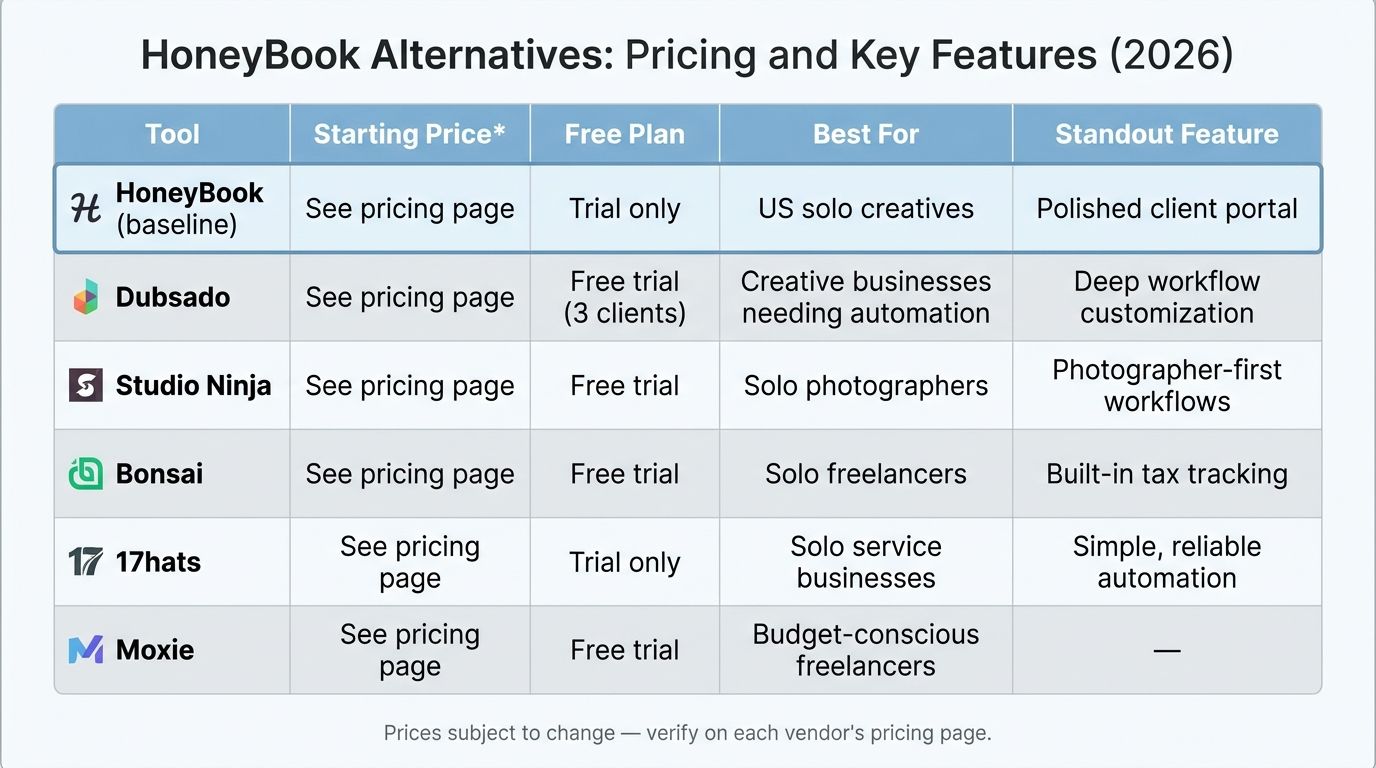
HoneyBook Alternatives: Pricing and Features Comparison Table
Below is the at-a-glance comparison. Each tool name links to its official pricing page so you can confirm current rates yourself.
HoneyBook Alternatives: Pricing and Key Features (2026)
| Tool | Starting Price* | Free Plan | Best For | Standout Feature |
|---|---|---|---|---|
| HoneyBook (baseline) | See pricing page | Trial only | US solo creatives | Polished client portal |
| Dubsado | See pricing page | Free trial (3 clients) | Creative businesses needing automation | Deep workflow customization |
| Studio Ninja | See pricing page | Free trial | Solo photographers | Photographer-first workflows |
| Bonsai | See pricing page | Free trial | Solo freelancers | Built-in tax tracking |
| 17hats | See pricing page | Trial only | Solo service businesses | Simple, reliable automation |
| Moxie | See pricing page | Free trial | Budget-conscious freelancers | Affordable lead intake |
| SuiteDash | See pricing page | Free trial | Agencies and studios | White-label client portal |
| Bloom | See pricing page | Free plan available | Photographers | Instant booking |
| Sprout Studio | See pricing page | Free trial | Full-service photographers | All-in-one with galleries |
| Flowlu | See pricing page | Yes (limited) | Small teams on a budget | Generous free tier |
| Plutio | See pricing page | Free trial | Multi-client freelancers | Multi-workspace management |
⚠️ Pricing accuracy notice > SaaS pricing changes frequently. All information in this table was verified in 2026, but you should confirm current pricing and plan inclusions directly on each vendor's live pricing page before purchasing. Prices subject to change.
The 10 Best HoneyBook Alternatives in 2026
Here's the shortlist at a glance:
- Dubsado — Best for deep workflow automation
- Studio Ninja — Best CRM for photographers
- Bonsai — Best all-in-one for solo freelancers
- 17hats — Best for solo service businesses
- Moxie — Best for affordable lead capture
- SuiteDash — Best for white-label client portals
- Bloom — Best for instant booking for photographers
- Sprout Studio — Best for all-in-one photography business management
- Flowlu — Best free CRM option for creatives
- Plutio — Best for multi-workspace freelancers
1. Dubsado — Best for Deep Workflow Automation
Who it's for: creative freelancers and small studios who want granular, automated client workflows.
Key features: fully customizable lead capture forms, canned emails, multi-step workflow sequences, branded client portal, contract and invoice templates, and an integrated scheduler.

Pros: - Extremely flexible automation — you can model almost any client journey - No transaction fees on top of payment processor fees - Strong template marketplace and active community
Cons: - Steep learning curve. Reviewers on Capterra commonly note setup time as the biggest drawback - Onboarding is slower than HoneyBook
Aggregated rating: check current G2 and Capterra scores for the latest user sentiment. Pricing: verify current plans on the Dubsado pricing page.
2. Studio Ninja — Best CRM for Photographers
Who it's for: solo and studio photographers who need a purpose-built booking and client management system.
Key features: inquiry and booking workflows, automated email follow-ups, questionnaires, gallery integrations, and photography-tailored invoicing.
Pros: - Built exclusively for photographers — the workflow mirrors how shoots actually run - Intuitive onboarding compared to general-purpose CRMs - Strong community support and photographer-focused templates
Cons: - Not suitable if your business expands beyond photography - Fewer third-party integrations than Dubsado or HoneyBook
Pricing: confirm current rates on the Studio Ninja pricing page.
3. Bonsai — Best All-in-One for Solo Freelancers
Who it's for: individual freelancers across creative disciplines who want an affordable, polished all-in-one.
Key features: proposals, contracts, invoices, time tracking, expense tracking, client CRM, and tax estimates.
Pros: - Clean, modern UI - Affordable starting price for solo operators - Built-in tax tracking useful for US freelancers — Zapier's freelancer CRM roundup regularly highlights this as a standout
Cons: - Limited team collaboration features - Less photographer-specific than Studio Ninja or Bloom
Pricing: check the Bonsai pricing page for current tiers.
4. 17hats — Best for Solo Service Businesses
Who it's for: solo business owners who want a straightforward all-in-one without agency complexity.
Key features: quotes, contracts, invoices, booking forms, automated workflows, and basic bookkeeping.
Pros: - Simple to learn - Reliable automation for the standard inquiry-to-invoice path - Long-established platform with proven stability
Cons: - UI feels dated compared to newer competitors - Limited free trial window
Pricing: verify current plans on the 17hats pricing page.
5. Moxie — Best for Affordable Lead Capture
Who it's for: freelancers who prioritize affordable pricing and streamlined lead intake.
Key features: customizable lead forms, project management, time tracking, invoicing, and Stripe/PayPal integrations.
Pros: - Competitive pricing for solo operators - Modern interface - Solid project tracking built into the CRM
Cons: - Smaller user community — fewer templates and third-party resources - Fewer integrations than larger platforms
Pricing: check Moxie's live pricing page for current plans.
6. SuiteDash — Best for White-Label Client Portals
Who it's for: agencies and established studios that want a fully branded client experience.
Key features: fully white-labeled client portals, project management, invoicing, file sharing, and LMS integration.
Pros: - Exceptional white-label depth — your clients never see "SuiteDash" branding - Flat-rate pricing, not per-user - Broad feature set that replaces multiple tools
Cons: - Significant learning curve. Reviewers consistently cite setup time as a hurdle - Overwhelming for solo freelancers who don't need the depth
Pricing: confirm current rates on the SuiteDash pricing page.
7. Bloom — Best for Instant Booking for Photographers
Who it's for: photographers who want a modern booking experience with instant session reservation.
Key features: instant booking, built-in gallery delivery, contracts, invoices, and lead management.
Pros: - Purpose-built for photographers - Modern aesthetic that matches your brand - Gallery delivery built in — no separate Pic-Time or Cloudspot subscription needed
Cons: - Limited outside photography - Fewer automation options than Dubsado
Pricing: check Bloom's live pricing page.
8. Sprout Studio — Best for All-in-One Photography Business Management
Who it's for: photographers who want proposals, contracts, galleries, booking, and invoicing under one roof.
Key features: studio management, online galleries, booking, invoicing, questionnaires, and workflow automation.
Pros: - True all-in-one for photographers — galleries included - Active development team that ships updates frequently - Strong fit for wedding and portrait photographers running packages
Cons: - Higher price point than simpler photography CRMs - Feature depth can feel overwhelming if you just need basics
Pricing: verify on Sprout Studio's pricing page.
9. Flowlu — Best Free CRM Option for Creatives
Who it's for: freelancers and small teams who want a free starting point with room to scale.
Key features: CRM, kanban lead boards, invoicing, project management, mind maps, and a basic client portal.
Pros: - Genuinely generous free plan - Integrated finance and CRM in one tool - Works well for small teams, not just solos
Cons: - Not tailored to creative workflows out of the box - Interface feels more like a generic business tool than a creative CRM
Pricing: check Flowlu's live pricing page for current free plan limits.
10. Plutio — Best for Multi-Workspace Freelancers
Who it's for: freelancers managing multiple client workspaces or distinct business lines.
Key features: multi-workspace management, proposals, contracts, invoices, time tracking, and task management.
Pros: - Flexible multi-workspace setup — ideal if you run two brands - Broad feature set for the price - White-label options available
Cons: - Smaller ecosystem than HoneyBook or Dubsado - Some features feel less polished than competitors
Pricing: verify current plans on Plutio's pricing page.
Which HoneyBook Alternative Fits Your Business Type?
Feature lists only get you so far. The faster path to the right tool is matching it to how your business actually runs.
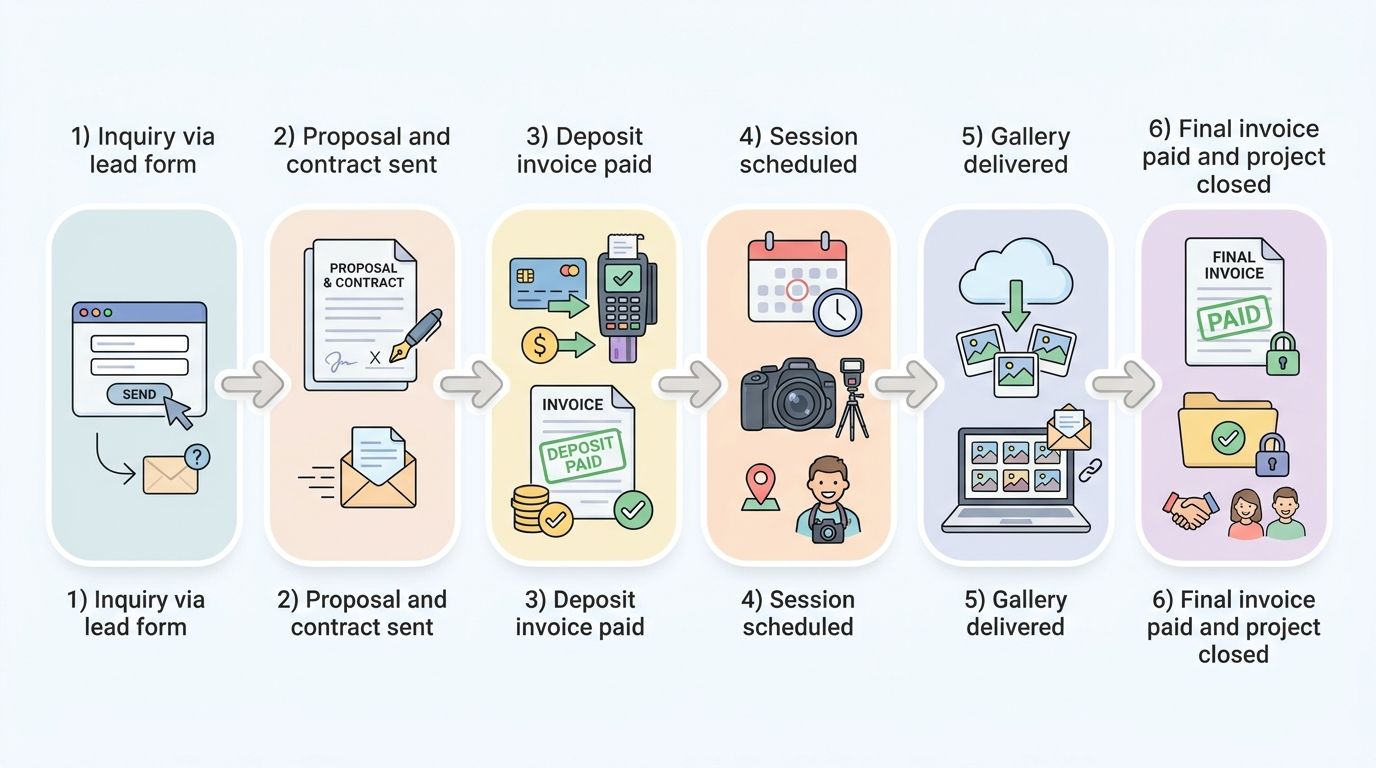
Tip — Photographer workflow > A typical photographer client journey runs: inquiry → proposal and contract → deposit invoice → session scheduled → gallery delivered → final invoice paid. Studio Ninja, Sprout Studio, and Bloom handle every stage natively. Dubsado and HoneyBook handle the business side well but need a third-party gallery tool like Pic-Time or Cloudspot for delivery.
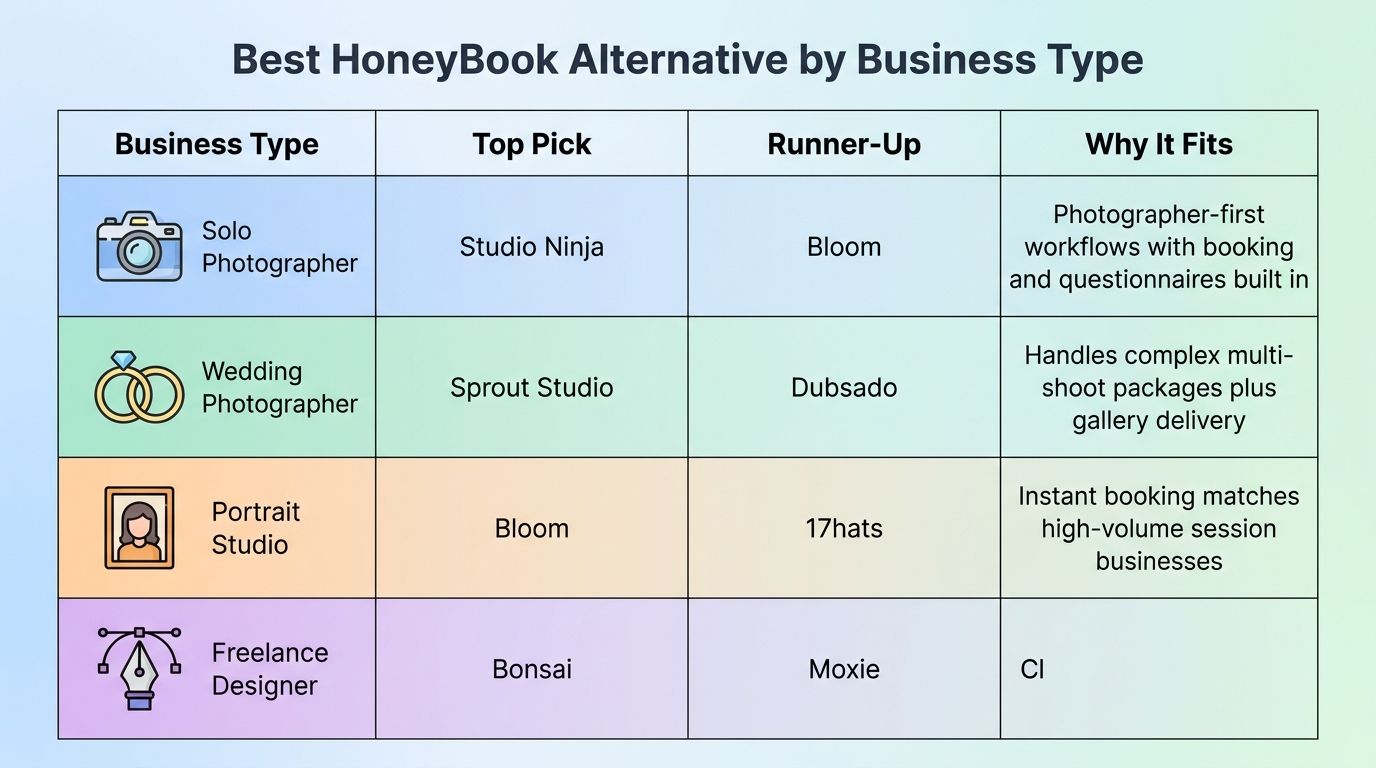
Best HoneyBook Alternative by Business Type
| Business Type | Top Pick | Runner-Up | Why It Fits |
|---|---|---|---|
| Solo Photographer | Studio Ninja | Bloom | Photographer-first workflows with booking and questionnaires built in |
| Wedding Photographer | Sprout Studio | Dubsado | Handles complex multi-shoot packages plus gallery delivery |
| Portrait Studio | Bloom | 17hats | Instant booking matches high-volume session businesses |
| Freelance Designer | Bonsai | Moxie | Clean proposals, contracts, and tax tools for solo designers |
| Business Coach | HoneyBook | Bonsai | Polished scheduling and client portal for 1:1 engagements |
| Small Creative Agency | SuiteDash | Flowlu | White-label portals and team permissions for multi-user ops |
For Photographers: What to Look for in a CRM
- Native or integrated gallery delivery (e.g., Pic-Time, Cloudspot, or built-in galleries)
- Session booking with automated reminders and questionnaires
- Contract and model release templates tailored to photography — context from industry publications like PetaPixel and DPReview can help you benchmark industry-standard contract terms
- Invoicing with package and add-on support
- Mobile-friendly client portal for on-location use
For Agencies and Studios: What to Look for
- Multi-user team permissions and role-based access
- White-label client portal for a branded experience
- Project management with task assignments across team members
- Reporting and pipeline visibility
- Integrations with accounting tools like QuickBooks or Xero — verify whether sync is native or Zapier-dependent at the time of your evaluation
How to Switch from HoneyBook: Step-by-Step Migration Guide
Switching CRMs sounds scarier than it is. Follow these five steps in order and you can migrate without losing data or disrupting active clients:
- Identify your must-have features before you shop.
- Export your HoneyBook data as CSV and download files.
- Trial your top shortlisted tool with a real workflow.
- Import contacts and rebuild automations in the new platform.
- Communicate the change to active clients.
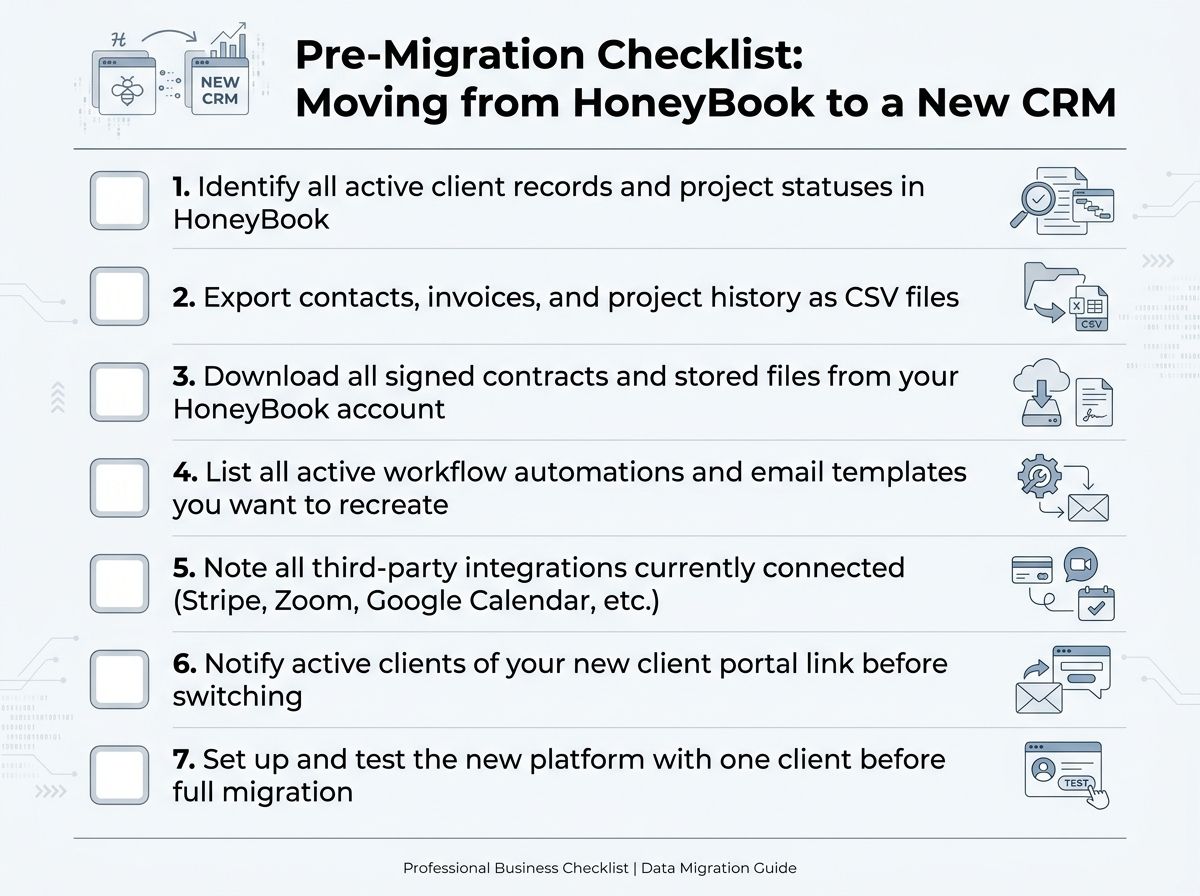
Pre-Migration Checklist
- Identify all active client records and project statuses in HoneyBook
- Export contacts, invoices, and project history as CSV files
- Download all signed contracts and stored files from your HoneyBook account
- List all active workflow automations and email templates you want to recreate
- Note all third-party integrations currently connected (Stripe, Zoom, Google Calendar, etc.)
- Notify active clients of your new client portal link before switching
- Set up and test the new platform with one client before full migration
Tip — Data export > HoneyBook currently allows CSV export of contact and invoice data. Check HoneyBook's help documentation for the latest export steps, as the UI may have changed since this guide was published.
⚠️ Allow transition time > Avoid switching platforms mid-project with an active client. Plan the migration during a slower season or between project milestones to minimize disruption.
Step 1 — Identify Your Must-Have Features Before You Move
- List the HoneyBook features you actually use weekly versus those you've barely touched
- Decide on non-negotiables: proposals, contracts, invoicing, automation, scheduler, client portal
- Use the evaluation checklist from earlier to score your shortlist against each other
Step 2 — Export Your HoneyBook Data
- Navigate to HoneyBook account settings and locate the data export option
- Export client contacts and project data as CSV
- Download executed contracts, invoices, and uploaded files manually or via bulk export if available
- Check HoneyBook's official help center for the most current export instructions
Step 3 — Trial Your Chosen Alternative With a Real Workflow
- Sign up for a free trial on your top 1–2 shortlisted platforms
- Run a real or simulated client workflow end-to-end: lead form → proposal → contract → invoice
- Test the client-facing experience by previewing portals and signing documents as a test client
- Evaluate onboarding time honestly — factor setup effort into the total cost
Step 4 — Import Data and Rebuild Automations
- Import your exported CSV contacts into the new platform's CRM
- Recreate workflow automations and email templates in the new tool
- Reconnect third-party integrations (payment processors, calendar, accounting software)
- Update any public-facing booking links or lead capture forms embedded on your website
Step 5 — Communicate the Change to Active Clients
- Send a brief, friendly email to active clients explaining the platform change
- Provide them with their new client portal login link if applicable
- Allow a brief overlap period where you monitor both platforms before fully closing HoneyBook
Risks and Limitations to Know Before You Switch
Switching platforms is manageable, but it's not free. Here are the real risks worth weighing before you cancel your HoneyBook subscription.
⚠️ Pricing accuracy disclaimer > All pricing mentioned in this article was verified in 2026, but SaaS pricing changes frequently. Always confirm current pricing and plan inclusions directly on each vendor's pricing page before purchasing or canceling an existing subscription.
⚠️ Feature claims note > Feature availability — especially integrations like native QuickBooks or Xero sync — can change without notice as vendors update their platforms. Verify current integration status in each tool's help documentation or integrations directory at the time of your evaluation.
Common Switching Risks
- Client experience disruption: active clients may be confused by a new portal, login, or communication platform mid-project
- Data loss risk: not all platforms import every HoneyBook data field — test imports with a small batch before full migration
- Automation rebuild time: complex HoneyBook workflows may take several hours to recreate in a new system
- Learning curve cost: some alternatives (especially Dubsado and SuiteDash) have steep onboarding; factor this into your timeline
- Integration gaps: a tool that looks perfect on paper may not connect natively with your gallery platform, payment processor, or calendar
- Pricing tier surprises: some platforms charge per user or per project; model your expected cost based on actual usage volume, not the headline starting price
What These Tools Cannot Do
- No single alternative does everything HoneyBook does at the same price point for every business type. Trade-offs are inherent.
- Photographer-specific tools like Studio Ninja or Bloom may feel limiting if your business evolves beyond photography.
- General-purpose CRMs like Flowlu often require significant customization to feel natural for a creative workflow.
- User review scores on G2 and Capterra reflect a broad user base — niche suitability for your specific business type may differ from the aggregate rating.
Frequently Asked Questions About HoneyBook Alternatives
What is the best HoneyBook alternative for photographers?
Studio Ninja and Bloom are the top photographer-specific alternatives in 2026. Studio Ninja is built exclusively for photographers with booking, questionnaires, and automated follow-ups. Bloom adds instant session booking and built-in gallery delivery. For photographers who want more workflow depth, Dubsado or Sprout Studio are strong runners-up.
Is there a free alternative to HoneyBook?
Yes. Flowlu offers a free plan with CRM, invoicing, and project management features, though it has limits on users and storage. Bonsai and Dubsado offer free trials rather than permanent free tiers. Always verify current free plan terms on each vendor's pricing page, as these change frequently.
How much does HoneyBook cost compared to its alternatives?
HoneyBook's pricing varies by plan — check the live pricing page for current rates. Among alternatives, Bonsai and Moxie typically offer lower starting prices for solo freelancers, while SuiteDash uses a flat-rate model that can be more cost-effective for teams. Verify all prices directly with each vendor before deciding.
Can I migrate my clients from HoneyBook to another CRM?
Yes, but the process requires planning. HoneyBook allows CSV export of contacts and invoice data. You'll need to manually download signed contracts and uploaded files. Rebuilding workflow automations in a new platform usually takes the most time. Use the migration checklist in this guide to prepare before switching.
What is better than Dubsado for solo freelancers?
Bonsai and Moxie are generally considered easier to set up and more affordable than Dubsado for solo freelancers who don't need complex multi-step automations. HoneyBook itself is often recommended as a more user-friendly starting point. Dubsado's power is best unlocked by businesses that invest time in its workflow automation system.
Does HoneyBook work outside the United States?
HoneyBook is primarily available in the US and Canada. Creatives in other regions often look at alternatives like Dubsado, Bonsai, Flowlu, or Plutio, which have broader international availability. Verify current regional support on HoneyBook's official website before assuming availability in your country.
What is the easiest HoneyBook alternative to set up?
Bonsai and Studio Ninja are consistently rated among the easiest to set up on G2 and Capterra, with guided onboarding and pre-built templates for proposals, contracts, and invoices. HoneyBook itself is designed for quick setup. Dubsado and SuiteDash offer more power but require significantly more configuration time.
Do HoneyBook alternatives charge transaction fees?
It varies by platform. Some alternatives like Dubsado do not charge transaction fees on top of payment processor fees, which is a common reason users switch from HoneyBook. Always check each platform's current payment terms, as fee structures change and may depend on your payment processor (Stripe, PayPal, etc.).
Sources
- HoneyBook Pricing — Official Page
- Dubsado Pricing — Official Page
- Studio Ninja Pricing — Official Page
- Bonsai Pricing — Official Page
- G2 CRM Software Reviews
- Capterra CRM Software Reviews
- TrustRadius CRM Reviews
- Zapier — Best CRM for Freelancers
- DPReview — Digital Photography Review
- PetaPixel — Photography News and Reviews