
What is the best free photography invoice template for professional photographers in 2026?
Quick answer: The best free photography invoice templates for 2026 are available in Word, Excel and PDF formats (the Word and Excel files also open in Google Docs and Sheets) and include fields specific to photography work: shoot date and location, package description, add-ons, a license or usage clause, deposit received, applicable tax, balance due, and payment details. Using a niche-matched template — such as a wedding photography invoice with a two-stage deposit-and-balance structure — helps photographers get paid faster and appear more professional to clients. No signup is required to access the templates linked in this guide.
Download free photography invoice templates in Word, Excel, PDF, and Google Docs. Covers wedding, portrait, and event shoots with deposit, tax, and license fields included.
Key Takeaways
- Free photography invoice templates are available in Word, Excel and PDF, and open in Google Docs and Sheets — no signup needed.
- A photography invoice must include shoot details, package lines, license terms, deposit, tax, and a due date.
- Wedding photographers should send two invoices: a booking deposit invoice and a balance invoice.
- Tax rules for photography services vary by country, state, and service type — consult a local accountant.
- Late-fee wording is useful but must comply with local legal limits on interest rates.
- Adding a clear license clause to your invoice prevents disputes over how clients use your images.
- Exporting as a locked PDF before sending prevents clients from altering invoice figures.
What Is a Photography Invoice Template?
A photography invoice template is a pre-structured billing document built specifically for photography work. It differs from a generic invoice because it includes fields for shoot date and location, package description, image deliverables, a license or usage clause, and a deposit deduction line — fields a plain small-business invoice simply doesn't have.
Here's the reality: if you're sending clients a generic invoice from a bookkeeping app, you're leaving money and clarity on the table. A client who paid a $500 retainer three months ago wants to see that $500 deducted clearly on the final bill. A commercial client needs to know exactly what usage rights they're paying for. A wedding couple needs to see what's included in the package versus the add-on album. A dedicated template handles all of that by default.
Invoice vs. Contract > An invoice requests payment for completed or upcoming work. A photography contract governs the full engagement — scope, cancellation terms, image ownership, delivery timelines. You need both. Your contract gets signed before the shoot; your invoices get sent at agreed billing milestones.
Why photographers need a dedicated invoice template
- Generic invoices lack photography-specific fields. Shoot date, location, package name, deliverables, and license terms are missing from most standard templates, which leads to client confusion and back-and-forth emails.
- It signals professionalism. A clean, itemized photography invoice tells a client you run a real business, not a side hustle. Photographers commonly report that upgraded invoices reduce payment delays.
- It saves setup time and reduces errors. Pre-built templates mean you're not rebuilding the structure for every client or forgetting to add a tax line.
- Consistent invoice numbers help with bookkeeping and tax filing. Sequential numbering is standard practice and expected by most tax authorities when you're audited or filing returns.
Free Photography Invoice Templates — Download by Format
You don't need expensive invoicing software. You need a template that matches the way you already work. Here are the four main formats, what each does best, and when to pick it.
| Format | Best For | Editable | Auto-Calculations | Download / Access |
|---|---|---|---|---|
| Word (.docx) | Text-heavy customization, logo branding | Yes | No | Download Word |
| Excel (.xlsx) | Multiple line items, automatic subtotals | Yes | Yes | Download Excel |
| Printing, or filling in by hand | Limited (with PDF editor) | No | Download PDF | |
| Google Docs | Cloud-based editing, shareable with team | Yes | No | Upload the Word file to Google Drive |
| Google Sheets | Cloud + auto-calculated totals | Yes | Yes | Upload the Excel file to Google Drive |
No Signup Required > Every template linked on this page is free to download or copy. No email address. No account creation. No "7-day trial" trap.
Word photography invoice template
- Best for: photographers who prefer to type, adjust layout freely, and brand the invoice with their own logo and fonts.
- Opens on virtually any device without specialist software.
- No automatic formulas — you'll need a calculator (or your phone) for subtotals and tax.
- Save a master copy and duplicate it for each new client. Never edit the master directly, or you'll lose your base formatting.
Excel photography invoice template
- Best for: billing multiple line items, travel, overtime, and add-ons that need automatic subtotals.
- Built-in SUM and tax formulas eliminate arithmetic errors.
- Can be adapted into a basic income tracker by adding a client log sheet alongside the invoice.
- Export as PDF before sending. Otherwise, a client can open the file, change the numbers, and claim that's what they were sent.
PDF photography invoice template
- Best for: a finished, locked document that cannot be altered after sending.
- Most professional-looking format for email delivery.
- You'll typically complete the invoice in Word, Excel, or Google Docs first, then export as PDF.
- Free tools like Adobe Acrobat online allow basic field filling if you're starting from a blank PDF template.
Google Docs and Google Sheets photography invoice templates
- Best for: photographers working entirely in Google Workspace who want cloud-based access from any device.
- Upload the Word or Excel file to Google Drive and choose Open with Google Docs or Google Sheets. Then use File > Make a copy for each new client so the master stays clean.
- Opened in Google Sheets, the Excel template keeps its subtotal, tax and balance-due formulas.
- Shareable via link, but always set permissions to View only when sending to clients. Otherwise, they can edit your invoice.
Photography Invoice Examples by Niche
Line items vary depending on what you shoot. A wedding invoice looks nothing like a real estate invoice. Here's a quick reference by niche so you know what belongs on yours.
| Photography Niche | Typical Line Items | Notes |
|---|---|---|
| Wedding | Full-day coverage, second photographer, engagement session, album, prints, travel | Use a two-invoice workflow (deposit + balance). Reference contract number on both. |
| Portrait | Session fee, number of edited images, prints, digital files, wardrobe/location add-ons | Keep license simple: personal use only unless otherwise negotiated. |
| Event | Hourly coverage, overtime rate, rush edit fee, number of deliverables | Hourly or time-plus-cost billing is standard. Specify overtime trigger. |
| Real Estate | Per-property fee, additional rooms, twilight shots, drone, floor plans, turnaround fee | Fast turnaround is a premium — charge for 24-hour delivery. |
| Commercial / Product | Creative fee, number of images, retouching, prop sourcing, usage license | Usage license must be itemized separately. See ASMP guidance below. |
| Headshot | Session fee, number of final edits, rush retouching, hair/makeup pass-through | Commonly a flat package. Separate business and personal use if needed. |
| Newborn | Session fee, props/wardrobe, digital gallery, prints, parent/sibling add-ons | In-home vs. studio travel fee. Often requires reschedule flexibility. |
| Drone / Aerial | Flight fee, per-location fee, licensed pilot surcharge, raw vs. edited footage | Note airspace authorization if required by your country's aviation authority. |
⚠️ Commercial and Advertising Work > If you shoot commercial or product work, always include a separate license line item. Personal-use pricing and commercial-use pricing are not the same thing — a product shot used in a national ad campaign is worth multiples of the same shot used on a single Instagram post. Omitting a license clause exposes you to unauthorized downstream usage. The American Society of Media Photographers (ASMP) publishes business resources that help benchmark usage fees.
Photography Invoice Format: Fields That Matter
Most invoice disputes come from missing fields, not wrong amounts. Here's every field a professional photography invoice should include and exactly why each one matters.
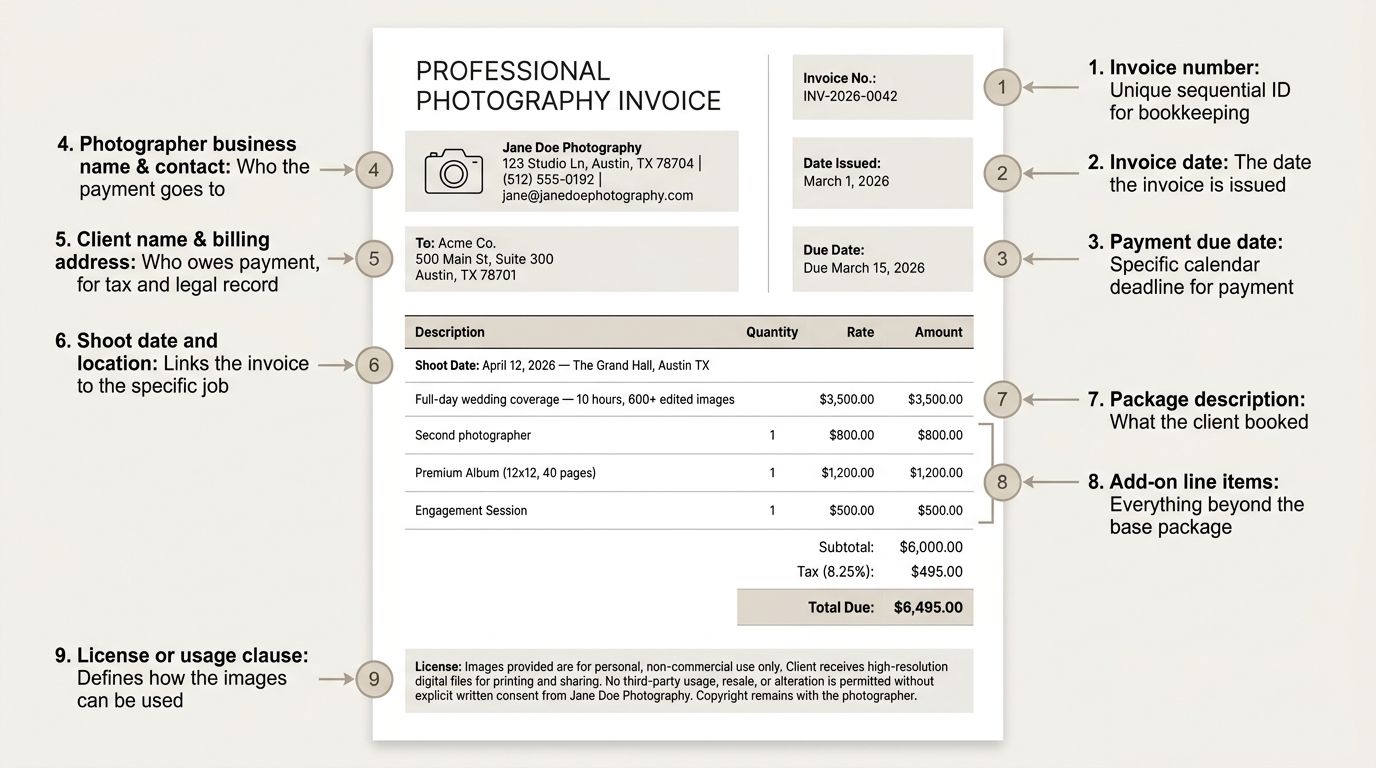
| Field | Purpose | Example Entry |
|---|---|---|
| Invoice number | Unique sequential ID for bookkeeping | INV-2026-0042 |
| Invoice date | The date the invoice is issued | March 1, 2026 |
| Payment due date | Specific calendar deadline for payment | Due March 15, 2026 |
| Photographer business name & contact | Who the payment goes to | Jane Doe Photography, 123 Studio Ln, jane@... |
| Client name & billing address | Who owes payment, for tax and legal record | Acme Co., 500 Main St |
| Shoot date and location | Links the invoice to the specific job | April 12, 2026 — The Grand Hall, Austin TX |
| Package description | What the client booked | "Full-day wedding coverage — 10 hours, 600+ edited images" |
| Add-on line items | Everything beyond the base package | Second photographer, premium album, engagement session |
| License or usage clause | Defines how the images can be used | "Personal use only" or full commercial clause |
| Travel and mileage | Billable travel separate from base fee | 120 miles at per-mile rate |
| Overtime | Hours beyond agreed coverage | 2 hours × overtime rate |
| Subtotal | Pre-tax total | $X,XXX |
| Tax (rate and amount) | Applicable tax per your jurisdiction | Varies — see tax section |
| Deposit received (negative line) | Shows the client credit clearly | -$500 (paid Jan 10, 2026) |
| Balance due | The one number the client needs to pay | $X,XXX |
| Accepted payment methods | Reduces friction to payment | Bank transfer, Stripe link, PayPal |
Photography Invoice Field Checklist
- Invoice number (sequential, unique)
- Invoice date
- Payment due date (specific calendar date, not "Net 30")
- Your business name, address, phone, and email
- Client name and billing address
- Shoot date and location
- Package name and description
- Individual add-on lines (albums, prints, rush delivery, etc.)
- License or usage clause
- Travel and mileage (if applicable)
- Overtime rate and hours (if applicable)
- Subtotal before tax
- Tax rate and tax amount
- Deposit or retainer already paid (shown as a deduction)
- Balance due
- Accepted payment methods and account details
💡 Invoice Numbers and Tax Authorities > Sequential invoice numbers are required by many tax authorities as part of record-keeping rules and are standard professional practice across most jurisdictions. For UK photographers, HMRC guidance on invoices outlines specific requirements for VAT-registered businesses. Check your own country's authority for exact rules.
Deposit and balance fields
- Show the deposit as a named negative line item (e.g., "Deposit received at booking: -$500"). This makes the math transparent and avoids the "wait, didn't I already pay?" email.
- Include the deposit payment date for your records and the client's.
- The balance due line should be the only figure the client needs to pay at this stage.
- If using a two-invoice workflow, reference the original booking invoice number on the balance invoice (e.g., "Balance for INV-2026-0017").
Late payment and cancellation terms
- Include a brief late-fee clause on the invoice, for example: "A late fee may apply to overdue balances in accordance with applicable law — please contact us if you have payment difficulties."
- Avoid specifying a fixed percentage rate without first confirming the legal cap in your jurisdiction. Limits on interest and late fees vary significantly by location.
- State your cancellation and refund policy, or reference the signed contract where those terms live.
- A brief thank-you line at the bottom keeps the tone positive while the terms above do the heavy lifting.
Worked Wedding Photography Invoice Example
Most wedding photographers send two invoices: a booking deposit invoice at contract signing to secure the date, and a balance invoice sent a set number of days before the wedding or before gallery delivery. This two-invoice workflow protects your cash flow and sets clear payment expectations with the couple.
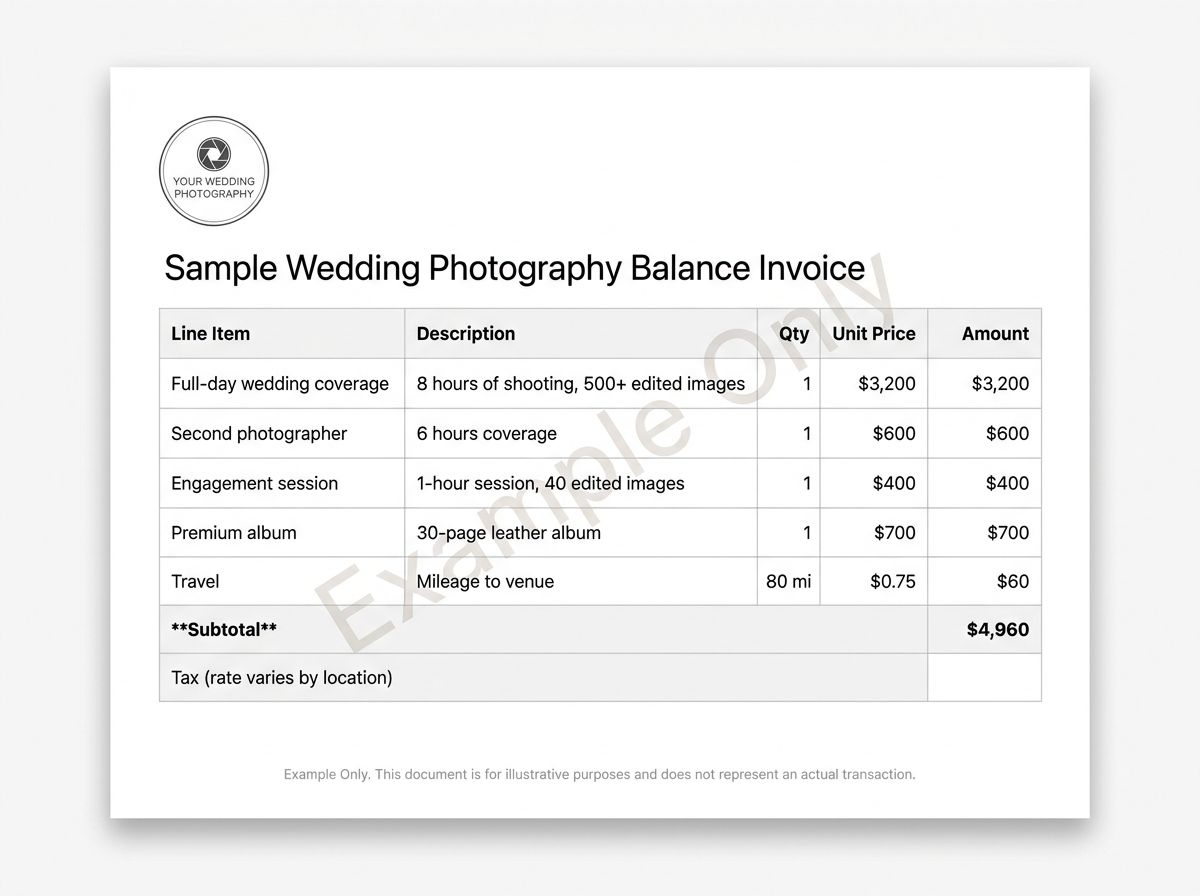
Below is an illustrative balance invoice showing how the deposit deduction, add-ons, and tax line come together. The numbers are placeholders — use them to understand structure, not pricing.
Sample Wedding Photography Balance Invoice
| Line Item | Description | Qty | Unit Price | Amount |
|---|---|---|---|---|
| Full-day wedding coverage | 8 hours of shooting, 500+ edited images | 1 | $3,200 | $3,200 |
| Second photographer | 6 hours coverage | 1 | $600 | $600 |
| Engagement session | 1-hour session, 40 edited images | 1 | $400 | $400 |
| Premium album | 30-page leather album | 1 | $700 | $700 |
| Travel | Mileage to venue | 80 mi | $0.75 | $60 |
| Subtotal | $4,960 | |||
| Tax (rate varies by location) | Applies based on local rules | — | — | Varies |
| Deposit received at booking (Jan 10, 2026) | Non-refundable retainer | 1 | — | -$1,000 |
| Balance Due | $3,960 + tax |
All figures above are illustrative only. Actual pricing varies by experience, location, market, and deliverables.
📌 Two-Invoice Workflow > Invoice 1 (deposit/retainer) goes out at contract signing to secure the date. Invoice 2 (balance) goes out a set number of days before the wedding or before gallery delivery. This keeps cash flow manageable for you and clear expectations for the couple. Reference your contract and the original deposit invoice number on the balance invoice for a clean paper trail.
⚠️ Example Figures Are Illustrative > The dollar amounts above are for layout illustration only and do not represent recommended market pricing. Photography rates vary widely based on experience, location, market, and deliverables. Consult industry associations such as ASMP or your local professional photographer community for regional benchmarks.
Photography Billing Methods Compared
Before you fill out your template, decide how you're going to bill. There are three main structures photographers use, and the right one depends on your niche.
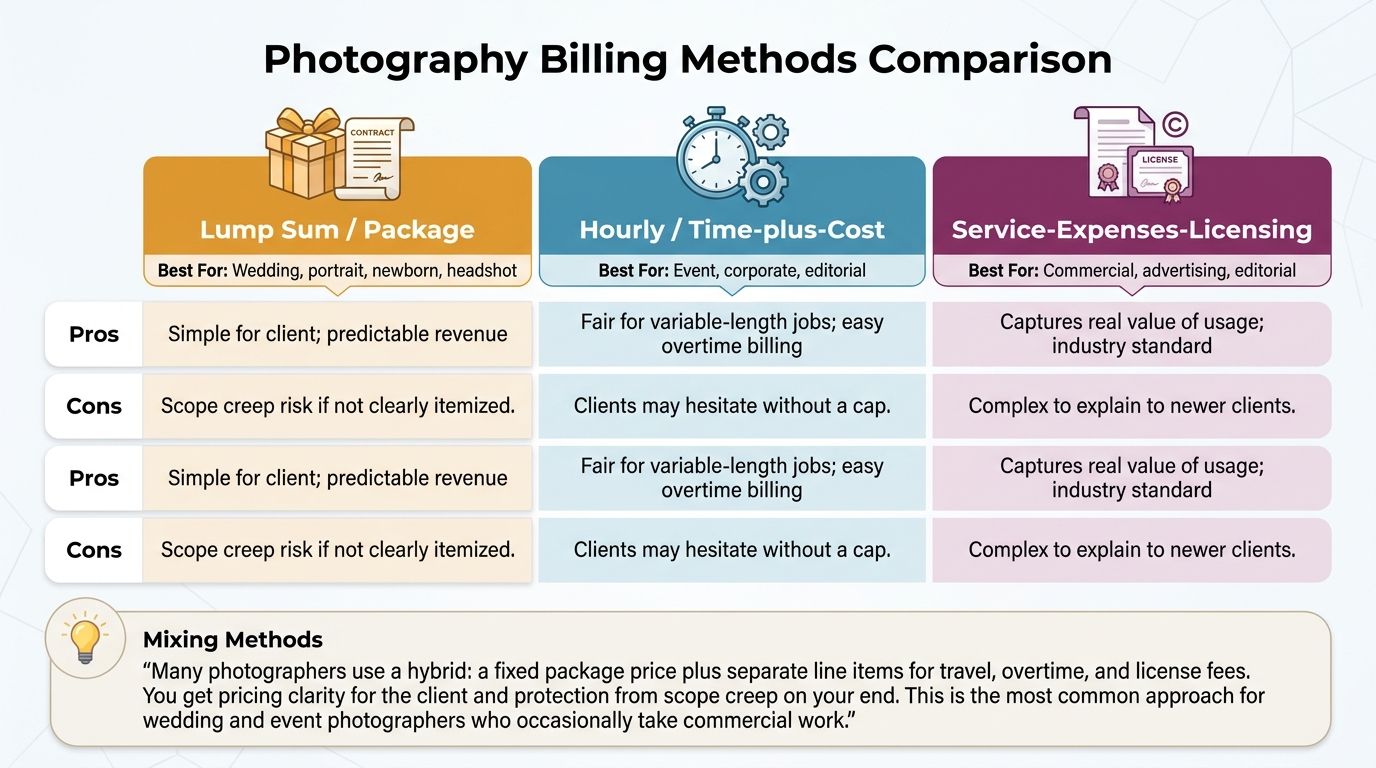
| Billing Method | Best For | Pros | Cons |
|---|---|---|---|
| Lump Sum / Package | Wedding, portrait, newborn, headshot | Simple for client; predictable revenue | Scope creep risk if not clearly itemized |
| Hourly / Time-plus-Cost | Event, corporate, editorial | Fair for variable-length jobs; easy overtime billing | Clients may hesitate without a cap |
| Service-Expenses-Licensing | Commercial, advertising, editorial | Captures real value of usage; industry standard | Complex to explain to newer clients |
💡 Mixing Methods > Many photographers use a hybrid: a fixed package price plus separate line items for travel, overtime, and license fees. You get pricing clarity for the client and protection from scope creep on your end. This is the most common approach for wedding and event photographers who occasionally take commercial work.
Adding a License and Usage Clause to Your Invoice
If you shoot anything beyond personal portraits, your invoice needs a license clause. This is the single biggest gap most photographers have — and the single biggest reason clients end up using images in ways you never agreed to.
A proper license clause specifies five things:
- Use type: personal, commercial, editorial, social media, or advertising — be explicit.
- Territory: where the images may be used (e.g., worldwide, US only, regional).
- Duration: how long the license lasts (e.g., one year, perpetual, campaign term).
- Exclusivity: whether you can license the same images to other clients.
- Restrictions: platforms, file types, or contexts where use is not permitted.
Copy-Paste License Clause Examples
| Use Type | Sample Clause Wording | Notes |
|---|---|---|
| Personal use | "License: Personal use only. Digital files may be printed and shared privately. No commercial reproduction, resale, or third-party licensing." | Typical for portrait, family, wedding clients. |
| Commercial — single campaign | "License: Commercial use for [Client Name]'s [Campaign Name] campaign. Territory: [Region]. Duration: 12 months from delivery. Non-exclusive." | Fill in the brackets for every job. |
| Editorial | "License: Editorial use in [Publication Name] only. One-time print and digital use. No syndication without prior written consent." | Editorial fees are usually lower than commercial. |
| Social media | "License: Client's owned social media channels only. Duration: perpetual. Non-exclusive. No paid advertising use without additional license." | Paid ads = separate license. |
| Advertising — exclusive | "License: Exclusive advertising use, worldwide, 24 months from delivery. Covers print, digital, out-of-home, and broadcast. Exclusivity prevents photographer from licensing identical images to competitors during the term." | Highest tier. Price accordingly. |
⚠️ Clause Is a Starting Point, Not Legal Advice > The sample wording above is illustrative only. Have a qualified legal professional review any license language you intend to use, especially for high-value commercial or advertising work. For industry-standard benchmarking, see the ASMP business resources.
Tax Fields on a Photography Invoice
Here's the honest truth about tax on photography invoices: the rules depend entirely on where you are, what you deliver, and whether you're registered. You cannot copy another photographer's tax setup and assume it applies to you.
Tax Invoice Fields by Region (Illustrative Reference)
| Region | Tax Type | Typical Invoice Fields Required | Authority to Consult |
|---|---|---|---|
| United States | Sales Tax (state-level) | State tax ID (where applicable), tax rate, tax amount | IRS Self-Employed Center + your state revenue department |
| United Kingdom | VAT | VAT number, VAT rate, VAT amount, net and gross totals | HMRC VAT invoice guidance |
| Canada | GST / HST | GST/HST number, applicable rate, tax amount | CRA GST/HST for Businesses |
| Australia | GST | ABN, "Tax Invoice" heading, GST rate, GST amount | ATO Tax Invoices guidance |
| European Union | VAT | VAT number, VAT rate, VAT amount per line, country-specific fields | Local tax authority in your EU member state |
| India | GST | GSTIN, HSN/SAC code, CGST/SGST/IGST split, tax amount | Central Board of Indirect Taxes and Customs (CBIC) |
Tax rules vary by jurisdiction, service type, and registration status. Consult your local tax authority or a qualified accountant before applying tax to client invoices.
⚠️ Tax Rules Vary — Always Verify Locally > Photography services may or may not be taxable depending on your country, state or province, and whether you deliver digital files, prints, or both. The table above is an illustrative starting point only. Verify your obligations with your local tax authority — the IRS, HMRC, CRA, ATO, or a qualified accountant.
Should you charge tax on photography services?
- In many US states, photography services are taxable, but rules differ by state and sometimes by whether the deliverable is digital or printed. Verify with your state revenue department.
- In the UK, VAT-registered photographers must add VAT to invoices. Those below the VAT registration threshold typically do not charge VAT. See HMRC guidance.
- In Canada, most photography services are subject to GST/HST depending on the province. Consult the CRA.
- In Australia, GST-registered photographers add GST according to ATO rules. Check your registration status first.
- Never assume a specific tax rate applies to your situation — always confirm with the authority or an accountant.
How to Fill Out and Send a Photography Invoice
Here is the step-by-step process, one step at a time.
Step 1 — Choose a template and format
Pick the format that matches your workflow. Word or Google Docs work best for text-heavy customization. Excel or Google Sheets save time when you have multiple variable line items that need auto-calculation. If you already have a finished invoice, work from a PDF.
Choose a niche-matched template if available (wedding, portrait, commercial) to minimize editing.
Step 2 — Add your business and client details
Enter your business name, logo, address, phone, and email at the top. Below that, add the client's full name and billing address. For a commercial client, use the registered business name and address — this matters for tax record-keeping on both sides.
Step 3 — List the package and add-ons
Create one line for the base package (e.g., "6-hour wedding coverage — 500 edited images, online gallery"). Add separate lines for each add-on: second photographer, album, prints, engagement session, travel, overtime.
Being itemized is not pedantic. It's the single easiest way to prevent "I thought that was included" arguments later.
Step 4 — Add the license or usage clause
State the permitted use type, territory, duration, and any restrictions. For personal clients, "Personal use only — no commercial reproduction" is sufficient. For commercial clients, use the copy-paste clauses from the license section above as a starting point and have a legal professional review before you deploy them on high-value jobs.
Step 5 — Apply tax, deduct the deposit, and set the due date
Add the applicable tax rate and calculated tax amount — verify your local obligations before doing so. Show the deposit as a named negative line (e.g., "Deposit received: -$500") so the balance is transparent.
Set a specific calendar due date ("Due by March 15, 2026") rather than a vague term like "Net 30". Clear payment terms reduce the chance of a client misinterpreting when payment is actually due.
Step 6 — Export as PDF and send
Export the completed invoice as a PDF to lock the figures. Send by email with a clear subject line: "Invoice #0042 — [Client Name] Wedding Photography — Due March 15, 2026".
Include a brief, friendly message and your preferred payment methods with account details or a payment link. Save a copy to your records folder and follow up if payment hasn't arrived by the due date.
💡 Always Send as a Locked PDF > Export the completed invoice as a PDF before emailing. A PDF prevents the client from altering amounts and gives both parties a fixed record of what was agreed. In Google Docs or Sheets, go to File > Download > PDF document. If you prefer an online generator, Wave's free invoicing tool also exports clean PDFs.
Best Practices for Getting Paid Faster
Most late payments aren't caused by broke clients. They're caused by friction — unclear due dates, missing payment details, invoices sent weeks after the shoot. Remove the friction, and you get paid faster.
Practical tips to reduce late payments
- Collect a non-refundable deposit (retainer) at contract signing. A 25–50% retainer is common practice for wedding and portrait photographers. It reduces no-shows and ensures client commitment.
- Use a specific calendar due date on every invoice rather than "Net 30." A date is harder to misread than a term.
- Include your preferred payment methods directly on the invoice. Bank transfer details, a Stripe or PayPal link, whatever you accept — remove the "how do I pay you?" email.
- Send the invoice promptly after the shoot or at the agreed milestone. Delays in sending correlate strongly with delays in receiving payment.
- Follow up politely on the due date if payment hasn't arrived. A single-sentence email referencing the invoice number is usually enough.
- If you use a late-fee clause, ensure the percentage and terms comply with your local jurisdiction's limits on interest and late fees. A local legal professional can confirm the cap.
- Keep all invoice communications in writing. If a dispute arises, a paper trail protects you.
Pre-Send Invoice Quality Check
- Invoice number is unique and sequential
- Invoice date and due date are both filled in with specific calendar dates
- Client name and billing address are correct
- Every deliverable agreed in the contract appears as a line item
- License or usage clause is included for commercial work
- Tax has been applied correctly per your local obligations
- Deposit is deducted as a named negative line item
- Accepted payment methods are clearly listed with account details or a payment link
- Invoice has been exported as a locked PDF
- A copy has been saved to your records folder
Frequently Asked Questions
What should a photography invoice include?
A photography invoice should include an invoice number, invoice date and due date, your business details, the client's details, shoot date and location, package description, add-on line items, a license or usage clause, travel and overtime (if applicable), subtotal, applicable tax, deposit already paid (as a deduction), balance due, and your accepted payment methods.
Should I take a deposit for a photography job?
Yes. Most professional photographers collect a non-refundable deposit or retainer at the time of contract signing to secure the booking date. The deposit is then shown as a deduction on the final balance invoice. The amount varies by photographer and market, but a range of 25–50% of the total fee is common practice.
Is a Word or Excel photography invoice template better?
It depends on your workflow. Word (or Google Docs) is better for straightforward invoices where you prefer to type and format manually. Excel (or Google Sheets) is better when you bill for multiple variable line items and want automatic subtotals and tax calculations. Both should be exported as PDF before sending to the client.
How do I invoice travel and overtime?
Add travel as a separate line item on your invoice — either as a flat travel fee or as a per-mile or per-kilometer rate multiplied by the distance traveled. Overtime should appear as a separate line showing your hourly overtime rate multiplied by the number of hours worked beyond the agreed coverage period. Being specific prevents disputes.
How do I bill usage rights on a photography invoice?
Add a dedicated license line item that states the use type (personal, commercial, editorial, advertising), territory, and duration. For commercial or advertising work, usage fees are typically charged in addition to the creative fee. The American Society of Media Photographers (ASMP) publishes business resources that help you benchmark usage fee pricing.
Can I get a photography invoice template as a PDF?
Yes. The simplest approach is to complete a Word or Google Docs template with your details and then export it as a PDF (File > Save As PDF or File > Download > PDF). Free online tools like Wave also let you create and download a finished photography invoice as a PDF without a paid subscription.
How do I charge sales tax or VAT on photography services?
Tax rules for photography services vary significantly by country, state or province, and even by the type of deliverable (digital files vs. printed products). In the US, check your state revenue department's guidance alongside the IRS Self-Employed Center. In the UK, consult HMRC; in Canada, the CRA; in Australia, the ATO. Always verify your obligations with your local tax authority or a qualified accountant before adding tax to client invoices.
What is the difference between a photography invoice and a photography contract?
A photography contract is a comprehensive legal agreement covering scope of work, cancellation terms, ownership of images, and other conditions — it is signed before the shoot. An invoice is a payment request document sent at billing milestones (deposit, balance). Both documents work together: the contract protects the engagement and the invoice requests payment under those agreed terms.
Sources
- IRS Self-Employed Individuals Tax Center
- HMRC: Invoice Requirements for VAT-Registered Businesses
- CRA: GST/HST for Businesses
- ATO: Tax Invoices (Australia)
- ASMP Business Resources for Photographers
- Invoice Payment Terms Explained — The Balance Money
- DPReview — Photography Industry Reference
- PetaPixel — Photography Business Guides
- Wave Free Invoice Generator