What is Pixieset, and is it the right platform for photographers in 2026?
Quick answer: Pixieset is an all-in-one platform for photographers that combines client galleries, a website builder, an online store, and studio management tools. It's best suited for small studios and photographers who want an affordable, beginner-friendly solution starting at around $8 per month, though photographers with advanced automation or scaling needs may find specialized alternatives like Pic-Time a better long-term fit.
Independent Pixieset review for 2026: full pricing breakdown, feature-by-feature analysis, pros and cons, and comparisons to Pic-Time, ShootProof, and SmugMug.
Key Takeaways
- Pixieset bundles client galleries, a website builder, an online store, and studio management under one subscription.
- A free tier exists with storage and gallery limits; paid plans start at approximately $8/month billed annually.
- Users rate Pixieset around 4.5/5 on Capterra based on 33 reviews, praising ease of use and gallery design.
- Notable limitations include no full photographer-side mobile management app and limited advanced automations.
- Pic-Time, ShootProof, SmugMug, and Zenfolio are the most relevant photographer-specific alternatives.
- Pixieset acquired Flothemes, which expanded website theme options and signals ongoing product investment.
- Pixieset suits beginners and mid-level studios; high-volume or sales-focused photographers should compare alternatives carefully.
What Is Pixieset?
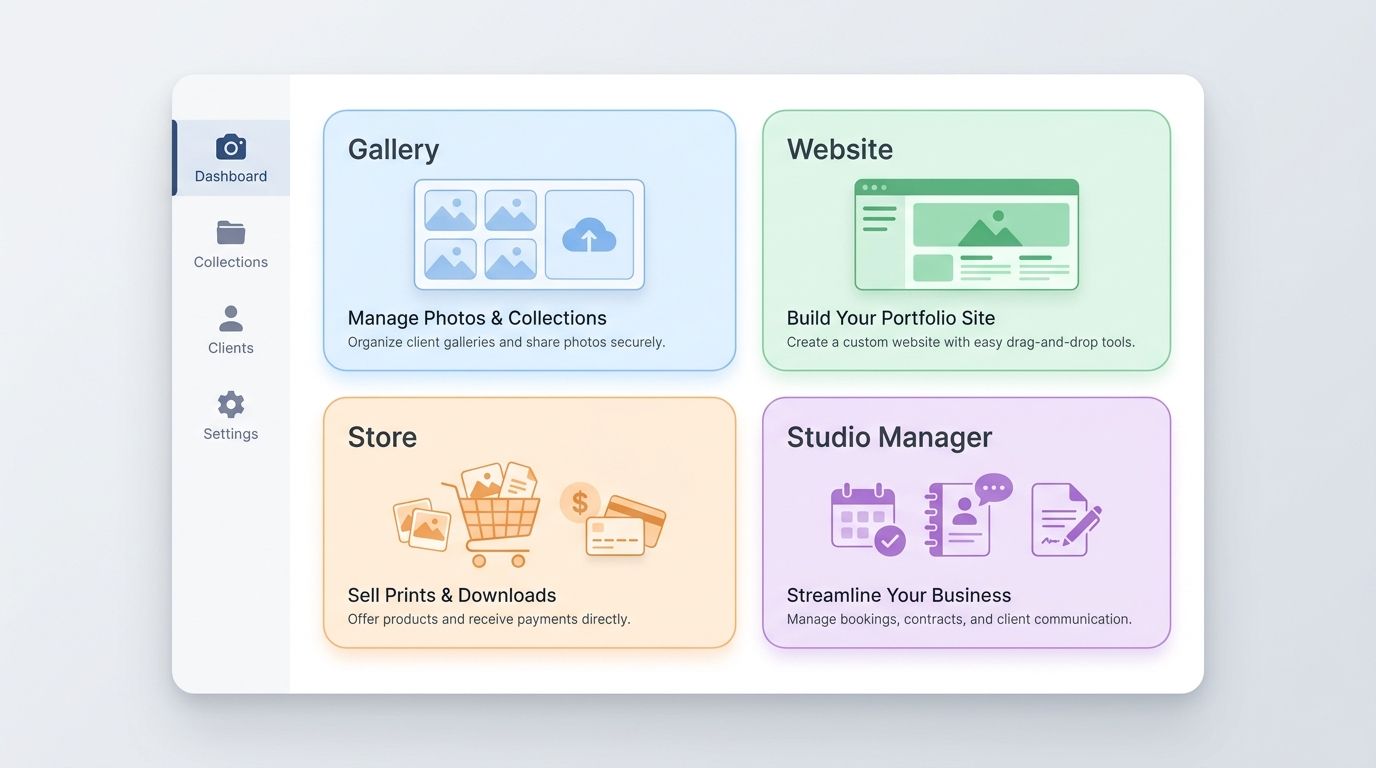
Pixieset is an all-in-one software platform built specifically for photographers. It combines four core tools — client galleries, a portfolio website builder, an online store, and a studio management CRM — under a single subscription. The company positions itself as a growth-friendly platform where photographers can start on a free tier and upgrade as their business expands.
Here's the reality: most photographers end up stitching together four or five different tools — a gallery host, a website, an invoicing app, a print lab integration. Pixieset's pitch is that you don't need five logins. You need one.
💡 Quick Context: Flothemes Acquisition > > Pixieset acquired Flothemes, a well-known WordPress theme company for photographers, which expanded its website builder capabilities and signals continued investment in the portfolio-building side of the product. If you're evaluating Pixieset primarily for its website builder, verify current available themes directly on Pixieset's site before committing.
Who Uses Pixieset?
- Wedding photographers, portrait photographers, and small studio owners make up the primary user base.
- Hobbyist photographers who want professional client delivery without complex setup also rely on it heavily.
- Capterra data shows the platform skews toward solo operators and small teams rather than large commercial studios.
- Pixieset is often used as a starter platform — many users begin on the free tier and upgrade as bookings grow.
How Long Has Pixieset Been Around?
Pixieset has been operating in the photographer software space for over a decade and has grown steadily enough to acquire competitors like Flothemes. That longevity matters when you're trusting a platform with years of client galleries. For the most current company background, check Pixieset's About page directly.
Pixieset Products Explained
Pixieset offers four core products bundled into its plans:
- Client Gallery — password-protected galleries for delivering images to clients.
- Website — a drag-and-drop portfolio website builder with photographer-focused templates.
- Store — an integrated storefront for selling prints and digital downloads.
- Studio Manager — a CRM for invoices, contracts, questionnaires, and lead tracking.
Pixieset Product Suite at a Glance
| Product | Primary Purpose | Key Features | Best For |
|---|---|---|---|
| Client Gallery | Deliver images to clients | Private galleries, PIN protection, selective download, custom branding | Every photographer delivering digital files |
| Website | Portfolio and marketing site | Drag-and-drop builder, photographer templates, custom domain on paid plans | Photographers who want gallery + site in one place |
| Store | Sell prints and digital downloads | Stripe checkout, pricing tiers, embedded in galleries | Photographers who sell beyond their shoot fee |
| Studio Manager | Business and client management | Invoices, contracts, questionnaires, lead tracking | Solo operators consolidating admin tools |
⚠️ Note on Mobile Access > > Pixieset offers a client-facing mobile gallery app so your clients can browse and download images on their phones. Based on the latest available information, there is no full photographer-side mobile management app for running your business on the go. Verify current app availability on the App Store and Google Play before you commit.
Client Gallery
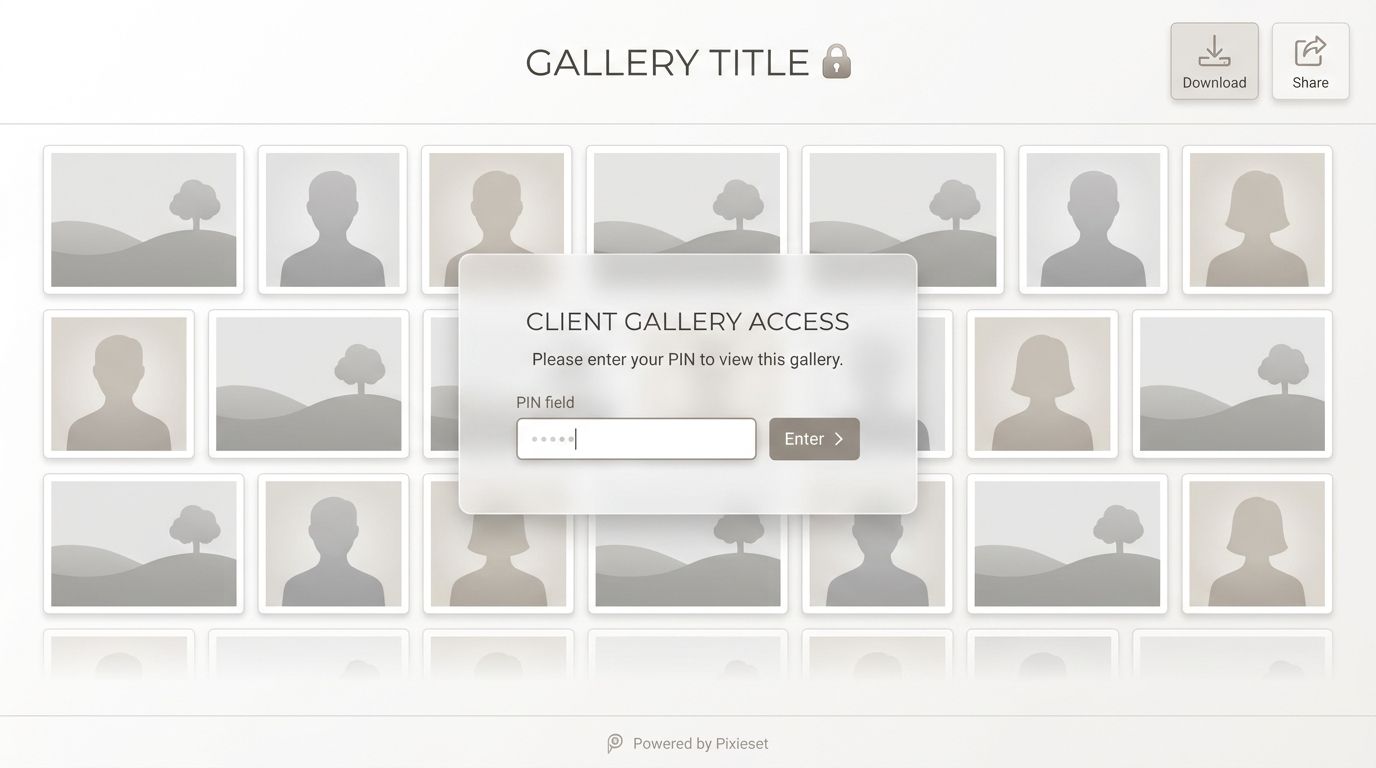
The Client Gallery is Pixieset's flagship product. You upload images from a shoot, apply branding, set a PIN or password, and send the gallery link to your client. On paid plans you get custom branding, selective download controls, and more storage.
Gallery design is the feature users praise most consistently in Capterra reviews — the client-facing interface is clean, modern, and feels premium without any setup effort. For newer photographers, that perceived polish directly impacts how clients value your work.
The free tier limits storage and active galleries. Check the Pixieset pricing page for the current free-tier cap before planning your workflow around it.
Website Builder
The Website builder is a drag-and-drop system with templates designed specifically for photographer portfolios. After the Flothemes acquisition, the theme library expanded with more polished, conversion-oriented options.
You get a custom domain on paid plans, and the main advantage over something like Squarespace is that your galleries and portfolio live under one login. If you only need a basic portfolio site and gallery delivery, this consolidates two tools into one bill.
Store
Pixieset Store lets you sell prints, digital downloads, and packages directly from your galleries. Clients add images to a cart and check out without ever leaving the gallery experience — which reduces the friction that kills most photographer print sales.
Stripe is the documented primary payment processor. Transaction fees vary by plan tier: higher tiers typically have lower or zero Pixieset commission, but Stripe's standard processing fees always apply on top. Confirm the current fee structure on the Pixieset pricing page.
If you're not already pricing prints strategically, the Store product on its own won't rescue weak sales — pricing psychology and product selection matter more than the platform.
Studio Manager
Studio Manager is Pixieset's CRM layer: invoices, contracts, questionnaires, workflows, and lead tracking. It's useful if you're managing multiple clients and want to stop juggling Google Docs, PayPal invoices, and email threads.
That said, it's not as deep as dedicated photographer CRMs like HoneyBook or Dubsado when it comes to multi-step automations and workflow branching. If complex workflow automation is a core need, test Studio Manager carefully before replacing a specialist tool. Verify which plan tiers include Studio Manager on Pixieset's pricing page — availability has varied across plans historically.
Pixieset Pricing: Full Plan Breakdown
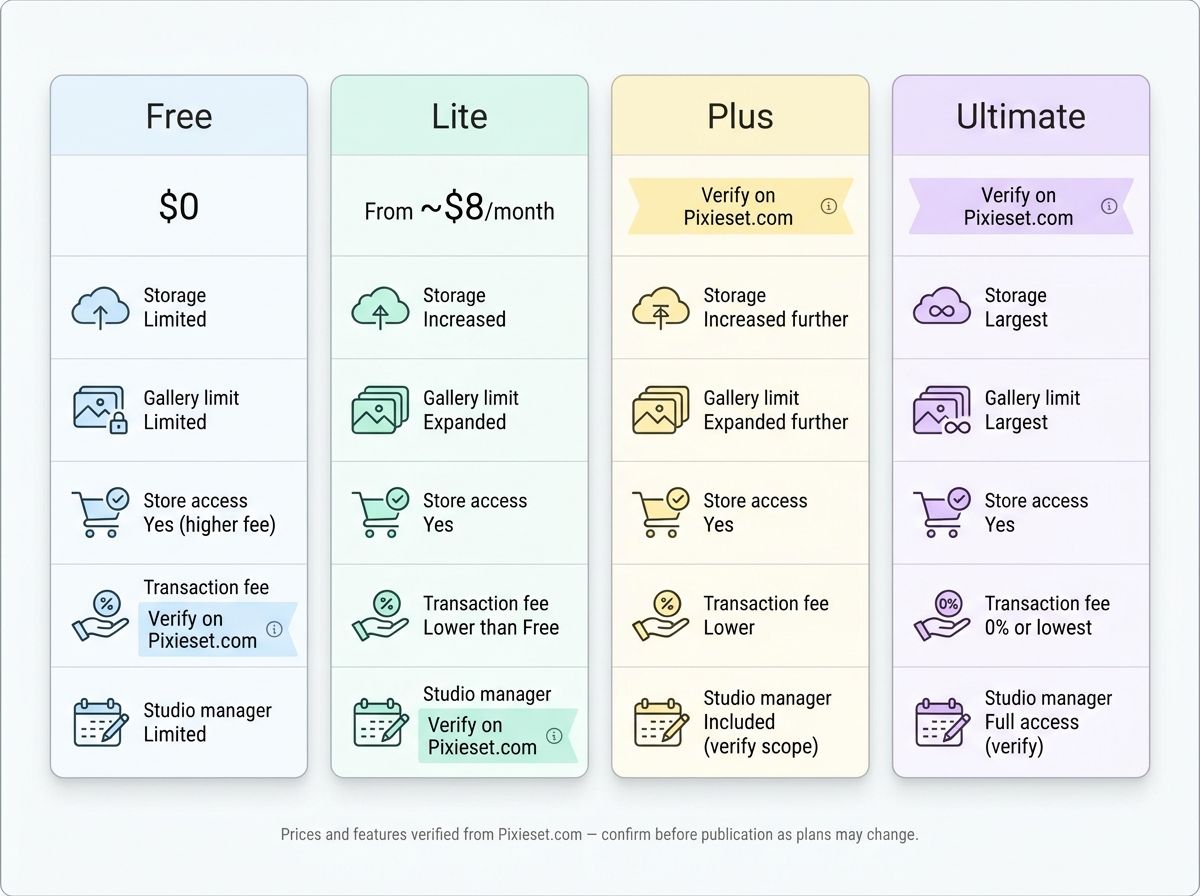
Let's break down the actual costs. Pixieset uses a tiered subscription model with a free plan and three paid tiers. All figures below reference Pixieset's official pricing page at the time of writing — pricing changes regularly, so always confirm before subscribing.
Pixieset Plan Comparison 2026
| Plan | Monthly Price (billed annually) | Storage | Gallery Limit | Store Access | Transaction Fee | Studio Manager |
|---|---|---|---|---|---|---|
| Free | $0 | Limited | Limited | Yes (higher fee) | Verify on Pixieset.com | Limited |
| Lite | From ~$8/month | Increased | Expanded | Yes | Lower than Free | Verify on Pixieset.com |
| Plus | Verify on Pixieset.com | Increased further | Expanded further | Yes | Lower | Included (verify scope) |
| Ultimate | Verify on Pixieset.com | Largest | Largest | Yes | 0% or lowest | Full access (verify) |
Prices and features verified from [Pixieset.com](https://pixieset.com/pricing/) — confirm before publication as plans may change.
⚠️ Free Plan Limitations > > Based on information available at time of writing, Pixieset's free plan includes a limited amount of storage, a cap on active galleries, Pixieset branding that cannot be removed, and higher transaction fees on Store sales. It's a legitimate starting point for new photographers testing the platform, but most paying clients will expect the custom branding that only unlocks on paid tiers. Verify current free-tier limits on Pixieset's pricing page.
💡 Is Annual Billing Worth It? > > Pixieset typically offers a meaningful discount for annual vs. monthly billing. If you're confident you'll use the platform for at least a year, the annual option usually saves money. Calculate the exact savings percentage from the current pricing page before you commit.
Pixieset Store Transaction Fees
Transaction fees on Store sales vary by plan tier. The free plan carries the highest Pixieset commission, and fees scale down as you move up tiers — the highest plans typically have 0% platform commission. Keep in mind:
- Stripe's standard payment processing fees apply separately on top of any Pixieset commission.
- If print sales are central to your business model, modeling the fee difference between tiers often justifies the higher plan.
- Confirm the current commission structure on the Pixieset pricing page or Store documentation.
What Does Pixieset Cost Compared to Competitors?
At roughly $8/month entry on paid plans, Pixieset sits in the affordable range for photographer-specific platforms. Pic-Time starts in a similar band, ShootProof's entry plans are comparable, and SmugMug's tiers scale based on storage and feature depth. Full side-by-side pricing is in the comparison table below.
The honest answer on value: it depends entirely on which products you actually use. A photographer who only needs client galleries may be fine on the free plan. One who wants galleries + a website + store + Studio Manager is getting four tools for one subscription — which is where Pixieset's value really shows up.
Pixieset User Ratings and Reviews
Pixieset holds a 4.5 out of 5 rating based on 33 reviews on Capterra, with users most frequently praising ease of use and gallery design while citing limited automations and bulk download friction as recurring concerns.
Pixieset Aggregated Ratings by Category
| Category | Capterra Score | Notes |
|---|---|---|
| Overall Rating | 4.5 / 5 (33 reviews) | Strong but based on a small sample |
| Ease of Use | 4.5 / 5 (33 reviews) | Most consistently praised attribute |
| Value for Money | 4.0 / 5 (29 reviews) | Lower than ease of use — suggests pricing-vs-features friction for some users |
| Customer Service | 4.1 / 5 (26 reviews) | Generally positive with some slow-response complaints |
Source: [Pixieset reviews on Capterra](https://www.capterra.com/p/207189/Pixieset/). Cross-check with [G2](https://www.g2.com/products/pixieset/reviews) for a broader perspective.
⚠️ Small Sample Size Caveat > > Capterra's 4.5 rating is based on just 33 reviews, which is a relatively small sample for a platform this widely used. Before making a decision, cross-check G2, Trustpilot, and community forums like Reddit's r/WeddingPhotography to get a wider picture of real-world sentiment.
What Users Praise Most
- Clean, modern gallery interface that clients find intuitive without any instructions.
- Fast setup — photographers commonly report being able to deliver a gallery the same day as a shoot.
- Affordable entry point, especially the free tier for new photographers.
- Professional gallery aesthetics that lift perceived brand quality, which matters for attracting referrals.
Common Complaints from Users
- Bulk downloading has been flagged as cumbersome by at least one Capterra reviewer — a real concern if you ever need to migrate galleries elsewhere.
- Limited automation compared to Pic-Time for things like expiry reminders and upsell email sequences.
- No full photographer-side mobile management app (client mobile app exists — verify current status).
- Some users note customer support response times slower than expected.
- Value for Money scored slightly lower than Ease of Use, suggesting a subset of users feel the pricing-to-features ratio could be better.
Pixieset Pros and Cons
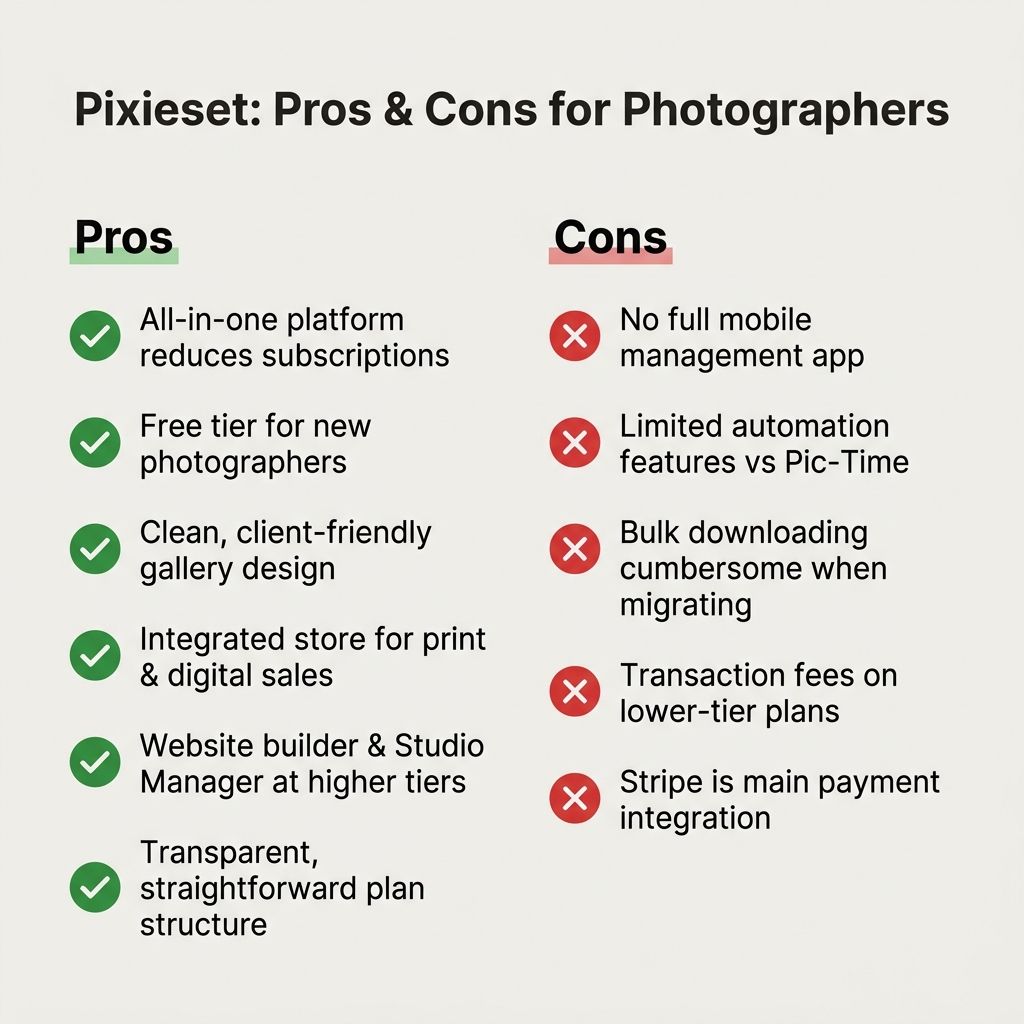
Is Pixieset worth it? For beginners and small studios who want one subscription covering galleries, website, store, and basic CRM, yes — it delivers genuine value at an accessible price. For high-volume photographers who depend on automated sales sequences or need deep third-party integrations, a specialist platform will likely serve you better.
✅ Pixieset Pros
- All-in-one platform reduces the need for multiple subscriptions
- Free tier available for photographers just starting out
- Clean, client-friendly gallery design with minimal learning curve
- Integrated store for print and digital sales
- Website builder and Studio Manager included at higher tiers
- Transparent, straightforward plan structure
❌ Pixieset Cons
- No full photographer-side mobile management app (verify current status)
- Limited automation features compared to Pic-Time
- Bulk downloading can be cumbersome if migrating galleries
- Transaction fees apply on lower-tier plans
- Stripe is the primary documented payment integration — verify if others are supported
- Free plan includes Pixieset branding that cannot be removed without upgrading
Pixieset vs Competitors: Side-by-Side Comparison
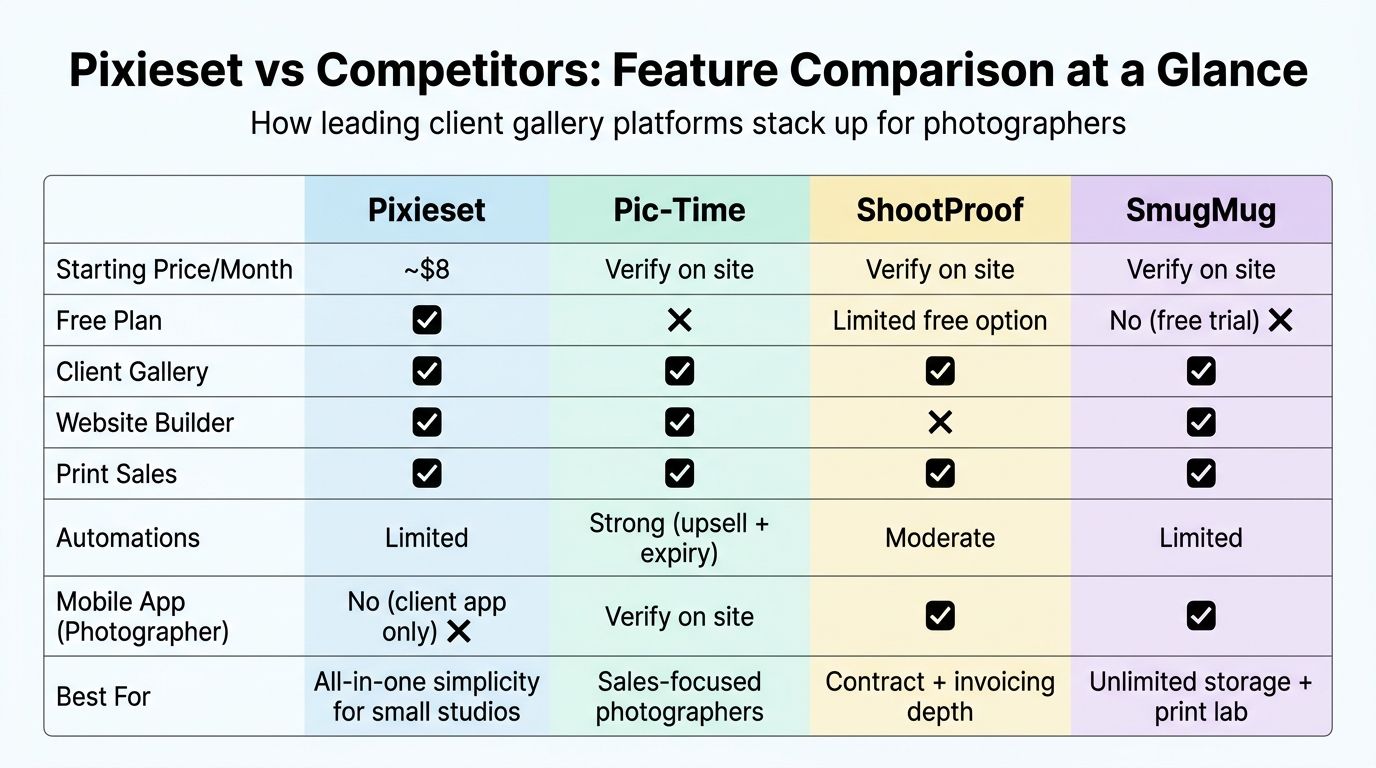
No single platform wins across every category. Here's how Pixieset stacks up against the most relevant alternatives for photographers evaluating client gallery and business management software.
Pixieset vs Pic-Time vs ShootProof vs SmugMug: Comparison Table
| Platform | Starting Price/Month | Free Plan | Client Gallery | Website Builder | Print Sales | Automations | Mobile App (Photographer) | Best For |
|---|---|---|---|---|---|---|---|---|
| Pixieset | ~$8 | Yes | Yes | Yes | Yes | Limited | No (client app only) | All-in-one simplicity for small studios |
| Pic-Time | Verify on site | No | Yes | Yes | Yes | Strong (upsell + expiry) | Verify | Sales-focused photographers |
| ShootProof | Verify on site | Limited free option | Yes | No | Yes | Moderate | Yes | Contract + invoicing depth |
| SmugMug | Verify on site | No (free trial) | Yes | Yes | Yes | Limited | Yes | Unlimited storage + print lab network |
| Zenfolio | Verify on site | No (free trial) | Yes | Yes | Yes | Moderate | Yes | Studios wanting lab fulfillment flexibility |
All pricing and feature details must be verified from each platform's official pricing page before publication.
📌 Pic-Time vs Pixieset: The Most-Asked Comparison > > The core difference is philosophy. Pixieset is a broad, beginner-friendly all-in-one. Pic-Time specializes in gallery sales automation — things like triggered expiry reminders, upsell email sequences, and seasonal marketing campaigns baked directly into the gallery experience. Practitioner reviews such as the Pic-Time vs Pixieset breakdown on Lilly Red Academy document real-world revenue differences for studios that scale their print sales through Pic-Time's automation stack. If you're not actively trying to grow post-delivery sales, Pixieset's simpler approach is often enough.
When to Choose Pixieset Over Alternatives
- You want one login for gallery delivery, website, store, and CRM.
- You prioritize ease of setup over advanced automation.
- You're a beginner on a budget who wants a free starting point.
- Clean client gallery aesthetics and a simple client experience matter more than sales automation depth.
When to Choose an Alternative Instead
- Pic-Time — if automated upsell sequences and expiry reminders are central to your revenue strategy.
- ShootProof — if contract and invoicing depth matters alongside gallery delivery.
- SmugMug — if you want storage tiers that scale with heavy archive needs and access to an established print lab network.
- Zenfolio or CloudSpot — if you want more print fulfillment lab flexibility.
Who Pixieset Is (and Isn't) For
Skip this section's wrong-fit list and you'll waste money on a subscription that doesn't match your workflow. Read it carefully.
✅ Pixieset Is a Strong Fit For
- Photographers starting their business who need an affordable all-in-one solution
- Wedding and portrait photographers delivering private client galleries
- Photographers who want a portfolio website and gallery delivery under one subscription
- Solo operators who want basic invoicing and CRM without complexity
- Photographers who prioritize clean gallery aesthetics and simple client experience
❌ Pixieset May Not Be the Best Choice For
- High-volume photographers relying heavily on automated sales sequences and email marketing
- Photographers who need a robust photographer-side mobile app for on-the-go management
- Businesses needing deep integrations with accounting tools, CRMs, or multiple payment processors
- Photographers with very large storage needs who expect costs to escalate at higher tiers
- Studios that need collaborative multi-user access with granular permissions
Limitations and Things to Know Before You Buy
⚠️ Pricing Changes: Always Verify > > All pricing figures in this article reference Pixieset's official pricing page at the time of writing. Plans and prices change regularly. Confirm current pricing directly before subscribing to avoid surprises.
⚠️ Migration Considerations > > Bulk downloading of galleries has been flagged as cumbersome by at least one verified Capterra reviewer. If you think there's any chance you'll migrate away someday, test the gallery export process on the free plan before committing years of client gallery data to a paid tier. This is the kind of detail that only becomes painful two years in.
Automation Gaps
- Pixieset's automation features are more limited than specialist platforms like Pic-Time, which offers triggered gallery expiry reminders and upsell email sequences out of the box.
- Photographers who rely on automated revenue-generating touchpoints after delivery may need a supplemental email marketing tool like Flodesk or ConvertKit.
- Automation is an area the platform may expand over time — verify current capabilities on Pixieset's official feature pages.
Mobile App Status
- A client-facing mobile gallery app exists so clients can browse and download from their phones.
- Based on the latest available information, there's no dedicated photographer-side mobile management app for running your business on the go. Verify on the App Store and Google Play before deciding.
- If you manage your business primarily from mobile devices, this may feel limiting compared to alternatives with dedicated photographer apps.
Integration Ecosystem
- Stripe is the primary documented payment integration for the Store — verify whether additional payment processors are now supported on Pixieset's integrations page.
- The broader integration ecosystem is narrower than some competitors. If you need deep integrations with QuickBooks, HubSpot, or marketing automation platforms, verify compatibility before committing.
- The Flothemes acquisition suggests potential for expanded capabilities over time, but confirm the current status.
Frequently Asked Questions About Pixieset
Is Pixieset free to use?
Yes, Pixieset offers a free plan with limited storage and gallery capacity. The free tier includes Pixieset branding that cannot be removed without upgrading, and transaction fees on Store sales are higher than on paid tiers. Paid plans unlock more storage, custom branding, and additional features. Verify current free-plan limits on Pixieset's pricing page.
How much does Pixieset cost per month?
Pixieset's paid plans start at approximately $8 per month when billed annually, based on figures cited on Capterra. Pricing varies by plan tier and whether you bill monthly or annually. Always verify current pricing directly on Pixieset.com as plans may change.
Is Pixieset worth it for professional photographers?
Pixieset is worth it for photographers who want an affordable all-in-one platform combining galleries, website, store, and basic studio management. It's best suited for small studios and photographers prioritizing ease of use. High-volume photographers or those relying on advanced sales automations may find specialized platforms like Pic-Time a stronger fit.
What are the best Pixieset alternatives?
The most relevant photographer-specific alternatives include Pic-Time (stronger automations and upsell tools), ShootProof (gallery delivery with contract and invoicing depth), SmugMug (unlimited storage tiers and print lab network), and Zenfolio. The right alternative depends on your storage needs, sales automation priorities, and budget.
Does Pixieset have a mobile app for photographers?
Pixieset offers a client-facing mobile gallery app so clients can browse and download photos on mobile. Based on the latest available information, there is no dedicated photographer-side mobile management app for running your business from a phone. Verify this on the App Store and Google Play before making a decision.
Can you sell prints and digital downloads through Pixieset?
Yes, Pixieset includes a Store product that allows photographers to sell prints and digital downloads directly from client galleries. Stripe is the primary documented payment integration. Transaction fees vary by plan tier — higher plans typically have lower or zero commission rates. Verify the current fee structure on Pixieset's pricing page.
How does Pixieset compare to Pic-Time?
Pixieset and Pic-Time both serve photographers with client galleries and sales tools, but differ in focus. Pixieset is broader and more beginner-friendly, bundling a website builder and Studio Manager. Pic-Time specializes in gallery sales automation with stronger upsell sequences and email triggers. Photographers scaling online print sales often migrate to Pic-Time as their volume grows.
Is it easy to migrate away from Pixieset?
Migration away from Pixieset can be cumbersome, particularly for bulk downloading large gallery archives — a pain point flagged by at least one verified Capterra reviewer. Before committing substantial client data to a paid subscription, test the gallery export process on the free plan so you understand what a migration would actually involve.