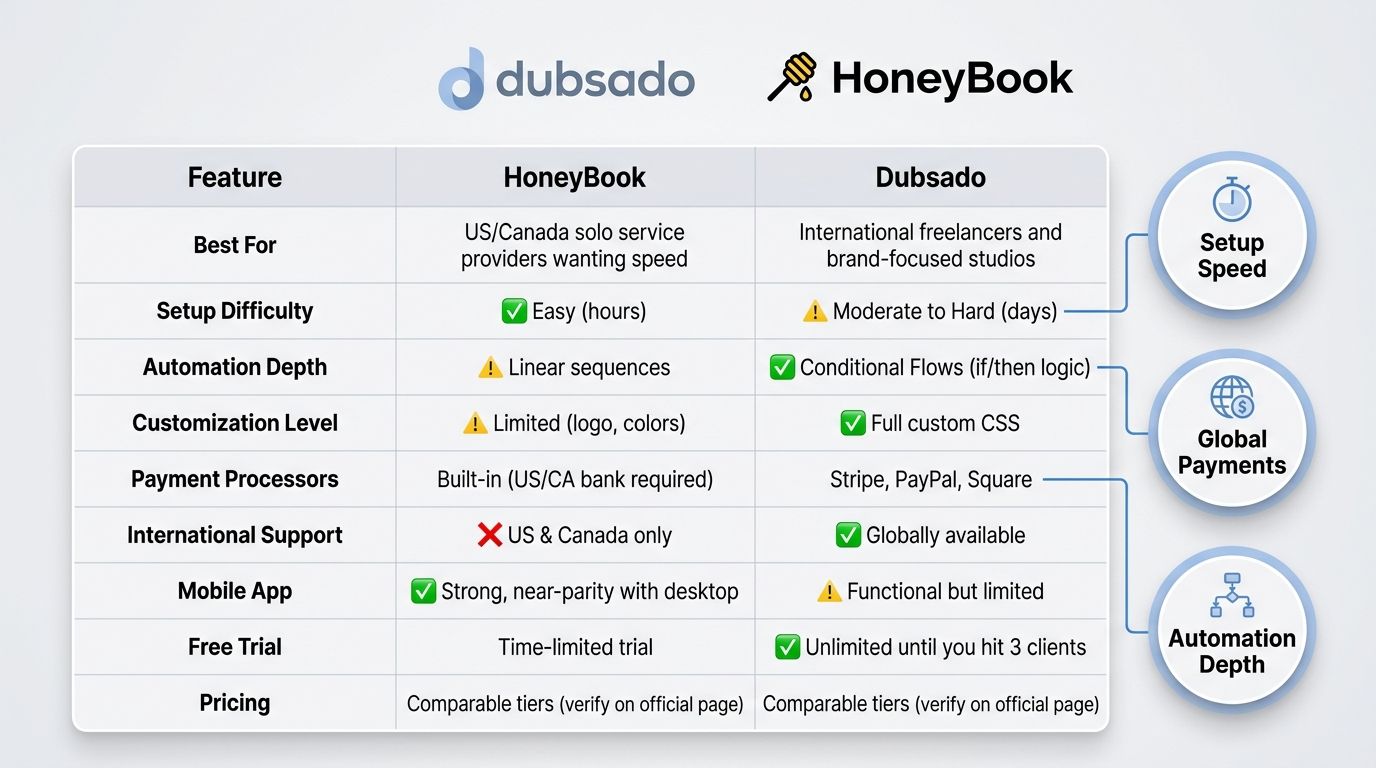
Which is better for your service business in 2026 — HoneyBook or Dubsado?
Quick answer: HoneyBook is the faster, simpler choice for US- and Canada-based service providers who want a polished all-in-one experience with minimal setup. Dubsado is the better fit for international freelancers and brand-conscious service providers who need advanced workflow automation and deep visual customization. Neither is universally "best" — the right pick depends on your location, your tolerance for setup complexity, and how much control you need over your client experience.
HoneyBook vs Dubsado in 2026: compare pricing, automation, branding, international payments, and which CRM fits your business type. Unbiased, up-to-date review with tables and a decision framework.
Key Takeaways
- HoneyBook currently requires a US- or Canada-based bank account for payment processing; Dubsado supports Stripe, PayPal, and Square globally.
- HoneyBook is significantly faster to set up; Dubsado's learning curve is steeper but rewards more complex workflows.
- Dubsado offers deeper workflow automation with conditional logic; HoneyBook's automations are more linear but easier to build.
- Both platforms include proposals, contracts, invoices, and client portals — but Dubsado allows more visual customization including custom CSS.
- HoneyBook's mobile app is stronger; Dubsado's mobile experience is limited.
- Pricing for both platforms is comparable — verify current rates on each platform's official pricing page before deciding.
- Your industry and business model matter: photographers, coaches, designers, and international freelancers each have a clear recommendation below.
HoneyBook vs Dubsado at a Glance
!Dubsado vs HoneyBook 2026 side-by-side comparison hero graphic showing key stats
Here's the reality: both platforms are excellent. But they're built for meaningfully different businesses. If you skim nothing else in this article, skim this table.
| Feature | HoneyBook | Dubsado |
|---|---|---|
| Best For | US/Canada solo service providers wanting speed | International freelancers and brand-focused studios |
| Setup Difficulty | ✅ Easy (hours) | ⚠️ Moderate to Hard (days) |
| Automation Depth | ⚠️ Linear sequences | ✅ Conditional Flows (if/then logic) |
| Customization Level | ⚠️ Limited (logo, colors) | ✅ Full custom CSS |
| Payment Processors | Built-in (US/CA bank required) | Stripe, PayPal, Square |
| International Support | ❌ US & Canada only | ✅ Globally available |
| Mobile App | ✅ Strong, near-parity with desktop | ⚠️ Functional but limited |
| Free Trial | Time-limited trial | ✅ Unlimited until you hit 3 clients |
| Pricing | Comparable tiers (verify on official page) | Comparable tiers (verify on official page) |
Pricing and feature availability verified from official platform pages in 2026. Confirm at the [HoneyBook pricing page](https://www.honeybook.com/pricing) and [Dubsado pricing page](https://www.dubsado.com/pricing) before purchasing.
⚠️ Heads up on pricing: Both platforms adjust their plans regularly. Every figure in this article was verified from official pricing pages in 2026, but always confirm current rates before you put in your card.
What Each Platform Actually Does
HoneyBook and Dubsado are all-in-one client management platforms built for service businesses — the kind where you send proposals, sign contracts, collect payments, and manage client communication. Both consolidate tools you'd otherwise stitch together (proposal software + contract signing + invoicing + scheduling + client portal) into a single subscription. Where they diverge is philosophy: HoneyBook optimizes for a quick, polished experience inside a North American ecosystem, while Dubsado optimizes for flexibility, brand control, and global usability.
💡 New to CRMs? If you're still figuring out whether you even need a CRM versus just a spreadsheet and Stripe, start with the basics before comparing platforms.
What HoneyBook Does
- All-in-one client management built for US- and Canada-based service businesses.
- Smart Files: proposals, contracts, and invoices bundled into a single client-facing document the client can read, sign, and pay in one flow.
- Built-in payment processing — but it requires a US or Canadian bank account. Verify current eligibility on the HoneyBook payment eligibility help article.
- Project pipeline, scheduling, contact management, and basic reporting.
- Strong mobile app that mirrors most desktop functionality.
What Dubsado Does
- All-in-one client management designed for deeper customization and global use.
- Separate (but fully customizable) proposals, contracts, invoices, questionnaires, and client portals — you assemble them into the flow you want.
- Supports Stripe, PayPal, and Square as payment processors, available in significantly more countries than HoneyBook.
- Flows: advanced conditional workflow automation with multi-step logic.
- Custom CSS branding for a near-white-label client experience.
- Dubsado 3.0 added a Kanban-style project board and time tracking — verify plan-level availability before relying on these features.
Setup & Ease of Use: Which Is Faster to Launch?
If speed-to-launch is your top priority, HoneyBook wins easily. Most users can build a service package, customize a Smart File template, and send their first proposal within a few hours of signing up. Dubsado typically takes days to a week of focused configuration before it's running on autopilot — the trade-off for its deeper customization is upfront setup time.
📝 Realistic setup time expectations: A solo photographer can usually have HoneyBook usable the same afternoon they sign up. The same photographer moving to Dubsado should block out a weekend (or hire help) to build out templates, canned emails, packages, and at least one Flow before going live.
HoneyBook: Quick-Start Experience
- Guided onboarding wizard walks you through the initial setup.
- Smart File templates are ready to customize immediately — drop in your logo, edit a few fields, send.
- Most users send their first proposal within a few hours of signing up.
- Trade-off: less granular control over how each document looks and behaves.
- Mobile app mirrors desktop functionality, so you can set up and run the business from your phone.
Dubsado: Powerful but Patience Required
- No guided onboarding wizard by default — setup is manual and modular.
- You build form templates, canned emails, packages, and Flows separately before they connect into a working system.
- Steeper learning curve, but once configured, workflows run on autopilot.
- A large community of Dubsado-certified specialists offers paid setup services if you'd rather not DIY it.
- Plan for at least several days of focused setup before going live.
Features Compared: Proposals, Contracts, Invoices & Client Portals
Both platforms cover the same core territory. The difference is in how the pieces fit together and how much control you have over each piece.
!Feature-by-feature comparison infographic of Dubsado vs HoneyBook 2026 showing proposals, contracts, invoices, and client portals
| Feature Area | HoneyBook | Dubsado | Edge Goes To |
|---|---|---|---|
| Proposals | ✅ Smart Files (bundled) | ✅ Standalone, customizable | Tie — depends on workflow |
| Contracts | ✅ E-signature, templates | ✅ E-signature, more flexible | Dubsado |
| Invoices | ✅ Built-in payments | ✅ Flexible payment schedules | Tie |
| Questionnaires | ✅ Basic | ✅ Advanced with conditional fields | Dubsado |
| Client Portal | ✅ Clean, limited branding | ✅ Fully brandable with CSS | Dubsado |
| Scheduling/Booking | ✅ Native scheduler | ⚠️ Native scheduler, less polished | HoneyBook |
| Mobile App | ✅ Strong | ⚠️ Limited | HoneyBook |
| Project Management | ⚠️ Pipeline view | ✅ Pipeline + Kanban (3.0) | Dubsado |
| Reporting/Analytics | ⚠️ Basic dashboards | ⚠️ Basic dashboards | Tie |
| White-label Branding | ⚠️ Logo + colors only | ✅ Full custom CSS | Dubsado |
| Custom CSS | ❌ Not available | ✅ Available | Dubsado |
Smart Files vs Separate Documents: A Key UX Difference
- HoneyBook bundles proposals, contracts, and invoices into one Smart File — the client reads, signs, and pays in a single uninterrupted flow.
- Dubsado keeps these as separate but sequentially triggered documents — more pieces to configure, but more flexible for complex service structures.
- Smart Files feel more polished out of the box; Dubsado's modular approach lets you mix and match for unusual workflows (think tiered packages, conditional add-ons, multi-phase projects).
- Both support e-signatures recognized in the US. For jurisdiction-specific legal questions, talk to a lawyer in your region.
Client Portal Experience
!Side-by-side comparison of HoneyBook and Dubsado client portal experiences showing branding differences
- HoneyBook: clean, consistent client portal with project timeline, documents, and messaging. Branding customization is limited to logo and color accents.
- Dubsado: fully brandable client portal — custom colors, fonts, logo placement, and CSS control mean the portal can feel like an extension of your website.
- Both support in-platform client communication.
- For brand-conscious designers and high-end studios, Dubsado's portal wins on premium feel. For most other businesses, HoneyBook's default polish is more than enough.
Automation & Workflows: Which Platform Runs Smarter?
Automation is the biggest functional gap between these two tools. Both can automate, but they automate at different depths.
Choose Dubsado for automation if: - You offer 3+ distinct service packages with different contracts or pricing. - Your onboarding includes conditional steps (different questionnaires for different services, for example). - You want full lifecycle automation from lead inquiry through offboarding. - You're willing to invest setup time for hands-off operation later.
Choose HoneyBook for automation if: - Your workflow is mostly linear (inquiry → proposal → contract → invoice → done). - You want to set up automations in an hour, not a weekend. - You don't need if/then branching. - You'd rather have something working today than perfect next week.
!Dubsado Flows workflow builder showing a multi-step conditional automation for client onboarding
📝 Real workflow example: Imagine a coach with three packages — Single Session, 3-Month Coaching, and Corporate Workshop. In Dubsado, one Flow handles all three: when a lead picks Corporate Workshop, the Flow sends a tailored proposal, the corporate contract, an invoice with NET 30 terms, and a different onboarding questionnaire. In HoneyBook, you'd build three separate workflows or manually pick the right templates each time. For a session-based coach with one package, HoneyBook's linear automation is plenty — and faster to set up.
HoneyBook Automations: Linear and Beginner-Friendly
- Trigger on pipeline stage changes or specific actions (file signed, payment received).
- No conditional branching — automations run in a fixed sequence.
- Easy to build in under an hour.
- HoneyBook has expanded automation triggers and added AI-assisted features — verify current capabilities on the official product page.
Dubsado Flows: Conditional Logic for Complex Workflows
- Flows support if/then conditional logic — if the client picks Package A, send the Package A contract; if Package B, send a different one.
- Multi-step Flows can run an entire client lifecycle from inquiry to offboarding with no manual intervention.
- Steeper to build, but once live, can dramatically cut admin time.
- Time delays, conditional email triggers, and multi-branch logic are all available.
- Recommended if you offer more than 2–3 distinct service types.
Integrations: Does It Work With Your Existing Stack?
If you already run your business on QuickBooks, Google Calendar, and Zoom, your CRM needs to play nicely with them. Here's how both stack up.
| Tool / App | HoneyBook | Dubsado |
|---|---|---|
| QuickBooks | Native (verify on official page) | Via Zapier |
| Xero | Via Zapier | Via Zapier |
| Google Calendar | ✅ Native | ✅ Native |
| Zoom | ✅ Native | ✅ Native |
| Stripe | Built-in payments | ✅ Native |
| PayPal | Via Zapier | ✅ Native |
| Square | Via Zapier | ✅ Native |
| Zapier | ✅ Supported | ✅ Supported |
| Calendly | Via Zapier | Via Zapier |
Verify current integration status on HoneyBook's Zapier integration page and Dubsado's Zapier integration page.
💡 QuickBooks users: read this. QuickBooks integration details differ between the two platforms and can change. If accounting sync is a dealbreaker, log into both free trials and test the actual connection before you commit — don't trust a comparison article (including this one) to be current six months from now.
Pricing Breakdown: What Does Each Platform Actually Cost?
Let's break down the actual costs. Pricing on both platforms shifts, so the table below is your starting point — verify before you buy.
!Dubsado vs HoneyBook 2026 pricing comparison infographic showing plan tiers and monthly vs annual costs
| Plan | HoneyBook (Monthly) | HoneyBook (Annual) | Dubsado (Monthly) | Dubsado (Annual) | Notable Inclusions |
|---|---|---|---|---|---|
| Starter / Entry | [verify] | [verify] | [verify] | [verify] | Core templates, limited automation |
| Mid Tier (Essentials / Premier) | [verify] | [verify] | — | — | Full automation, scheduler, reporting |
| Top Tier (Premium / Premier) | [verify] | [verify] | [verify] | [verify] | Multi-user, advanced features |
Prices verified from official sources in 2026. Confirm at the [HoneyBook pricing page](https://www.honeybook.com/pricing) and [Dubsado pricing page](https://www.dubsado.com/pricing) before purchasing.
💡 Free trial comparison: HoneyBook offers a time-limited free trial (check the current duration on HoneyBook's site). Dubsado offers an unlimited free trial — you can keep using it free until you've added 3 clients. That makes Dubsado's trial significantly more useful for actually evaluating the platform with real work before paying anything.
💡 Annual vs monthly savings: Both platforms offer meaningful discounts for annual billing — typically around 20–30%. If you're confident in your choice after testing, annual billing pays for itself fast. Verify the current discount on each official pricing page.
Limitations & Dealbreakers: What Each Platform Can't Do
Here's where the decision usually gets made. Features sell you on a platform; limitations push you away.
Choose HoneyBook if: - You're based in the US or Canada. - You want minimal setup time. - Your workflow is linear and straightforward. - You manage clients heavily from your phone. - You value a unified Smart File experience for clients.
Choose Dubsado if: - You're based outside North America. - You offer multiple service types with conditional logic needs. - Brand customization matters to you. - You're willing to invest setup time for deeper automation. - You juggle many ongoing projects at once.
⚠️ International users: HoneyBook may not be an option. HoneyBook currently requires a US- or Canada-based bank account for payment processing. If you're based outside North America, verify current eligibility on the HoneyBook payment eligibility help article before you even start a trial. Dubsado's support for Stripe, PayPal, and Square makes it usable in significantly more countries — verify processor availability in your specific country.
HoneyBook's Key Limitations
- Payment processing currently restricted to US- and Canada-based bank accounts (verify current eligibility on HoneyBook's help center).
- Less customization — limited CSS control, fixed Smart File structure.
- Linear automations only — no conditional branching.
- No native time tracking.
- Reporting is more basic than dedicated accounting tools.
Dubsado's Key Limitations
- Steep learning curve — expect real setup time before going live.
- Mobile app is functional but notably weaker than HoneyBook's. If you run your business primarily from a phone, this matters.
- Time tracking availability varies by plan in Dubsado 3.0 — verify current plan-level access before relying on it.
- Project management features are basic beyond the new Kanban board.
- Fewer native integrations — Zapier fills gaps but adds cost and complexity.
Which CRM Fits Your Business Type?
If you want a one-line answer for your industry, here it is. Detailed reasoning below.
| Business Type | Recommended Platform | Primary Reason |
|---|---|---|
| Wedding Photographers | HoneyBook | Polished Smart File flow fits standard booking workflow |
| Web/Graphic Designers | Dubsado | Custom CSS supports brand-conscious client experience |
| Business Coaches & Consultants | Dubsado | Conditional Flows handle complex onboarding |
| Virtual Assistants & OBMs | Dubsado | Project structure + global payment support |
| Interior Designers | Dubsado | Multi-phase invoicing and brand customization |
| Copywriters & Content Creators | HoneyBook | Simple workflow, fast setup, US-based |
| International Freelancers | Dubsado | HoneyBook payment geography restriction |
Wedding & Event Photographers
- Both platforms handle the core flow: inquiry → proposal → contract → invoice → questionnaire → gallery delivery.
- HoneyBook's Smart Files feel polished to clients and fit a standard one-package wedding booking perfectly.
- Dubsado wins for photographers with multiple packages, complex add-on structures (engagement sessions, second shooters, album upgrades), or who want automated questionnaires and reminders across a 9–12 month client timeline.
- Verdict: HoneyBook for simplicity; Dubsado for multi-package studios.
Web Designers & Graphic Designers
- Brand presentation matters to designers more than almost any other category — Dubsado's custom CSS and portal customization let you deliver a white-label client experience.
- Project-based work with phased payments benefits from Dubsado's flexible invoice scheduling.
- HoneyBook works fine for designers with 1–2 straightforward packages who prioritize speed over brand control.
- Verdict: Dubsado for brand-conscious designers; HoneyBook for designers who'd rather ship work than tweak their CRM.
Business Coaches & Consultants
- Coaches usually run discovery calls, structured onboarding sequences, and recurring retainers — Dubsado's conditional Flows handle multi-step onboarding cleanly.
- For group programs or subscription pricing, verify recurring billing on each platform. Neither is purpose-built for subscription commerce.
- HoneyBook's scheduler is useful for coaches whose first client touchpoint is booking a call.
- Verdict: Dubsado for coaches with complex onboarding; HoneyBook for session-based coaches who want simplicity.
Virtual Assistants (VAs) & Online Business Managers (OBMs)
- VAs and OBMs juggle many clients at once — Dubsado's project-based structure and Kanban board (from 3.0) fit this model.
- Both platforms handle retainer contracts and recurring invoices, but verify current capabilities for your specific billing model.
- International VAs: Dubsado is the clear choice because of HoneyBook's payment geography restriction.
- Verdict: Dubsado for most VAs and OBMs.
International Freelancers (Outside North America)
- HoneyBook currently requires a US- or Canada-based bank account for payment processing — confirm current eligibility before considering it.
- Dubsado supports Stripe, PayPal, and Square, available in a wider range of countries.
- Verdict: Dubsado is the default recommendation for freelancers outside North America. Verify processor availability in your country.
What's New in 2026: Recent Updates to Both Platforms
Both platforms have shipped meaningful updates recently. Dubsado's 3.0 release brought a Kanban project board and time tracking. HoneyBook has expanded automation triggers and added AI-assisted features. Verify the specifics below against official changelogs at time of decision.
⚠️ Always verify before you cite. Platform feature lists change. Confirm any 3.0 feature on Dubsado's official 3.0 announcement and HoneyBook updates on the HoneyBook automations resource before betting your workflow on them.
Dubsado: What Changed in the 3.0 Update
- Redesigned interface with a Kanban-style project board — useful for VAs, OBMs, and anyone managing many simultaneous projects.
- Time tracking reported at the Premier plan level — verify current plan requirements.
- Additional UI, mobile, and reporting refinements — confirm via Dubsado's official help center.
HoneyBook: Automations and AI Features
- Expanded automation triggers and AI-assisted features for drafting client messages and summarizing inquiries — verify current capabilities on HoneyBook's product page.
- Check the Rising Tide blog and release notes for the most current additions.
- Confirm whether AI features are bundled in all plans or limited to higher tiers.
How to Test Both Platforms Before You Commit
Don't pick based on this article alone. Run both through a real workflow. Here's how:
Your CRM Trial Checklist:
- Sign up for HoneyBook's free trial (verify current duration on HoneyBook's site).
- Sign up for Dubsado's free trial — unlimited until you hit 3 clients.
- Build your most-used service package in each platform.
- Create a sample proposal, contract, and invoice in each tool.
- Test a basic automation or workflow in each platform.
- Send a test client (yourself, a friend, or a mock account) through the entire booking flow and note the client-side experience.
- Test the mobile app on your primary device.
- Verify that your required integrations (QuickBooks, Google Calendar, etc.) connect correctly.
💡 Use real (or test) client scenarios. Clicking around the dashboard tells you nothing. Build and send a real (or mock) client workflow end to end. Dubsado's 3-client free tier is genuinely useful here — you can onboard a real client before paying a cent.
The Final Verdict: Which CRM Should You Choose?
!Decision flowchart helping service business owners choose between HoneyBook and Dubsado based on location, workflow, and branding needs
Here's the straight answer: if you're a US- or Canada-based service provider with a relatively simple workflow and you want to be running this week, pick HoneyBook. If you're international, offer multiple service types, care deeply about brand presentation, or need conditional automation logic, pick Dubsado. Both platforms are excellent — they're just optimized for different businesses.
Choose HoneyBook If…
- You're based in the US or Canada (verify current payment eligibility).
- You want to be up and running quickly with minimal setup.
- Your workflow is relatively straightforward (1–3 service types, linear booking flow).
- You rely heavily on mobile access to manage clients.
- You value a polished, unified Smart File experience for clients.
Choose Dubsado If…
- You're based outside North America (or want global payment processor flexibility).
- You offer multiple service types, packages, or complex onboarding sequences.
- Brand experience matters — you want a fully white-labeled client portal.
- You're willing to invest setup time in exchange for near-full automation once live.
- You manage multiple ongoing client projects simultaneously.
Neither Feels Right?
- Consider alternatives like 17Hats, Bonsai, or Practice (for coaches) if both platforms feel like overkill or underpowered for your needs.
- If you've already chosen Dubsado but are stuck on setup, hiring a Dubsado-certified specialist can save weeks of trial and error.
- If you're still earlier in your evaluation, comparing more than two options side by side will help you avoid buyer's remorse.
💡 Still not sure? Both platforms offer trials. Run the checklist in the section above with real client scenarios before spending anything. Two weeks of structured testing beats two years of regret on the wrong platform.
Frequently Asked Questions
Is Dubsado or HoneyBook better for international users?
Dubsado is the better choice for users outside North America. HoneyBook currently requires a US- or Canada-based bank account for payment processing — confirm current eligibility on the HoneyBook payment eligibility help article. Dubsado supports Stripe, PayPal, and Square, which are available in significantly more countries.
How much does HoneyBook cost compared to Dubsado in 2026?
Both platforms offer comparable pricing across their tiers, with meaningful discounts for annual billing. Because pricing changes regularly, verify current rates directly on the HoneyBook pricing page and Dubsado pricing page before making a decision. Annual billing typically offers savings of approximately 20–30% on both platforms.
Which is easier to set up — HoneyBook or Dubsado?
HoneyBook is significantly faster to set up, with a guided onboarding wizard and Smart File templates ready to customize immediately. Most users can send their first proposal within a few hours. Dubsado has a steeper learning curve and requires building out templates, emails, and Flows manually before the system runs automatically — plan for several days of dedicated setup time.
Which has better automation — HoneyBook or Dubsado?
Dubsado offers more powerful automation through its Flows feature, which supports conditional if/then logic for complex, multi-step workflows. HoneyBook's automations are linear — they follow a set sequence without branching — making them easier to build but limiting for businesses with multiple conditional paths. Choose Dubsado for complex workflows; HoneyBook for straightforward ones.
Does Dubsado have time tracking?
Dubsado 3.0 introduced a time tracking feature, reportedly at the Premier plan level. Verify current availability and plan requirements via Dubsado's official documentation before relying on it in your decision.
Can I white-label HoneyBook or Dubsado for my clients?
Dubsado offers significantly more branding control, including custom CSS for forms and client portals, custom colors, fonts, and logo placement — enabling a near-white-label client experience. HoneyBook allows logo and color customization but has more limited options for fully removing HoneyBook branding from the client experience.
Do HoneyBook and Dubsado have mobile apps?
Yes, both platforms have mobile apps. HoneyBook's mobile app is widely considered stronger — it mirrors the desktop experience well and is suitable for managing clients on the go. Dubsado's mobile app is more limited in functionality compared to its desktop version and is not recommended as a primary interface.
Can HoneyBook or Dubsado handle subscription or retainer billing?
Both platforms offer recurring invoice functionality, but neither is purpose-built for subscription commerce. Verify current recurring billing capabilities for your specific use case on each platform's official feature documentation, as this area has evolved with recent updates.
Is HoneyBook good for small businesses and freelancers?
Yes — HoneyBook is particularly well-suited to small service businesses and solo freelancers in the US and Canada who want a fast, polished all-in-one platform without significant setup investment. It handles the core client workflow (inquiry, proposal, contract, invoice, payment) with minimal configuration.
Which CRM is best for wedding photographers?
Both platforms handle the core photography workflow well. HoneyBook is a strong choice for photographers with a simple, standard booking flow who want fast setup. Dubsado is preferred by photographers with multiple packages, complex add-on structures, or who want deeper automation across a long client timeline from booking to gallery delivery.
Sources
- HoneyBook Official Pricing Page
- Dubsado Official Pricing Page
- HoneyBook Payment Eligibility — HoneyBook Help Center
- Dubsado Payment Processors — Dubsado Help Center
- HoneyBook vs Dubsado Comparison — G2
- HoneyBook vs Dubsado — Capterra
- Dubsado Integrations — Zapier
- HoneyBook Integrations — Zapier
- Dubsado 3.0 Release Notes — Dubsado Blog
- HoneyBook Automations Overview — HoneyBook Rising Tide Blog