What is the best way for a photographer to deliver photos to clients in 2026?
Quick answer: The most professional way to deliver photos to clients is through a dedicated client gallery platform — such as Pixieset, Pic-Time, or ShootProof — that provides password-protected access, download controls, watermarking, and print ordering in one branded experience. For photographers who prefer flexibility, cloud services like Google Drive or WeTransfer work as a secondary option, though they lack client-facing branding and proofing tools. A repeatable workflow that covers exporting, naming, uploading, and following up is what separates hobbyists from professionals.
Learn how to deliver photos to clients professionally — step-by-step workflow, top gallery platforms compared, file size specs, and a free delivery checklist.
Key Takeaways
- Use a dedicated client gallery platform for branded, secure, and professional photo delivery.
- Export final images as sRGB JPG in both full-resolution and web-optimized sizes.
- Name files consistently — for example,
ClientName_EventDate_001.jpg— before uploading. - Send a branded delivery email with the gallery link, password, and expiration date.
- Follow up within 2–4 weeks to prompt print purchases and album orders.
- Back up all delivered files using the 3-2-1 rule before deleting from your local drive.
- Choose your gallery platform by use-case: weddings, volume sports, and free-tier needs all pull in different directions.
What Is Client Photo Delivery and Why Does It Matter?
Here's the reality: your delivery experience is what your client remembers. They forget the tripod adjustments, the light stand you knocked over, and the reshoot on frame 47. What sticks is the moment they open the link and see their photos for the first time.
Client photo delivery is the structured process of transferring finished images from your workflow to your client — including how they view, download, share, and buy prints. It sounds simple. It isn't. Done well, delivery drives referrals, prints sales, and repeat bookings. Done poorly, it makes an otherwise excellent shoot feel amateur.
A photography client gallery is a private, password-protected web page where you upload finished photos for a client to preview, favorite, download, and order prints from. Clients get a branded viewing experience and controlled access; photographers control expiration dates, download permissions, watermarks, and pricing on any print products offered.
💡 First Impressions Count > The gallery is often the last — and most memorable — touchpoint your client has with your brand before they show the photos to friends and family. A clunky delivery undermines an otherwise beautiful shoot. Every referral your client sends will be filtered through how they felt opening that link.
The Difference Between Sharing and Delivering
Sharing photos is what you do with your family on WhatsApp. Delivering photos is what you do as a business.
- Sharing is informal: a Google Drive folder from your personal account, a WeTransfer link that expires without warning, a text with 40 attachments. No branding, no controls, no expectations set.
- Delivering is structured: a branded gallery URL, a password, a clear expiration date, download permissions matched to the client's package, and a follow-up plan.
- Professional delivery communicates value before the client even downloads anything. It tells them you run a business, not a hobby.
- The method you choose directly affects perceived value. A
iloveweddings.zipfile in someone's inbox will never feel like a $4,000 wedding package — no matter how good the photos are.
Common Delivery Methods at a Glance
Most working photographers use two or three of these depending on the client and package:
- Dedicated client gallery platforms — Pixieset, Pic-Time, ShootProof, CloudSpot, Lightfolio, SmugMug. Purpose-built for photographer workflows.
- Cloud storage services — Google Drive, Dropbox, iCloud. Functional but unbranded and lacking proofing.
- File transfer tools — WeTransfer, Smash, Send Anywhere. Fine for one-off deliveries; useless for building repeat business.
- Physical media — USB drives, custom packaging, and printed keepsakes. Niche but valued in premium wedding packages.
- Printed products — albums, framed prints, canvas wraps, folio boxes. Rarely a delivery method alone, but a powerful add-on.
Depth on each of these follows in the process and comparison sections below.
Step-by-Step: How to Deliver Photos to Clients
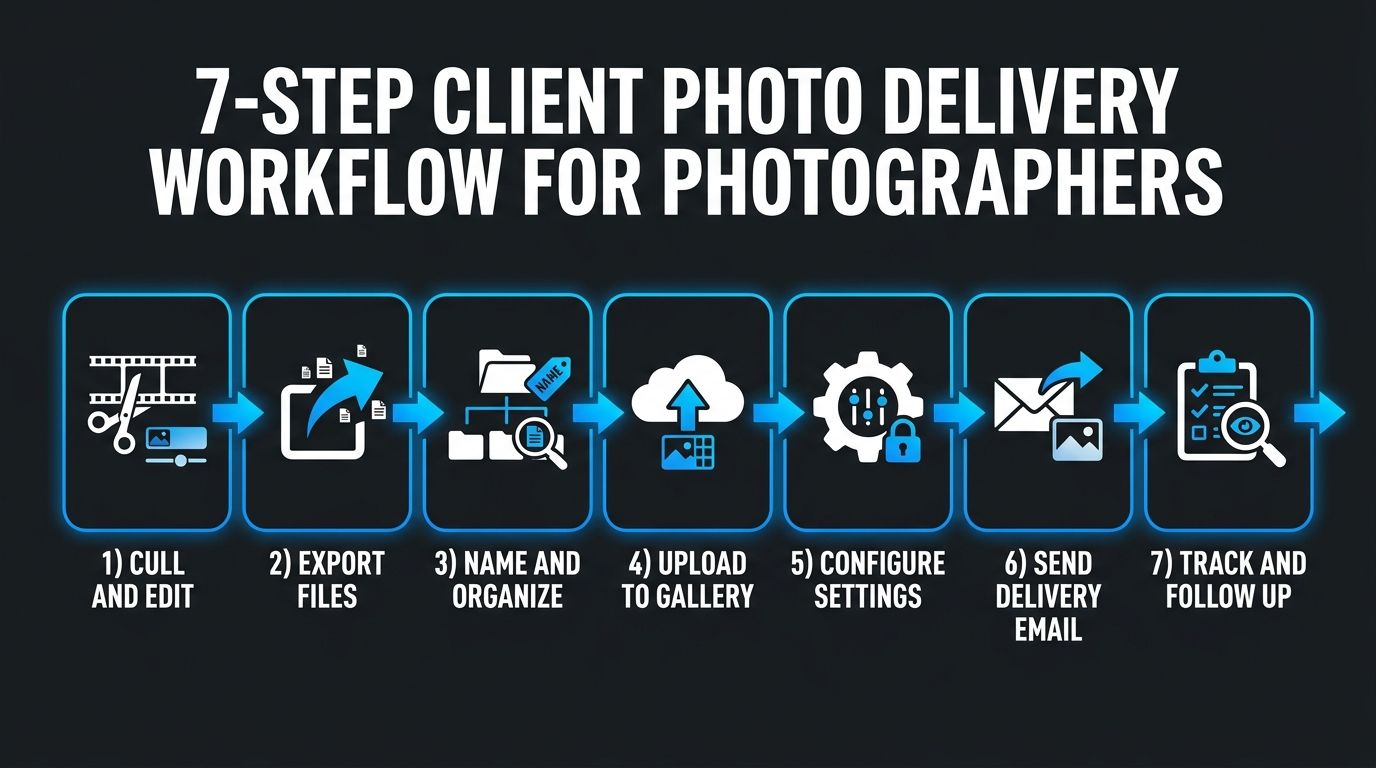
!Infographic showing a photographer's 7-step client photo delivery workflow from culling to follow-up
Here's the 7-step workflow I use for every paid client, wedding or portrait:
- Cull and edit your final selection.
- Export with proper file settings.
- Name and organize files.
- Upload to a client gallery platform.
- Configure proofing, watermarks, and downloads.
- Send a branded delivery email.
- Track downloads and follow up.
Each step is short. But skipping any of them creates the small cracks clients notice.
Step 1: Cull and Edit Your Final Selection
Culling is where you decide which frames make the cut. Editing is where you finish them.
- Use Photo Mechanic or an AI culler (Aftershoot, Narrative Select) to move through thousands of frames fast. This alone can save 4–6 hours on a wedding day.
- Edit in Lightroom Classic or Capture One so your color grading stays consistent across the full gallery. A gallery that jumps between warm and cool tones from image to image looks unfinished.
- Set your minimum image count in the contract before the shoot. "I'll deliver what looks good" is not a deliverable — it's a dispute waiting to happen.
- If your editing workflow needs work, that's a separate rabbit hole — but it's the foundation everything else sits on.
Step 2: Export with Proper File Settings
Get this right once and set it as a Lightroom export preset. You'll never think about it again.
- Export as sRGB JPG for all digital deliveries. Every screen and consumer print lab is optimized for sRGB.
- Deliver two sizes: full-resolution (native camera resolution or long edge 5000px+) for printing, and web-optimized (long edge ~2048px, 72–150 DPI) for social sharing.
- Set JPG quality between 80–90%. Above 95% you get diminishing returns at much larger file sizes. Your clients cannot see the difference. Their inbox and their gallery storage limits can.
- Don't deliver RAW files by default. RAWs need editing software to view, expose your unedited originals, and are almost always excluded by contract. Only deliver RAW when a commercial contract specifically licenses them and the fee reflects that.
- Full breakdown by delivery tier is in the file specs section below.
Step 3: Name and Organize Files
!Photographer sitting at a desk uploading edited photos to a client gallery on a laptop
- Rename files during export using Lightroom's file naming dialog, or batch rename in Bridge/Finder before upload.
- Organize using subfolders where the platform supports them:
Getting-Ready,Ceremony,Receptionfor weddings;Family,Individuals,Detailsfor portraits. - Avoid
IMG_4521.jpg. It looks unprofessional, and clients merging download folders end up with filename collisions and lost images.
📝 Naming Convention Template > Use this format:ClientLastName_EventDate_SequenceNumber.jpg> Example:Johnson_20260614_001.jpg> Consistency across galleries means clients can drag files between folders without ever getting a duplicate warning. When they email you two years later asking for "that one from the ceremony," you can find it in seconds.
Step 4: Upload to a Client Gallery Platform
- Pick a platform matched to your niche and package tier (see the comparison table in the next section).
- Always turn on password protection. Not sometimes. Always. Even for family portrait clients.
- Set gallery expiration between 30 and 90 days, with the option to extend for a fee. This encourages clients to actually download their files rather than assuming the link is permanent.
- Match download permissions to the package: watermarked previews only for proofing, full-resolution downloads unlocked after final payment or on delivery day.
Step 5: Configure Proofing, Watermarks, and Downloads
- Turn on favorites or selection tools so clients can mark hero images for albums, reprints, and social shares. This makes album design faster and creates a natural upsell moment.
- Use light, tasteful watermarks on proof galleries before final payment. Not big semi-transparent logos across the subject's face. A small mark in the corner is enough to deter casual screenshot theft while keeping the image reviewable.
- Set download permissions by collection where possible — clients get web-size downloads on all images, full-resolution only on their contract-included count.
- Watermarking is a deterrent, not legal protection. In the U.S., copyright attaches automatically at the moment of creation, but registering with the U.S. Copyright Office before publication gives you access to statutory damages if someone infringes.
Step 6: Send a Branded Delivery Email
!Mockup of a branded photographer client delivery email with gallery link, password, and download instructions
Your delivery email is a marketing asset. Treat it like one.
- Include: gallery URL, password, expiration date, and short download instructions.
- Add a personal note. "Loved photographing your day, especially the moment during the vows when your dad started laughing" beats "Here are your photos" every time.
- Mention available print products or album design services as a soft mention — not a hard pitch. One line. Two at most.
- Set an auto-reminder in your CRM to resend the link one week before expiration. Half the time, the first email got buried.
⏱ Turnaround Time Benchmarks > Industry ranges from ShootDotEdit's turnaround survey data and PPA guidance: > - Wedding photography: 4–8 weeks > - Portrait sessions: 1–2 weeks > - Events: 3–5 business days > > These are typical ranges, not contractual standards. Whatever number you commit to, put it in your contract before the shoot.
Step 7: Track Downloads and Follow Up
- Use built-in gallery analytics to confirm your client accessed and downloaded their files. Most paid platforms show download activity by image and by visitor.
- Follow up 2–4 weeks after delivery to ask about print interest or album design. This is where hybrid delivery revenue comes from.
- Before gallery expiration, send one final notice. Do not delete originals after — move them to your archive per the 3-2-1 backup rule below. Disputes can surface months later.
- Log the delivery date in your CRM (Honeybook, Dubsado, Studio Ninja, whatever you use). Contract compliance is only meaningful if you can prove it.
Best Client Gallery Platforms Compared
Every "best gallery platform" article online is written by someone with an affiliate deal. I'll tell you what actually matters: the right platform for you depends on what you shoot and how you sell.
The table below is a use-case-first comparison. Pricing changes constantly, so I'm keeping the numbers directional — verify current plans on each platform's official pricing page before you commit.
!Comparison chart of top photography client gallery platforms including Pixieset, Pic-Time, ShootProof, Lightfolio, CloudSpot, and SmugMug
Client Gallery Platform Comparison (2026)
| Platform | Free Tier | Paid Plans (from) | Storage | Print Sales | Proofing / Favorites | Watermarking | Best For |
|---|---|---|---|---|---|---|---|
| [Pixieset](https://pixieset.com/pricing/) | Yes (verify current limits) | Paid plans available — see official page | Tiered | Yes | Yes | Yes | Weddings & branding |
| [Pic-Time](https://www.pictime.com/features) | Trial — verify | Paid plans available — see official page | Tiered | Yes (automation-focused) | Yes | Yes | Print sales & automation |
| [ShootProof](https://www.shootproof.com/pricing) | Free tier — verify current limits | Paid plans available — see official page | Tiered | Yes | Yes | Yes | Volume, sports, events |
| Lightfolio | Trial — verify | See official page | Tiered | Yes | Yes | Yes | Budget-friendly wedding/portrait |
| [CloudSpot](https://www.cloudspotapp.com/pricing) | Free tier — verify | See official page | Tiered | Yes | Yes | Yes | Modern UX & sales tools |
| SmugMug | Trial | See official page | Unlimited on paid tiers | Yes | Yes | Yes | Portfolio + gallery combined |
⚠️ Pricing Changes Frequently > SaaS pricing tiers, free-tier storage limits, and print commission structures change several times a year. Always verify current plans directly on each platform's official pricing page before committing to a subscription or migrating your data.
💡 Non-Gallery Alternatives > If you're not ready for a paid platform, Google Drive, Dropbox, and WeTransfer all work. They're just missing the branding, proofing, and print-sales layers. Fine for a one-off portrait session; painful for a full wedding season.
Which Platform Is Right for Your Niche?
- Wedding and portrait photographers: prioritize branding, album design integration, and print sales. Pic-Time and Pixieset dominate this category.
- Volume and sports photographers: you need bulk upload speed, subject-based organization (per-athlete or per-team), and lab-fulfillment at scale. ShootProof is frequently cited for this workflow.
- Photographers on a tight budget: evaluate free-tier limits carefully, and — more importantly — check whether the platform lets you grow into a paid plan without migrating gallery data or losing existing client links.
- Commercial and editorial photographers: you may not need a full gallery experience. FTP delivery, direct download links, or a simple Dropbox with a signed usage license may serve you better than a $30/month gallery subscription.
Recommended File Sizes and Formats for Client Delivery
!Infographic showing recommended export settings for client photo delivery by tier: web, standard digital, and full print resolution
Deliver two file sizes for every client: a full-resolution version for printing, and a web-optimized version for sharing online. Export as sRGB JPG unless a commercial contract specifically calls for something else.
Recommended Export Settings by Delivery Tier
| Delivery Tier | Long Edge | DPI | Color Space | Format | Typical File Size | Use Case |
|---|---|---|---|---|---|---|
| Web / Social Preview | ~2048 px | 72 | sRGB | JPG | ~1–3 MB | Online viewing, social sharing |
| Standard Digital Delivery | ~3600 px | 150 | sRGB | JPG | ~4–8 MB | Digital albums, large-screen viewing |
| Full Print Resolution | Native camera resolution | 300 | sRGB | JPG or TIFF | ~15–40 MB | Lab printing up to 20×30 in and beyond |
Professional print labs like Bay Photo publish exact file requirements per product — verify against your lab's spec page before delivering print-tier files.
📸 Should You Deliver RAW Files? > No, in almost all cases. RAW files require editing software to view, expose your unedited work, and are almost always excluded by contract. Only deliver RAW when a commercial license explicitly requires it and your fee reflects the additional rights. Delivering RAW by default is one of the fastest ways to devalue your service.
Color Space: Why sRGB Is the Safe Default
- sRGB is the standard for web browsers, social media, and every consumer print lab.
- Adobe RGB has a wider gamut, but on an uncalibrated screen — which is what your clients use — the colors look muted and lifeless.
- Convert to sRGB in Lightroom's Export dialog. Set it once as a preset. Forget about it.
How Many Photos Should You Deliver?
The number should be defined in the contract, not decided after the shoot. Common industry ranges:
- Wedding full-day coverage: 400–800 edited images
- Portrait sessions: 30–75 edited images
- Events: varies significantly by duration and pace
These are common ranges from working photographers — not rules. Whatever you commit to, put it in writing before the shoot. "You'll receive all the good ones" is not a delivered number.
Client Delivery Best Practices Every Photographer Should Follow
Here's what separates the working professionals from the hobbyists trying to charge pro rates:
- Password-protect every gallery, by default.
- Watermark proof galleries, never final deliverables.
- Back up using the 3-2-1 rule before deleting anything.
- Set expiration dates and communicate them clearly.
- Track delivery status in a CRM or project tool.
- Follow up within 2–4 weeks for print and album interest.
- Register copyrights for portfolio-critical work.
💾 The 3-2-1 Backup Rule > Keep 3 copies of every delivered file, on 2 different media types, with 1 copy offsite (or in the cloud). This is the industry-standard backup approach, and it applies before and after delivery. Never delete originals from your working drive until at least two backups are confirmed. Not because drives will fail catastrophically — because drives eventually just do fail, and clients ask for reprints two years later.
©️ Copyright Is Automatic — Registration Is Strategic > In the U.S., copyright protection attaches to your images automatically at the moment of creation. But registering with the U.S. Copyright Office before infringement occurs unlocks statutory damages and attorney's fees in a lawsuit. Framing this as informational only — copyright law varies internationally, and for specific legal questions talk to an IP attorney.
Watermarking: When to Use It and When to Skip It
- Use watermarks on proof galleries before final payment or when clients are selecting favorites from a larger set.
- Remove watermarks from final delivered files. Watermarked finals feel amateur and cheapen your work.
- Keep the mark small, tasteful, positioned where it protects the image without covering the subject's face.
- No watermark is theft-proof. It's a deterrent, not a guarantee.
Setting a Gallery Expiration Policy
- Define expiration in the contract. Standard range is 30–90 days, extendable for a nominal fee.
- Send an automated reminder 7 days before expiration. Most platforms handle this.
- Make it explicit in your contract that you're not obligated to store client files indefinitely.
- After expiration, move originals to cold storage or an archive drive. Don't delete outright — disputes surface months later.
Communicating Professionally Around Delivery
- Set turnaround expectations at booking, not after the shoot. Overdeliver on timing by underpromising early.
- If delivery will be delayed, tell the client before the deadline. One message before the date is worth a thousand apologies after.
- Track every client's delivery status in a CRM. Honeybook, Dubsado, Studio Ninja, even a Notion board. Just track it. Nothing kills reputation faster than a client wondering where their photos went while you're mid-editing another job.
Print vs. Digital: Should You Offer a Hybrid Delivery Model?
Hybrid delivery — digital files plus tangible prints or albums — is almost always the better client experience for portrait and wedding work. Digital-only feels transactional. Print-only feels dated. Hybrid gives the client immediate access to share online and something physical that gets displayed, referenced, and shown to friends for years. For commercial and editorial work, digital-only remains the standard because prints aren't the deliverable.
!Side-by-side comparison of a framed print on a wall and a digital gallery viewed on a tablet, representing hybrid photo delivery
🖼 Hybrid Delivery in Practice > A wedding photographer delivers a digital gallery of 500 edited images through Pic-Time and includes a 10×10 lay-flat album plus 3 matted prints in the premium package. The gallery's built-in print store handles fulfillment automatically — the photographer never touches the shipping. Perceived value goes up. Revenue goes up. Post-processing workload stays the same.
Pros and Cons of Digital-Only Delivery
- Pros: low overhead, instant delivery, infinitely scalable, no shipping logistics, no lab errors to troubleshoot.
- Cons: clients rarely print on their own. Two years later they can't find the drive. Every photo lives on a phone that eventually breaks. Long-term satisfaction drops.
- Best for: commercial contracts, editorial assignments, sports and volume photography where print sales sit downstream through the platform's parent store rather than as a delivered product.
Adding Prints and Albums Without the Logistics Headache
- Pic-Time, ShootProof, and Pixieset Store all integrate directly with professional print labs. You set markup pricing, the platform handles ordering, payment processing, and shipping.
- Print products — albums, canvas wraps, framed prints, folio boxes — are high-margin. A $40 wholesale album can sell to your client for $600+ inside a wedding collection.
- Every framed print on a client's wall is quiet advertising. Their guests see your work, ask who took it, and you get referrals you didn't chase.
Client Photo Delivery Checklist
Copy this into your project management tool as a reusable template. Every client, every time.
Pre-Delivery Checklist
- Culled and finalized image selection per the contract's minimum image count.
- Edited all images with consistent color grading and exposure.
- Exported two file size tiers: full-resolution for print and web-optimized for sharing.
- Named files using a consistent convention (
ClientName_EventDate_SequenceNumber.jpg). - Verified 3-2-1 backup is in place before uploading.
- Uploaded images to the client gallery platform with correct privacy and download settings.
- Applied watermarks to proof images if applicable; removed watermarks from final deliverables.
- Set gallery expiration date and enabled client reminders.
- Prepared branded delivery email with gallery link, password, expiration date, and download instructions.
- Sent delivery email and logged the delivery date in CRM.
- Scheduled a follow-up reminder for 2–4 weeks post-delivery.
📋 Save This as a Template > Copy this checklist into Trello, Notion, Honeybook, or whatever tool runs your business. The point isn't to memorize it — it's to make sure every client, from your $500 mini-session to your $8,000 destination wedding, gets the same professional delivery experience without you having to remember what step comes next.
Frequently Asked Questions About Delivering Photos to Clients
What is the best way to deliver photos to clients?
A dedicated client gallery platform such as Pixieset, Pic-Time, or ShootProof is the best method for most working photographers — it provides branded delivery, password protection, download controls, and optional print sales in a single interface. For occasional or low-volume deliveries, cloud services like Google Drive or WeTransfer are acceptable alternatives but lack professional branding and proofing tools. The best specific method depends on your niche, client expectations, and package tier.
How long does it take to deliver wedding photos?
Industry practice for wedding photo delivery typically ranges from 4–8 weeks after the event date, depending on the photographer's workload, editing complexity, and time of year. Peak season (May–October in the U.S.) usually sits at the higher end of that range. Turnaround time should always be defined in the photography contract before the wedding date, not disclosed after the shoot. Ranges cited from ShootDotEdit's turnaround data and Professional Photographers of America industry guidance.
Should I deliver photos as JPG or RAW?
For almost all consumer, portrait, and wedding photography, deliver edited JPG files — not RAW. RAW files require editing software to view, expose unprocessed originals to the client, and are typically excluded by contract. Delivering RAW is generally reserved for commercial photography contracts that explicitly license the raw capture and price the service accordingly. Always specify file format in the client agreement to prevent misunderstandings later.
How long should a client gallery stay online?
A standard gallery expiration window is 30–90 days and should be stated clearly in the photography contract. This is enough time for most clients to download files while creating a natural urgency to actually do it. Paid extensions can be offered for clients who need longer access — a small fee ($25–$50) is typical. Send an automated reminder 7 days before the gallery closes.
What file size should I deliver to clients?
Deliver two sizes: a full-resolution file (native camera resolution or long edge 5000px+, sRGB JPG) for printing, and a web-optimized file (long edge ~2048px, sRGB JPG) for digital sharing and social media. For print orders through a lab, most professional labs require 300 DPI at the intended print size — refer to your lab's file requirements page (for example, Bay Photo Lab) for exact specs. The file specs table in this guide gives a full breakdown by delivery tier.
How do I stop clients from downloading or stealing my photos?
Use watermarked proof galleries before final delivery, enable password protection on every gallery, and set download permissions to off until payment or delivery is confirmed. No watermark or digital control is 100% theft-proof — copyright is your real legal backstop. In the U.S., copyright attaches automatically to your images at the moment of creation, and registering with the U.S. Copyright Office before publication unlocks statutory damages and attorney's fees if infringement occurs.
Is Pixieset the best client gallery platform?
Pixieset is one of the most widely used client gallery platforms globally and is particularly strong for wedding and portrait photographers who value branding and ease of use. That said, "best" depends on your niche and business model. Pic-Time is favored for print-sales automation, ShootProof is frequently chosen for volume and sports photography, and platforms like Lightfolio and CloudSpot offer competitive alternatives with different pricing and feature emphasis. Use the comparison table above to evaluate by the features that matter most to your workflow.
Do I need a client contract before delivering photos?
Yes — a signed contract should be in place before the shoot and, without exception, before final delivery. The contract should specify delivered image count, file format, turnaround time, gallery expiration, usage rights, and payment terms. Delivering photos without a written agreement exposes you to disputes over image counts, formats, licensing, and payment timing. If you don't have a contract yet, get one written before your next paid booking.
Sources
- Delivering Photography to Clients — Professional Photographers of America
- Pixieset Pricing — Official Pricing Page
- ShootProof Pricing — Official Pricing Page
- Pic-Time Gallery Features — Official Features Page
- CloudSpot Pricing — Official Pricing Page
- How Do I Protect My Copyrights? — U.S. Copyright Office
- File Requirements for Print — Bay Photo Lab
- Photography Turnaround Time Guide — ShootDotEdit
- Best Online Photo Storage Services — PetaPixel
- DPReview — Camera and Photography Authority