What is a photography model release form and when do photographers actually need one?
Quick answer: A photography model release form is a legal document in which a subject grants a photographer permission to use, publish, and license images of them for specified purposes — such as commercial advertising, editorial content, or portfolio display. Without a signed release, publishing identifiable images of people or private property for commercial purposes can expose photographers to right-of-publicity or invasion-of-privacy claims. The exact requirements vary by jurisdiction and intended use, so templates should be reviewed by a local attorney before use in high-value commercial projects.
Download a free photography model release form (PDF & DOCX). Learn which type you need, what clauses to include, and how to get it signed on-site.
Key Takeaways
- A model release form documents consent before images are published or licensed commercially.
- Five main types exist: standard photo, model, property, copyright, and minor release forms.
- Every release should include usage scope, compensation, duration, territory, and signature fields.
- Minors require a parent or legal guardian signature — no exceptions.
- E-signatures are legally enforceable in most jurisdictions under laws like the US ESIGN Act.
- Requirements differ significantly between editorial and commercial use cases.
- Templates are a starting point — have a local attorney review forms for high-stakes shoots.
What Is a Photography Model Release Form?
A photography model release form is a signed agreement between a photographer and an identifiable subject that grants the photographer permission to use, publish, and license images of that subject for the purposes stated in the document. The subject signs. The photographer keeps a copy. And the form becomes the primary evidence that consent was given if a dispute ever surfaces.
The legal backbone here is called the right of publicity — the right of every individual to control the commercial use of their name, image, and likeness. Cornell Law School's Legal Information Institute defines this as a state-level right in the US that lets individuals sue when their identity is used commercially without consent. A signed release is how you demonstrate consent was granted.
Here's the reality: you don't need a release to take a photo in most situations. You need one to use it commercially. That's the distinction that trips up most photographers starting out.
⚠️ Important Legal Note > The templates and guidance in this article are starting points, not legal advice. Jurisdiction, intended use (editorial vs. commercial), and subject type (minor vs. adult) all affect what a valid release must contain. As the Center for Engaged Learning advises, "work with your own institution's legal counsel" before relying on any template for high-stakes commercial work.
Editorial vs. Commercial Use: Why It Changes Everything
The single biggest question that determines whether you need a release is: how will the image be used?
- Editorial use — news reporting, documentary, books, journalism, education — generally requires less formal consent. The First Amendment and similar protections in other jurisdictions give wide latitude to publish images that document real events.
- Commercial use — advertising, product promotion, marketing materials, stock licensing — almost always requires a signed model release to avoid right-of-publicity claims.
PetaPixel's guidance on model releases and the American Society of Media Photographers both reinforce this split. Requirements can differ considerably by state and country, so avoid assuming a release is "never needed" just because you shot in a public space. If the image will sell a product, promote a service, or appear in paid advertising, assume you need one.
Who Needs to Sign?
- The identifiable subject whose likeness appears in the image.
- A parent or legal guardian when the subject is under 18.
- A property owner when a privately owned, identifiable location or object is the focal subject.
- Both parties — photographer and subject — should retain signed copies.
Types of Photo Release Forms
There are five main types of photo release forms photographers use:
- Standard Photo Release — general consent for events and group settings.
- Model Release — the detailed release used for commercial and portfolio shoots.
- Property Release — for privately owned locations, artworks, or branded items.
- Copyright Release — governs ownership of the image itself.
- Minor Release — required when the subject is under 18.
Which one you need depends on who or what is in the frame and how the image will be used.
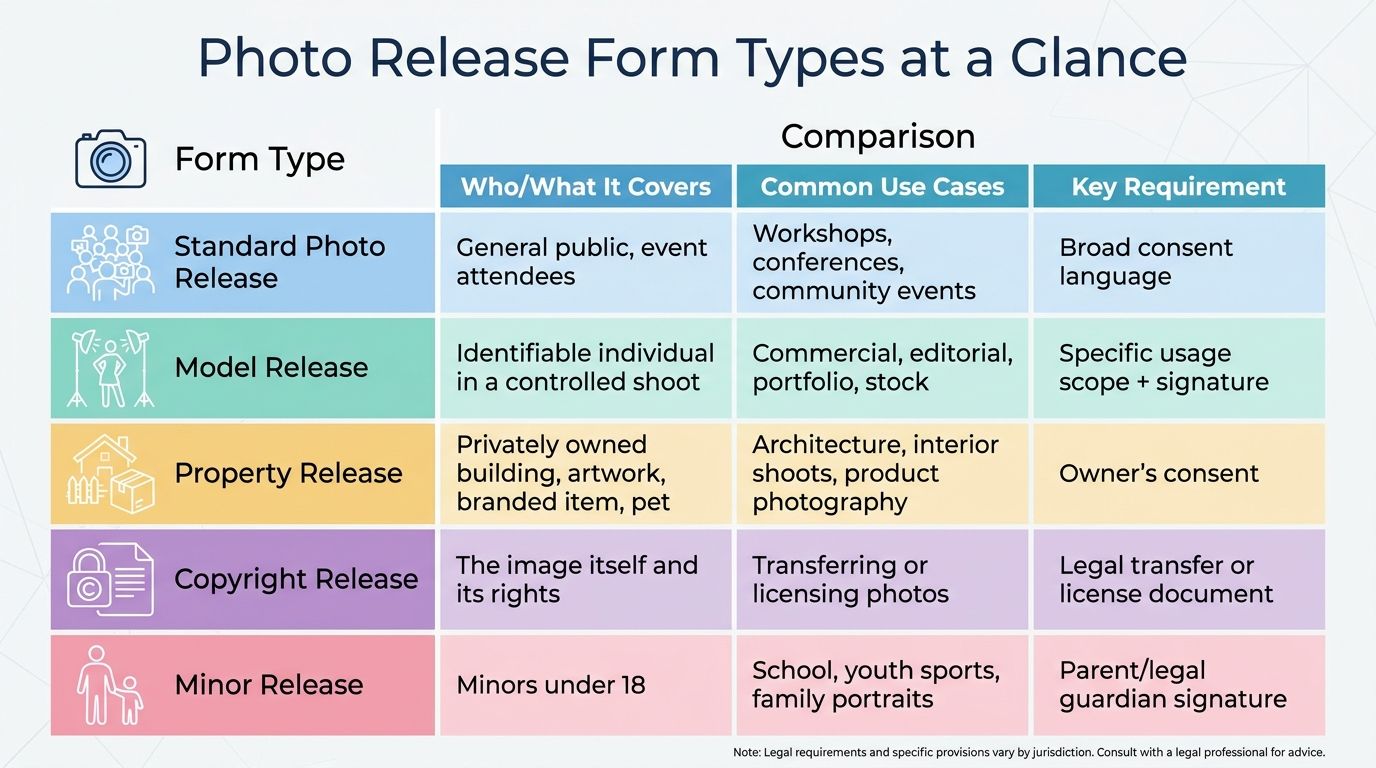
Photo Release Form Types at a Glance
| Form Type | Who/What It Covers | Common Use Cases | Key Requirement |
|---|---|---|---|
| Standard Photo Release | General public, event attendees | Workshops, conferences, community events | Broad consent language |
| Model Release | Identifiable individual in a controlled shoot | Commercial, editorial, portfolio, stock | Specific usage scope + signature |
| Property Release | Privately owned building, artwork, branded item, pet | Architectural, product, interior shoots | Signed by property owner |
| Copyright Release | The image file itself | Transferring or licensing ownership | Explicit grant or assignment language |
| Minor Release | Any subject under 18 | Family, school, youth sports | Parent or guardian signature |
💡 Which Form Do You Need? > If a person is the main subject of a commercial image, use a Model Release. If a property is the focal point, add a Property Release. If ownership of the image itself is changing hands, use a Copyright Release. If your subject is under 18, always use a Minor Release regardless of other form types.
1. Standard Photo Release Form
A standard photo release covers general consent to publish an image of a person in a broad range of contexts. It's commonly used at events, workshops, and community gatherings where you need fast, uniform consent from many attendees. It's less detailed than a model release and generally appropriate for non-commercial or low-stakes uses.
2. Photography Model Release Form
The model release is the workhorse document for professional shoots. It identifies both the photographer and subject by name, specifies permitted uses, and locks in duration, territory, and any compensation agreed upon. A proper model release also includes a revocation clause explaining whether (and how) consent can be withdrawn later.
3. Property Release Form
A property release is required when a privately owned building, artwork, branded object, or even a recognizable pet is the focal point of a commercial image. The owner of the property signs — not the person in the image. Public landmarks may not require a release, but rules vary by jurisdiction, so check local law before assuming you're clear.
4. Photo Copyright Release Form
A copyright release governs ownership and licensing of the image itself, not the subject's likeness. It may fully transfer copyright from photographer to client, or grant a limited license for specific uses. These are legally distinct — granting usage rights is not the same as assigning copyright. ASMP's copyright resources offer solid guidance here, and your template should make both options available so you're choosing deliberately.
5. Minor (Parental Consent) Release Form
A minor release is mandatory whenever the subject is under 18. The parent or legal guardian signs — not the minor. Some jurisdictions also require the minor to co-sign once they reach a specified age. Child privacy laws vary significantly by country and US state, so cross-check locally before publishing images of minors online.
Free Photo Release Form Templates (PDF and DOCX)
Download the template that matches your shoot. Each form comes as a PDF to print and sign, and as a DOCX to edit first. The DOCX also opens in Google Docs: upload it to Google Drive, then choose Open with Google Docs. All free, no sign-up required.
| Form Type | DOCX (Word / Google Docs) | Best For | |
|---|---|---|---|
| Standard Photo Release | Download PDF | Download DOCX | Events, workshops, group settings |
| Model Release | Download PDF | Download DOCX | Portrait and commercial shoots |
| Property Release | Download PDF | Download DOCX | Architecture, interiors, branded objects |
| Copyright Release | Download PDF | Download DOCX | Transferring or licensing image ownership |
| Minor Release | Download PDF | Download DOCX | Any subject under 18 |
💡 No Sign-Up Required > Every template downloads directly — no email, no account, no paywall. Grab what you need and move on.
⚠️ Customize Before Use > Replace every bracketed placeholder (names, dates, usage scope, territory) with real details before presenting the form for signature. A generic or incomplete form may not be enforceable if challenged.
What to Include in a Photography Model Release Form
A legally sound model release form should include:
- Full legal names and contact details of both parties
- Date and location of the shoot
- Scope of permitted use (commercial, editorial, portfolio, social media, AI training)
- Compensation or "consideration" (even $1 or "no compensation" must be stated)
- Duration of the license (perpetual or time-limited)
- Territory (worldwide or specified regions)
- Right to edit or alter the images
- Revocation terms
- Signature lines for both parties (and parent/guardian for minors)
- Date of signing
Model Release Form Clause Checklist
- Full legal names and contact details of both parties
- Date and location of the photo shoot
- Scope of permitted use (commercial, editorial, portfolio, social media, AI training — specify each)
- Compensation or consideration (even $1 or "no compensation" must be stated)
- Duration of the license (perpetual vs. time-limited)
- Territory (worldwide vs. specified regions)
- Right to edit or alter images
- Revocation terms (can consent be withdrawn, and under what conditions)
- Signature lines for both parties (and parent/guardian if subject is a minor)
- Date of signing
📘 Compensation Clause Example > In contract law, "consideration" is the legal term for something of value exchanged between parties. For a release to be enforceable in most US jurisdictions, some form of consideration should be stated — even a nominal amount like $1 or "complimentary digital prints." Requirements vary by location, so confirm what your jurisdiction expects.
⚠️ AI and Machine Learning Use Clause > Older templates almost never cover AI training data use. If your images could be used to train AI or machine learning models — yours or a licensee's — add an explicit clause granting or denying this right. This is an emerging area of law and enforceability is actively evolving. Get a local attorney to review any clause you draft.
Usage Scope: The Most Important Clause
Usage scope defines exactly how and where the image may be used. The more specific, the better for both sides. List individual channels: print advertising, website, social media platforms, billboards, editorial publications. Vague language like "any purpose" gives broad rights to the photographer on paper, but it can be challenged in some jurisdictions as overbroad. Consider separating commercial and editorial use into distinct clauses so each is covered on its own terms.
Duration and Territory
- Duration: "Perpetual" is the most protective option for photographers; clients sometimes negotiate time-limited licenses (e.g., 2 years from signing).
- Territory: "Worldwide" is standard for digital use; physical campaigns may specify regions (North America, EU, global ex-China, etc.).
- Never leave either field blank. Blank fields create ambiguity, and ambiguity gets interpreted against the party who drafted the document.
Annotated Example of a Completed Release Form
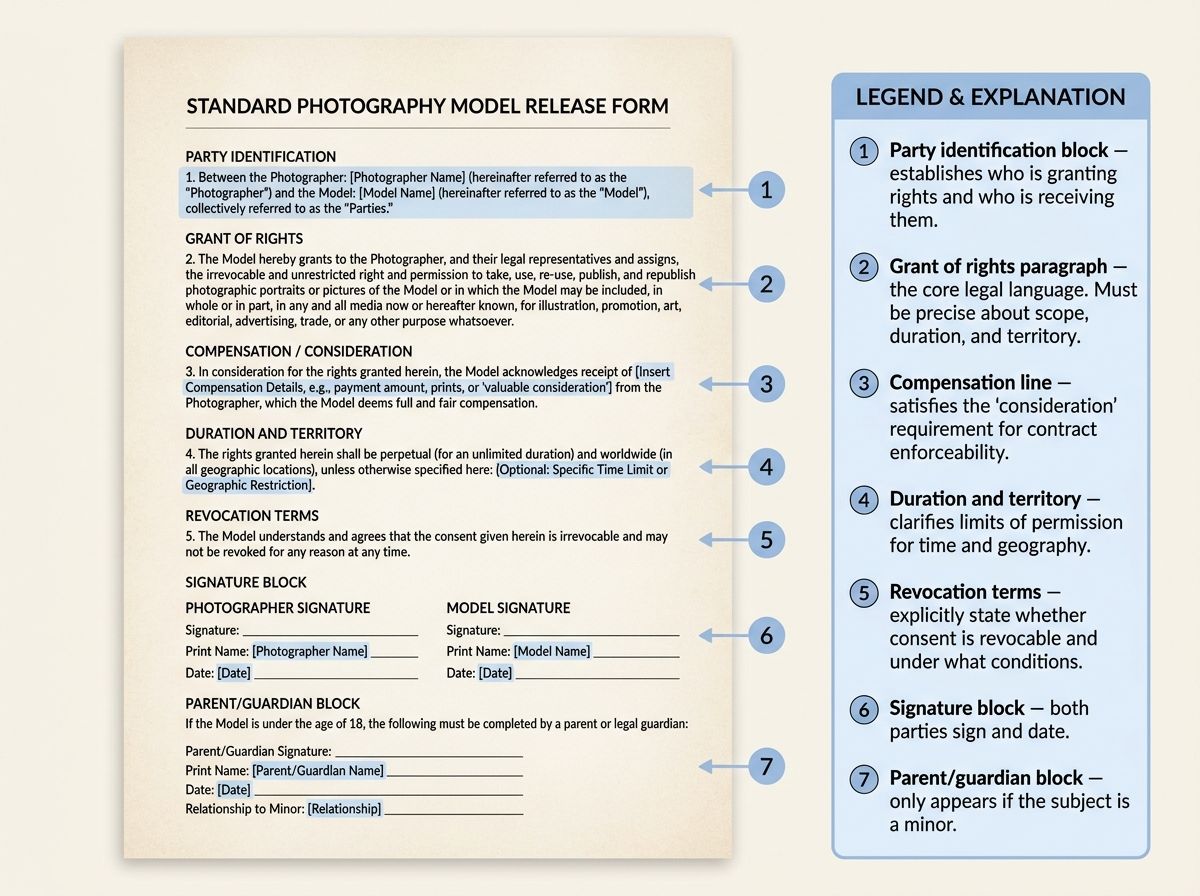
💡 Reading the Example > Use this annotated image alongside the clause checklist in the previous section. Every bracketed placeholder must be replaced with real information before the form is presented for signature.
What Each Section of the Form Does
- Party identification block — establishes who is granting rights and who is receiving them.
- Grant of rights paragraph — the core legal language. Must be precise about scope, duration, and territory.
- Compensation line — satisfies the "consideration" requirement for contract enforceability.
- Representations and warranties — the subject confirms they are of legal age and have authority to grant the rights.
- Signature block — both parties sign and date; a parent/guardian block appears below if the subject is a minor.
- Revocation terms — explicitly state whether consent is revocable and under what conditions.
Special Cases: Minors, Social Media, AI Use, and International Shoots
Standard templates handle the typical adult-portrait-shoot scenario well. They often fall short for the four situations below. These are where photographers get into trouble.
Photographing Minors

- Any subject under 18 requires a parent or legal guardian to sign. The minor cannot legally grant rights.
- Some jurisdictions set a minimum age at which a minor may co-sign alongside a guardian — check local law.
- Child privacy laws like COPPA in the US add extra restrictions when images will appear online.
- Avoid publishing images of minors in any context that could be construed as exploitative, regardless of whether a release was signed.
⚠️ GDPR and EU Photographers > Photographers capturing images of EU residents — even on personal trips — may need to comply with GDPR's consent and data-processing requirements. GDPR treats photographs of identifiable individuals as personal data. A standard US model release alone may not satisfy GDPR. Consult an EU-qualified attorney before commercial publication.
Social Media and Digital Platforms
- Name each platform in your usage scope clause if images will be used there commercially (Instagram, TikTok, YouTube, LinkedIn, etc.).
- Platform terms of service typically grant the platform a sublicense to your content. Your model release should permit sublicensing, or you create a conflict.
- Paid partnerships and influencer content almost always require a signed model release even when the subject is a willing collaborator — a DM saying "yes please use it" is not the same as a signed document.
⚠️ AI Training Use: An Emerging Gray Area > Using images to train AI or machine learning models is not covered by most standard release templates written before 2023. If AI training use is anticipated — yours or a licensee's — add an explicit AI-use clause granting or denying that right. This area of law is evolving rapidly across jurisdictions. Legal review is strongly recommended.
International Considerations
- US right-of-publicity laws vary state by state. California and New York have especially strong protections, including post-mortem rights.
- EU GDPR treats photographic images of identifiable individuals as personal data. Consent standards are stricter than a standard US model release.
- UK post-Brexit operates under UK GDPR, which largely mirrors EU GDPR.
- Don't make universal legal claims in your templates. Phrases like "varies by location" and "subject to local law" are more accurate and more defensible.
How to Get a Release Form Signed: Step-by-Step
Here's the fix, one step at a time:
- Choose the right release form type.
- Download and customize the template.
- Review the form with your subject.
- Collect signatures.
- Store and back up signed copies.
- Keep forms with the shoot archive for the full retention period.
Pre-Shoot Release Form Checklist
- Identify which form type(s) you need for this shoot
- Download and customize the appropriate template
- Fill in your name, the subject's name, shoot date and location
- Define the usage scope, duration, and territory clearly
- Decide on paper or e-signature method in advance
- Prepare a copy for the subject to retain
- Back up signed forms digitally alongside the shoot folder
💡 Get It Signed Before the Shoot Starts > Collect signatures before shooting begins, not after. Post-shoot requests are harder to fulfill — subjects have more leverage and may refuse or request changes once they see the images. Treat the signing as part of the pre-shoot workflow, not an afterthought.
Step 1: Choose the Right Form Type
Use the comparison table in the Types of Photo Release Forms section to figure out which form you need — model, property, copyright, standard, or minor. In many commercial shoots, more than one form type is needed simultaneously (for example, a lifestyle shoot in a private home will usually need both a model release and a property release).
Step 2: Download and Customize the Template
Pick the PDF if you print and sign on paper, or the DOCX if you want to adjust the wording first (it opens in Word or Google Docs). Replace every bracketed placeholder with real details before presenting the form to the subject. Never leave the usage scope, duration, or territory fields blank — that's the single most common mistake.
Step 3: Review the Form With Your Subject
Walk through the usage rights, compensation, and duration clauses together before signing. Answer questions honestly. Don't pressure subjects or misrepresent the intended use — a release signed under misrepresentation can be invalidated. Subjects should feel free to request changes; negotiate terms before the shoot begins.
Step 4: Collect Signatures
Sign in person on paper or use an e-signature tool (compared in the next section). If the subject is a minor, the parent or legal guardian must sign — not the minor. Both parties should sign and date the same version of the document so there's no dispute about which draft was agreed to.
Step 5: Store and Back Up Signed Copies
Save a digital copy — a scan or e-signature PDF — alongside the associated shoot files. Keep physical copies in a dedicated client folder for high-value commercial work. Retain copies for as long as you hold the images; rights claims can and do arise years after a shoot.
E-Signature Tools Compared for Photographers

E-signatures are generally enforceable for model release forms under the US ESIGN Act and the EU's eIDAS Regulation. The right tool for you depends on volume, mobile usability, and whether you need audit trails.
E-Signature Tools for Photographers: Quick Comparison
| Tool | Free Tier | Mobile-Friendly | ESIGN / eIDAS Compliant | Best For |
|---|---|---|---|---|
| Adobe Acrobat Sign | Limited | Yes | Generally compliant | Photographers already in the Adobe ecosystem |
| DocuSign | Limited | Yes | Generally compliant | High-volume studios needing audit trails |
| Dropbox Sign (formerly HelloSign) | Yes (limited) | Yes | Generally compliant | Simple workflows and lightweight use |
| SignWell | Yes | Yes | Generally compliant | Freelancers on a tight budget |
| Google Forms + PDF workaround | Yes (fully free) | Yes | Varies — audit trail is thinner | Hobbyists and event photographers |
Pricing changes frequently. Check current plans directly with each provider before committing. Prioritize mobile usability if you're signing on-site via phone or tablet.
💡 Are E-Signatures Legally Valid on Release Forms? > In the US, e-signatures on model release forms are generally enforceable under the ESIGN Act of 2000. In the EU, eIDAS sets equivalent standards for qualified electronic signatures. Enforceability varies by jurisdiction and signature type, so confirm with a local attorney if you're using e-signatures for high-value commercial work.
Common Mistakes and Legal Limitations
⚠️ Template Disclaimer > The templates provided here are starting points, not legal advice. For high-value commercial work, consult a licensed attorney in the relevant jurisdiction before relying on any template. This mirrors the guidance of the Center for Engaged Learning: "work with your own institution's legal counsel."
Top Mistakes Photographers Make
- Collecting signatures after the shoot. Subjects have more leverage after they've seen the results. Get signatures first.
- Leaving usage scope vague. A clause that says "any purpose" can be challenged as overbroad in some jurisdictions. Be specific.
- Using a branded template without editing out the previous photographer's name. This happens more than you'd think.
- Failing to include a minor release when the subject is under 18. A standard adult release signed by a 17-year-old is not valid.
- Assuming a public-space shoot never needs a release. Commercial use of images taken in public may still require consent depending on jurisdiction.
- Storing signed forms inconsistently. If a dispute arises three years later and you can't find the form, you effectively have no release at all.
What a Release Form Cannot Do
- A release form cannot override GDPR or other data-protection regulations. Additional compliance steps may be required for images of EU residents.
- A release does not transfer copyright from the photographer to the subject (or vice versa) unless a copyright clause explicitly says so.
- A release signed under duress, misrepresentation, or by a minor acting alone may not be enforceable.
- No template is "legally valid in all jurisdictions." Validity varies by state, country, and intended use.
Frequently Asked Questions About Photography Release Forms
Do I need a model release form for every photo I take?
No. A model release is primarily required when images of identifiable people will be used for commercial purposes such as advertising or product promotion. Editorial uses — news, education, journalism — generally require less formal consent, though requirements vary by jurisdiction and intended use. Always check local law for your specific situation.
Is a verbal model release legally binding?
Verbal consent is generally very difficult to prove and enforce if challenged. While verbal agreements can be legally valid in some jurisdictions, a written and signed release form provides far stronger protection for both parties. Written releases are considered best practice by professional photography organizations such as ASMP.
Does a minor need a parent to sign the release form?
Yes. In virtually all jurisdictions, a minor (a person under 18) cannot legally sign a binding contract. A parent or legal guardian must sign the model release on the minor's behalf. Some jurisdictions also require the minor to co-sign once they reach a specified age. Consult local law for specifics.
What is the difference between a model release and a property release?
A model release covers the right to publish images of an identifiable person. A property release covers the right to use images of privately owned locations, buildings, branded items, or animals. Many commercial shoots require both when people and distinctive private property both appear in the frame.
Can I use a standard model release form for social media posts?
Only if the usage scope clause explicitly includes social media platforms. Older templates often don't list individual platforms. Update your release to name specific platforms (Instagram, TikTok, YouTube, etc.) if images will be used commercially on those channels.
Is a photo release form valid internationally?
Validity varies significantly by country and region. A US-drafted release may not satisfy EU GDPR requirements, which treat photographs of identifiable individuals as personal data subject to strict consent rules. If shooting internationally or publishing to global audiences, consult an attorney familiar with the relevant jurisdictions.
Can a subject revoke their consent after signing a model release?
It depends on the revocation clause in the release and applicable local law. Many releases specify that consent is irrevocable once signed. However, some jurisdictions — particularly in the EU under GDPR — give individuals ongoing rights to withdraw consent for personal data processing. Including a clear revocation clause (and its limits) in your template is strongly recommended.
Do I need a release form for images used in my photography portfolio?
Portfolio use occupies a gray area. Some photographers treat portfolios as non-commercial and rely on verbal consent; others always use a written release. Best practice — and the advice of organizations like ASMP — is to obtain a written release that explicitly includes portfolio and self-promotional use, especially if your portfolio is public-facing or used to win paid contracts.
Sources
- 4 Types of Photographer Release Forms — Adobe Acrobat
- Right of Publicity — Cornell Law School Legal Information Institute
- What Is GDPR? — GDPR.eu
- Electronic Signatures in Global and National Commerce (ESIGN) Act — FTC.gov
- Do You Need a Model Release? — PetaPixel
- Copyright Resources for Photographers — American Society of Media Photographers
- Sample Photograph Release Form — Center for Engaged Learning
- eIDAS Regulation — European Commission